
Security Cameras Without Monthly Subscription: Total Control, Zero Fees
Stop paying for cloud storage you don't need. Discover how to own your surveillance footage with local storage, no contracts, and no recurring fees.
VIEW TOP PICKSWhy pay monthly? Many homeowners don't realize that most security cameras can record locally to an SD card or DVR without ever connecting to a paid cloud service. This guide will show you how to choose a system that respects your wallet and your privacy.
Why Choose a Security Camera Without a Subscription?
The security camera market has shifted heavily toward subscription-based models. While cloud storage offers convenience, it comes at a cost—typically $3 to $15 per month, per camera. Over a few years, those fees can easily exceed the price of the camera itself. For budget-conscious homeowners and privacy advocates, security cameras without a subscription are the smarter long-term investment. They let you store footage locally on a microSD card, a DVR, or an NVR, so you retain full ownership of your data.
But not all no-fee cameras are created equal. Some manufacturers advertise "no subscription required" but heavily limit features unless you pay. Others provide full functionality right out of the box. The key is understanding where the footage is stored and how you access it. A security camera with SD card support is often the simplest solution, while a security camera system with hard drive is better for multi-camera setups.
How Do No-Subscription Security Cameras Work?
Instead of uploading video to a remote server, these cameras save recordings directly to a storage device you own. That could be a microSD card inside the camera, a USB drive attached to a base station, or a DVR/NVR that connects to multiple cameras. You access the footage through a mobile app over your local Wi-Fi network or via a direct HDMI connection to a monitor. This means no monthly bills and no dependence on a third-party cloud.
For areas with unreliable internet, a security camera that doesn't need internet is a game-changer. It continues recording even when your Wi-Fi goes down. Similarly, a wireless security camera without internet can operate entirely offline, storing everything locally. This is especially valuable for remote cabins, construction sites, or rental properties where you don't want to pay for broadband.
Types of Security Cameras Without Monthly Fees
1. Battery-Powered Cameras with Local Storage: These are easy to install and often include a microSD slot. Look for a battery-operated security camera with SD card for flexible placement. Some models also support motion detection to conserve battery life.
2. Wireless Outdoor Systems: A wireless outdoor security camera system typically includes a base station with a hard drive. Many are designed to work without a subscription, such as a wireless outdoor security camera system with DVR. If you prefer a dedicated screen, consider a system with monitor.
3. Solar-Powered Options: For locations without power outlets, a solar-powered security camera with WiFi can run indefinitely. Pair it with a solar panel charger for continuous operation. If you need multi-camera coverage, a solar-powered wireless system with DVR is an excellent choice.
Key Features to Look For
Local Storage Capacity: Check the maximum microSD card size supported. Many cameras accept up to 256GB, which can hold weeks of footage depending on resolution and motion events. A stand-alone security camera with SD card is perfect for single-location monitoring.
Night Vision: Security cameras with night vision are essential for 24/7 protection. For outdoor use, look for wireless outdoor security cameras with night vision that can see up to 30 feet in complete darkness.
Two-Way Audio: A security camera with 2-way audio lets you communicate with visitors or deter intruders directly from your phone.
Continuous Recording: Some cameras only record when motion is detected. If you need 24/7 coverage, choose a security camera with 24/7 recording or a security camera with continuous recording.
Installation and Setup Tips
Most DIY no-subscription cameras are designed for easy installation. A easy-to-install security camera system typically uses adhesive mounts or screws and connects via a mobile app. For a more permanent setup, home security camera system installation may require running cables, but wireless options simplify the process.
If you're installing outdoors, consider a outdoor wireless security camera with motion light to deter intruders. For comprehensive coverage, a indoor/outdoor wireless security camera combination works well. And if you need professional help, factor in the cost to have security cameras installed.
Privacy and Security Benefits
When you eliminate the cloud, you eliminate a major privacy risk. Your footage never leaves your property, so there's no chance of a data breach or unauthorized access. A security camera that doesn't need internet is inherently more secure because it's not connected to the web. Even if you use Wi-Fi for remote viewing, local storage ensures your recordings remain under your control.
For renters or temporary setups, a temporary construction security camera with local storage is ideal—no contracts, no installation fees, and you can take it with you when you leave.
Common Misconceptions About No-Subscription Cameras
Myth 1: You can't view footage remotely. Many no-fee cameras still offer remote viewing via an app, as long as the camera is connected to your Wi-Fi. You just don't pay for cloud storage.
Myth 2: Local storage is unreliable. Modern microSD cards and hard drives are highly durable. With proper setup, local storage can be just as reliable as cloud storage—and you own it.
Myth 3: No-subscription cameras are low quality. Brands like Reolink, Amcrest, and Eufy offer high-resolution no-fee cameras with excellent features. You don't have to sacrifice quality to avoid monthly fees.
Recommended Security Cameras Without Monthly Subscription
⚠️ AFFILIATE DISCLOSURE: This website contains affiliate links. As an affiliate Associate, we earn from qualifying purchases. If you make a purchase through these links, we may receive a small commission at no additional cost to you. Read our full affiliate policy.

Psync MaaX V1 2.5K Outdoor/Indoor Wired Security Camera, Color Night Vision | Built-in 64GB Storage, No Subscription Required, IP65, 24/7 Recording, WiFi, Two-Way Talk, Dual-Band WiFi, Motion Detection
Check price on Amazon
2026 Enhanced 2K UHD Security Cameras Wireless Outdoor – Free Cloud & SD Storage, Dual-Band WiFi 2.4G/5G, Full-Color Night Vision, 6-Month Battery, Motion Alerts, IP66 Weatherproof, 2-Way Talk
Check price on Amazon
Lifetime Free Data & No Monthly Fee 4G LTE Solar Cellular Security Camera Outdoor Wireless,No WiFi Needed, 360° PTZ, 2K Full Color Night Vision, Human Tracking, 2-Way Audio, 32GB SD Card, IP66-White
Check price on Amazon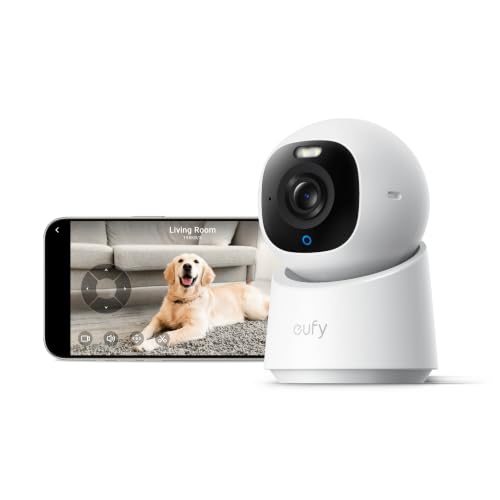
eufy Security 4K Indoor Camera E30, No Subscription, Work as Pet Camera | Nanny/Baby Camera, Pan&Tilt, AI Tracking, AI Detection, 24/7 Recording, Color Night Vision, Two-Way Audio,Works with HomeKit
Check price on Amazon
VSKY 4G Cellular Security Camera, Lifetime Free Unlimited Data, 2K Pan Tilt | No Monthly Subscription Fee, No WiFi LTE Solar Powered IP65 Outdoor Cam with SIM Card, Color Night Vision, 360 Live Feed
Check price on Amazon
aosu D1 Classic 4-Cam Kit, Security Cameras Wireless Outdoor, Solar Powered | No Subscription Required, 32GB Built-in Storage, 360° Auto Tracking, 2K (3MP) Full-Color Night Vision, Easy Install
Check price on Amazon
2026 Upgraded 2K Security Cameras Wireless Outdoor, Free Cloud Storage, 1-6 Months Battery Life, Waterproof, 2-Way Talk, AI Motion Detection Spotlight Siren Alarm Cameras for Home Security
Check price on AmazonYour No-Subscription Camera Buying Checklist
Before you buy, ask yourself these questions:
- Does the camera support local storage (microSD, DVR, or NVR)?
- Is there a security camera without subscription option, or is cloud mandatory?
- What is the maximum storage capacity?
- Does it offer night vision and motion detection?
- Can I access footage remotely without paying?
- Is the camera weatherproof for outdoor use?
- Does it require Wi-Fi, or can it work offline?
For a complete system, consider a home security system without contracts. If you need multiple cameras, a wireless outdoor security camera system with a central DVR is often the most cost-effective solution.
Final Thoughts: Own Your Security, Not Your Subscription
Security cameras without monthly subscriptions give you peace of mind without the ongoing expense. Whether you choose a simple wireless security camera without subscription or a full battery-powered security camera system, you'll save money and retain control over your footage. With local storage, no contracts, and no hidden fees, you can protect your home on your terms.
Ready to explore more? Check out our guides on security cameras and security cameras without monthly fee to find the perfect setup for your needs.