
Wireless Rear View Camera: The Ultimate Guide to Safer Driving
Eliminate blind spots and park with confidence. Learn how to choose the perfect wireless backup camera for your vehicle, from installation tips to the best models on the market.
View Top PicksWhy Go Wireless? A wireless rear view camera system eliminates the need to run complex video cables from the back of your vehicle to the front. This makes installation dramatically easier, especially for long vehicles like trucks, RVs, and trailers. It's the modern solution for enhancing safety and convenience.
Why You Need a Wireless Rear View Camera
Blind spots behind your vehicle are a significant safety hazard. Whether you're parallel parking in a tight city spot, hitching up a trailer, or maneuvering a large RV, a reliable rear view camera is no longer a luxury—it's an essential safety tool. A wireless rear view camera takes this a step further by offering a clean, hassle-free installation that doesn't require professional wiring.
Unlike traditional wired systems, a wireless setup transmits the video signal from the camera mounted on your license plate or tailgate to a monitor inside your cabin. This guide will walk you through everything you need to know, from understanding signal stability and power sources to choosing between a dedicated monitor and a smartphone-integrated system. For those who prefer a factory-style look, you might also consider a mirror dash cam, which integrates the display directly into your rearview mirror.
Key Features to Look For in a Wireless Backup Camera
Signal Stability & Range
The biggest concern with any wireless system is signal interference. Look for cameras that operate on a 2.4GHz or 5GHz frequency with FHSS (Frequency Hopping Spread Spectrum) technology. This ensures a stable, lag-free connection even in areas with many Wi-Fi networks. For long vehicles, check the advertised range—a model rated for 50 feet may struggle on a 40-foot RV, so aim for a system with a range of at least 100 feet.
Power Source
Wireless cameras still need power. Most connect to your vehicle's reverse light for automatic activation, while some can be hardwired to a constant 12V source for continuous use. There are also battery-powered models, which offer the ultimate in flexibility but require periodic recharging. For a truly integrated solution, a wireless car dash camera front and rear can provide both forward and rearward coverage.
Image Quality & Night Vision
A high-resolution sensor is crucial for a clear picture. Look for at least 720p, but 1080p is now the standard for crisp, detailed images. Night vision is another non-negotiable feature. Cameras with infrared (IR) LEDs or advanced low-light sensors will provide a clear view even in pitch darkness, which is vital for safety. You might also want to compare this with a HD security camera for fixed-location monitoring.
Monitor Type & Size
You'll typically choose between a dedicated monitor (which can be windshield- or dashboard-mounted) or a system that connects to your smartphone. Dedicated monitors offer a constant, reliable view without draining your phone's battery. Smartphone-based systems are more compact and use a screen you already have. If you prefer a dedicated screen, consider whether you want a standalone unit or a portable camera that connects to your phone for more versatility.
Top Rated Wireless Rear View Cameras
⚠️ AFFILIATE DISCLOSURE: This website contains affiliate links. As an affiliate Associate, we earn from qualifying purchases. If you make a purchase through these links, we may receive a small commission at no additional cost to you. Read our full affiliate policy.

1080P HD Wireless Backup Camera - 1 Minute Magnetic Easy Install No Wiring | 7" Anti-Glare Monitor, Clear Night Vision, Solar 24H Long Life, Scratch-Proof Rear View Camera for Truck, Trailer, Small RV
Check price on Amazon
HD 1080P 7 Inch Wireless Backup Camera for Truck: 15-Min Easy to Install | Starlight Night Vision with 150° Wide View Angle Eliminate Rear Blind Spots - Rear View Camera for Pickup Car Parking Safety
Check price on Amazon
HD 1080P Wireless Backup Camera for Truck: 5 Inch Clear Day & Night Vision | 15 Mins Easy Install 150° Wide View Angle Cover Blind Spots Rear View Camera for Car Trucks SUV Camper Parking Safety Assist
Check price on Amazon
HD 1080P Dual Wireless Backup Camera: 15200mAh Battery Up to 3-Day Trip | 1-Second Magnetic Easy Install Solar RV Backup Camera with 7.2-inch Split-Screen DVR Monitor for RV Camping & Travel Trailers
Check price on Amazon
1080P HD 5 Inch Wireless Backup Camera for Trucks: 15-Min Easy to Install | Clear Night Vision,150° Wide Angle View with Customizable Parking Line for Car Truck Parking Safety
Check price on Amazon
HD 1080P Backup Camera Plug & Play: Fast 60FPS Smooth Real-Time Clear View | 25-Minute Easy to Install, Monitor Easy Setup, Bright and Clear Night Vision, Dustproof & Weatherproof for Cars Trucks SUVs
Check price on Amazon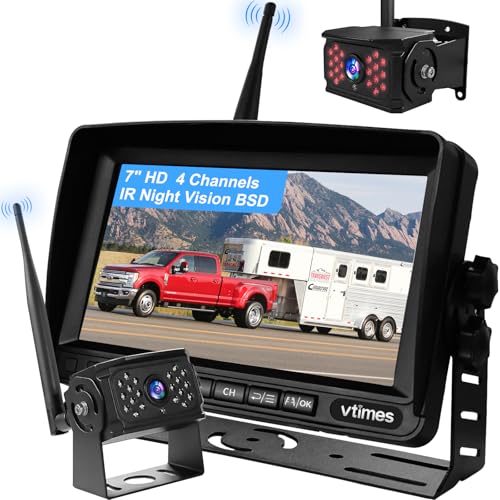
VTimes Wireless Backup Camera for Trucks, RV Backup Camera with HD Monitor | 4 Channels Split Screen, BSD Alert, 984ft Signal Range, IP69K Waterproof IR Night Vision Wide Angle, DIY Guide Lines
Check price on Amazon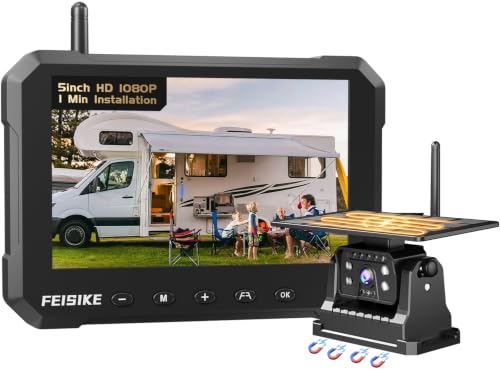
Magnetic Solar Wireless Backup Camerafor Truck, 5 Inch No-Drill Installation RV Backup Camera, 1080P Rear View Camera 150° Wide Angle, 24hrs Battery Life, 2.4GHz Signal, Night Vision, RVs, Trailers
Check price on AmazonInstallation Tips for a Hassle-Free Setup
One of the main advantages of a wireless system is the simplified installation. Here’s a quick overview:
- Mount the Camera: The most common spot is above the license plate. Ensure the camera is centered and angled slightly downward for the best view of the area directly behind your vehicle.
- Power the Camera: Connect the camera's power wire to your vehicle's reverse light. This ensures the camera only turns on when you shift into reverse. For constant monitoring (e.g., for a trailer), you can connect it to a constant 12V power source.
- Mount the Monitor: Place the monitor on your dashboard or windshield where it's easily visible but doesn't obstruct your view. Plug it into a 12V power outlet (cigarette lighter).
- Pair the Devices: Turn on your vehicle and put it in reverse. The monitor and camera should automatically pair. If not, follow the manufacturer's pairing instructions.
For those who need a more robust surveillance solution for their vehicle, like recording incidents while parked, a car security camera 24 hours recording might be a better fit, as it's designed for continuous operation.
Frequently Asked Questions (FAQ)
Do wireless backup cameras need Wi-Fi?
No, they do not need an internet connection or Wi-Fi network. They create their own private, direct wireless link between the camera and the monitor. This is different from a security camera that doesn't need Wi-Fi, which might use a cellular connection for remote viewing.
How long do wireless backup camera batteries last?
Battery life varies greatly depending on usage. A camera that only activates in reverse might last for several months on a single charge. A camera used for continuous monitoring might only last a day or two. If you choose a battery-powered model, look for one with a large capacity and easy USB-C charging.
Can I use a wireless rear view camera on a trailer?
Yes, this is one of the most popular use cases. You will need a system with a strong signal range and a camera that can be easily powered, often via a separate battery pack or a connection to the trailer's running lights.
What is the best resolution for a rear view camera?
While 720p is acceptable, 1080p (Full HD) is highly recommended as it provides a much clearer and more detailed image, making it easier to spot small obstacles. Some high-end systems even offer 2K or 4K resolution for ultimate clarity.