
Rear Wireless Camera: The Ultimate Guide to Safer Reversing
Eliminate blind spots and park with confidence. Our comprehensive guide covers everything you need to know about choosing, installing, and using a rear wireless camera for your vehicle.
VIEW TOP PICKSWhy a Rear Wireless Camera? Backing up a vehicle has never been safer. A rear wireless camera eliminates the dangerous blind spot directly behind your car, truck, or RV. Unlike traditional wired systems, wireless models transmit video signals without running cables through your vehicle's body — saving you time, money, and potential frustration during installation. Whether you're a daily commuter, a weekend adventurer, or a professional driver, a reliable rear wireless camera is one of the most valuable safety upgrades you can make.
How Does a Rear Wireless Camera Work?
Understanding the technology behind wireless backup cameras helps you make an informed purchase. Here's the basic workflow:
1. Camera Unit
A small, weather-resistant camera mounts on your rear license plate, bumper, or tailgate. It captures the view behind your vehicle.
2. Wireless Transmitter
The camera sends video signals wirelessly to a receiver inside the cabin. Most systems use 2.4GHz or 5GHz frequencies for stable transmission.
3. Display Monitor
A dedicated monitor or your smartphone screen displays the live feed. Many modern systems integrate with existing infotainment screens.
4. Power Source
The camera typically connects to your reverse light or a constant power source, while the monitor plugs into a 12V outlet or USB port.
Key Features to Consider Before Buying
Not all rear wireless cameras are created equal. Here are the critical specifications to evaluate:
| Feature | Why It Matters | Recommended Spec |
|---|---|---|
| Resolution | Higher resolution means clearer details, especially at night or in poor weather. | 1080p or higher (4K for premium) |
| Night Vision | Essential for reversing in dark parking lots or unlit driveways. | Infrared LEDs with automatic activation |
| Wireless Range | Determines how far the signal travels from camera to monitor. | 30–50 feet for cars; 50+ feet for trucks/RVs |
| Waterproof Rating | Camera must withstand rain, snow, and car washes. | IP67 or IP68 |
| Field of View | Wider angles reduce blind spots but may distort edges. | 120°–170° |
| Monitor Size | Larger screens are easier to see but may obstruct your dashboard. | 4.3"–7" for dedicated monitors |
| Connectivity | Some systems use Wi-Fi to connect to your smartphone instead of a dedicated monitor. | Wi-Fi (for smartphone integration) or 2.4GHz/5GHz RF |
Types of Rear Wireless Cameras
License Plate Cameras
Mount directly over your license plate. Installation is tool-free and takes minutes. Ideal for renters or lease vehicles.
- Easiest installation
- No drilling required
- Universal fit for most vehicles
Bumper-Mounted Cameras
Attach to your rear bumper for a lower, more discreet profile. Some require minor drilling for a flush fit.
- Cleaner look
- Better protection from theft
- More stable mounting
Tailgate Handle Cameras
Replace your existing tailgate handle with an integrated camera. Popular for pickup trucks and SUVs.
- Factory-like appearance
- Excellent durability
- Optimal viewing angle
Magnetic & Portable Cameras
Battery-powered and magnetic, these can be moved between vehicles. Perfect for trailers or temporary setups.
- No wiring at all
- Rechargeable battery
- Quick transfer between vehicles
Pros and Cons of Wireless vs. Wired Systems
✓ Wireless Advantages
- No drilling through firewall or body panels
- Installation takes 15–30 minutes
- Can be moved between vehicles
- Lower installation cost
- Ideal for leased or rented vehicles
✗ Wireless Limitations
- Potential signal interference in dense areas
- Occasional lag in video feed
- Requires power source for camera
- Battery models need regular charging
- Slightly higher cost than basic wired units
Installation Tips for Best Performance
Proper installation ensures your rear wireless camera works reliably for years. Follow these guidelines:
1. Choose the Right Mounting Location: Center the camera as much as possible for a balanced view. Avoid mounting near metal objects that could block the wireless signal.
2. Secure Power Connections: Use the reverse light wire for automatic activation. For constant power, consider a fuse tap for safety. If you need a reliable power source for multiple devices, a camera connect solution can streamline your setup.
3. Test Before Final Mounting: Connect everything temporarily and test the signal strength and video quality before permanently mounting the camera.
4. Manage Cables Neatly: Even wireless systems have some cables. Use cable clips and loom to keep everything tidy and protected.
5. Consider Professional Help: If you're not comfortable working with your vehicle's electrical system, professional installation is a worthwhile investment.
Recommended Rear Wireless Cameras
⚠️ AFFILIATE DISCLOSURE: This website contains affiliate links. As an affiliate Associate, we earn from qualifying purchases. If you make a purchase through these links, we may receive a small commission at no additional cost to you. Read our full affiliate policy.

1080P HD Wireless Backup Camera - 1 Minute Magnetic Easy Install No Wiring | 7" Anti-Glare Monitor, Clear Night Vision, Solar 24H Long Life, Scratch-Proof Rear View Camera for Truck, Trailer, Small RV
Check price on Amazon
HD 1080P 7 Inch Wireless Backup Camera for Truck: 15-Min Easy to Install | Starlight Night Vision with 150° Wide View Angle Eliminate Rear Blind Spots - Rear View Camera for Pickup Car Parking Safety
Check price on Amazon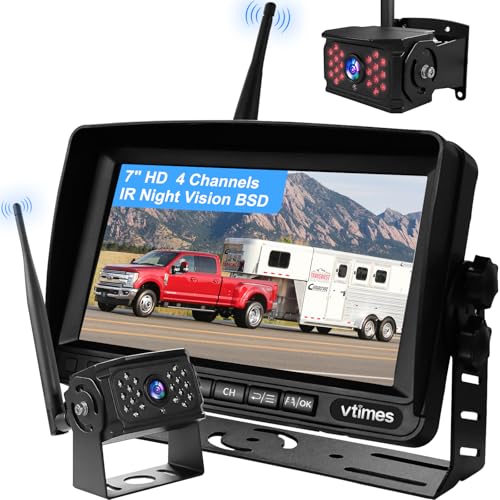
VTimes Wireless Backup Camera for Trucks, RV Backup Camera with HD Monitor | 4 Channels Split Screen, BSD Alert, 984ft Signal Range, IP69K Waterproof IR Night Vision Wide Angle, DIY Guide Lines
Check price on Amazon
RV Backup Camera with Solar Magnetic - 50 FT Long Distance No Signal Delay | HD 1080P Wireless Backup Camera with 7.1 Inch Touch Key Recording Monitor - for Trailer, 5th Wheel, Camper
Check price on Amazon
AUTO VOX Wireless Backup Camera Solar Magnetic, 7.2" DVR 1080P Monitor | 2 Split Recording, Dual Antenna Stable Signal, IP69K, 1-Min Install, HD IR Night Vision for Truck,Trailer,RV,Camper
Check price on Amazon
HD 1080P Dual Wireless Backup Camera: 15200mAh Battery Up to 3-Day Trip | 1-Second Magnetic Easy Install Solar RV Backup Camera with 7.2-inch Split-Screen DVR Monitor for RV Camping & Travel Trailers
Check price on Amazon
AUTO-VOX 6" Solar Wireless Backup Camera, 16:9 Monitor, Dual Antenna Signal | 1 Min Easy Setup, 1080P Split Screen, DVR Recording, Solar Assisted Rear View Camera for Truck, MPV and Van
Check price on AmazonMaintenance & Troubleshooting
Keep your rear wireless camera performing at its best with these simple maintenance tips:
Regular Cleaning
Wipe the camera lens with a soft, damp cloth weekly. Mud, dust, and water spots can significantly degrade image quality.
Check Connections
Periodically inspect power and ground connections for corrosion or looseness. A poor ground can cause flickering or complete failure.
Signal Interference
If you experience lag or static, try changing the wireless channel on your monitor or repositioning the receiver away from other electronics.
Firmware Updates
Some smart systems offer firmware updates via companion apps. Keep your camera updated for optimal performance and new features.
Related Camera Guides
Explore more of our in-depth guides to build a complete vehicle safety and photography setup:
Dash Cams for Cars
Protect yourself on the road with a reliable dash cam for cars. Capture evidence and monitor your driving.
Rear View Cameras for Trucks
Trucks need specialized solutions. Learn about rear view cameras for trucks designed for larger vehicles.
Car Dash Camera Front and Rear
Get complete coverage with a car dash camera front and rear system for all-around protection.
Rear Dash Cam
Complement your backup camera with a dedicated rear dash cam for continuous recording behind your vehicle.
Final Thoughts: A rear wireless camera is a small investment that pays huge dividends in safety and convenience. Whether you're parallel parking in the city, maneuvering a trailer, or simply want peace of mind when backing out of your driveway, the right camera makes all the difference. Use this guide to choose a system that fits your vehicle, budget, and lifestyle — then enjoy the confidence that comes with a clear view behind you.