
Security Camera That Goes in Light Socket: The Ultimate Guide
Learn how light socket security cameras work, their benefits, installation tips, and how to choose the best model for your home.
VIEW RECOMMENDED MODELSThe Light Socket Advantage: If you want a security camera without the hassle of drilling, wiring, or hiring an electrician, a light socket camera is the perfect solution. It screws into any standard E26/E27 light bulb socket and starts working in minutes.
What Is a Security Camera That Goes in a Light Socket?
A security camera that goes in a light socket is a compact, all-in-one surveillance device that replaces your existing light bulb. It draws power directly from the socket, so you never need to worry about charging batteries or running power cables. Most models combine a camera, motion sensor, and sometimes an LED light or floodlight into a single bulb-shaped unit. This makes them an excellent choice for renters, DIY enthusiasts, and anyone who wants a clean, wire-free installation.
These cameras are designed for standard E26 or E27 sockets, which are the most common light bulb fittings in North America and many other regions. Once screwed in, they connect to your Wi-Fi network and can be controlled through a smartphone app. You get live view, motion alerts, two-way audio, and recording capabilities—all without any complicated setup. For a broader look at how these fit into a complete system, see our guide on security camera systems with DVR.
Why Choose a Light Socket Security Camera?
Traditional security cameras often require drilling, mounting brackets, and a nearby power outlet. Light socket cameras eliminate all of that. Here are the main benefits:
- No Wiring or Drilling: Simply screw it in like a light bulb. This is ideal for apartments, rental homes, or any place where you can't make permanent modifications. If you prefer not to drill at all, you might also consider an outdoor camera that installs without drilling.
- Always Powered: Because they draw from the light socket, you never need to recharge batteries. This is a huge advantage over battery-operated outdoor cameras that need periodic charging.
- Discreet and Tidy: There are no dangling wires or bulky mounts. The camera looks just like a slightly larger light bulb, blending into your porch, garage, or hallway.
- Quick Installation: Most users can install one in under five minutes. This makes them one of the easiest security camera systems to install.
- Integrated Lighting (Some Models): Many light socket cameras include a built-in floodlight or LED bulb, so you get both illumination and surveillance in one fixture. This is similar in spirit to a motion detector flood light with camera, but without the complex wiring.
How Does a Light Socket Camera Work?
The technology is straightforward. The camera has a threaded base that fits into a standard light socket. Inside, a small power adapter converts AC power to the low-voltage DC power the camera needs. The camera itself typically includes:
- Image Sensor: Usually 1080p or 2K resolution for clear video.
- Night Vision: Infrared LEDs for seeing in the dark. For more on this, check our guide on security cameras with good night vision.
- Motion Detection: PIR sensors that trigger recording and alerts when someone approaches.
- Wi-Fi Connectivity: Connects to your home network for remote viewing.
- Two-Way Audio: Many models let you speak and listen through the camera. See our list of home security cameras you can talk through.
- Local Storage: A microSD card slot for recordings, so you may not need a subscription. This is a key feature of security cameras without subscriptions.
When motion is detected, the camera sends a push notification to your phone and begins recording. You can view the live feed anytime through the app. Some models also support cloud storage, but many work perfectly fine with just a local SD card. If you want to avoid monthly fees entirely, look for a security camera without a monthly subscription.
Recommended Light Socket Security Cameras
⚠️ AFFILIATE DISCLOSURE: This website contains affiliate links. As an affiliate Associate, we earn from qualifying purchases. If you make a purchase through these links, we may receive a small commission at no additional cost to you. Read our full affiliate policy.

Poleeye Light Bulb Security Camera Outdoor, 2K 5GHz & 2.4GHz WiFi Bulb Cameras for Home Security, 360° PTZ Wireless Cam with AI Human Detection, Color Night Vision, 2-Way Talk, Screw-in Light Socket
Check price on Amazon
WESECUU Light Bulb Security Camera -5G& 2.4GHz WiFi 2K Camera for Home Security, 1000-Lumen Dimmable Bulb Camera with Color Night Vision, Two-Way Talk, Motion Detection & Siren, 355°Pan (1-Pack)
Check price on Amazon
Easegain 3K HD Smart Light Bulb Security Camera,2.4GHz& 5G Dual Band WiFi 360 PTZ Camera, Wireless Indoor- Outdoor Security Camera with Color Night Vision and Two-Way Talk & Motion Alert
Check price on Amazon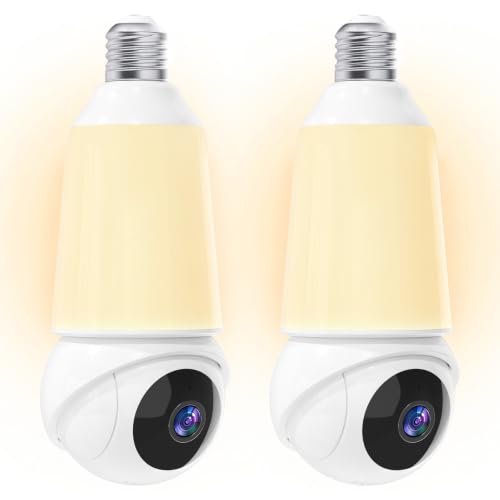
Light Bulb Security Camera -5G& 2.4GHz WiFi 2K Camera for Home Security, 1000-Lumen Dimmable Bulb Camera with Color Night Vision, Two-Way Talk, Motion Detection & Siren, 355°Pan Compatible with Alexa
Check price on AmazonInstallation Guide: Step by Step
Installing a light socket camera is incredibly simple. Here's how:
- Turn Off the Power: Switch off the light at the wall switch or, for safety, turn off the breaker.
- Remove the Existing Bulb: Unscrew the old light bulb and set it aside.
- Screw in the Camera: Thread the camera into the socket until it's snug. Do not overtighten.
- Restore Power: Turn the power back on. The camera should power up and flash an indicator light.
- Download the App: Install the manufacturer's app on your phone and follow the pairing instructions.
- Connect to Wi-Fi: Enter your home Wi-Fi password and wait for the camera to connect.
- Mount and Adjust: Angle the camera to cover the area you want to monitor. Most models have adjustable heads.
That's it! You now have a fully functional security camera. If you ever need to move it, just unscrew it and place it in another socket. This flexibility is unmatched by traditional cameras. For more permanent or complex installations, you might want to learn about the cost to have security cameras installed professionally.
Best Places to Use a Light Socket Camera
These cameras are incredibly versatile. Here are the most common and effective locations:
- Front Porch: Replace your porch light with a camera to monitor your entryway. Many models include a floodlight, similar to an outdoor security camera with motion light.
- Garage: Keep an eye on your garage and driveway. A camera here can also serve as a deterrent.
- Backyard Patio: Monitor your backyard without running extension cords. If you need a wider view, consider a 180-degree wide angle outdoor camera for full coverage.
- Hallways and Entryways: Ideal for indoor surveillance. You can even use a indoor security camera with night vision for dark corridors.
- Rental Properties: Since no drilling is required, this is perfect for tenants. It's one of the home security systems that do not require internet if you choose a model with local storage only, though most do use Wi-Fi for remote access.
Key Features to Look For
Not all light socket cameras are created equal. Here's what to consider before buying:
- Resolution: Look for at least 1080p. 2K is even better for identifying faces and license plates.
- Field of View: A wider field of view (130° or more) covers more area. Some models offer pan and tilt, similar to a pan tilt zoom outdoor camera.
- Night Vision: Ensure it has good infrared night vision. Check our guide on long range night vision security cameras for more details.
- Storage Options: microSD card (local) or cloud. For no monthly fees, choose local storage. See our article on outdoor security cameras with local storage.
- Two-Way Audio: Useful for talking to visitors or warning intruders.
- Motion Detection Zones: Customizable zones reduce false alerts.
- Weather Resistance: For outdoor use, look for an IP65 or higher rating. A waterproof inspection camera has different needs, but for security, weatherproofing is critical.
- Smart Home Integration: Some models work with Alexa or Google Assistant.
Limitations to Be Aware Of
While light socket cameras are convenient, they do have some limitations:
- Dependent on Socket Location: You can only place the camera where you have a light socket. This may not always be the ideal height or angle.
- Power Switch: If someone turns off the light switch, the camera loses power. You may need to tape the switch in the "on" position.
- Wi-Fi Signal: The camera needs a strong Wi-Fi signal at the socket location. If your Wi-Fi is weak outside, consider a wireless security camera with SIM card as an alternative.
- Limited Features: They may not have all the advanced features of larger, dedicated cameras, such as optical zoom or advanced AI detection.
How It Compares to Other Security Cameras
If you're considering a light socket camera, it helps to understand how it stacks up against other options:
- vs. Battery-Powered Cameras: Battery cameras offer more placement flexibility but require charging. Light socket cameras are always powered. See our guide on security camera outdoor battery operated for comparison.
- vs. Wired Cameras: Traditional wired cameras are more permanent and reliable but require professional installation. Light socket cameras are DIY-friendly.
- vs. Solar-Powered Cameras: Solar cameras are great for remote locations but depend on sunlight. A solar powered outdoor camera with light is a good alternative if you have sun exposure.
- vs. Doorbell Cameras: Doorbell cameras are specialized for entryways. A wireless video doorbell no subscription is excellent for front doors, but light socket cameras can cover broader areas.
Our Top Picks for Light Socket Security Cameras
Based on extensive research and user reviews, here are some of the best models available today. The products shown above are automatically updated with current pricing and availability.
When choosing, consider the specific needs of your home. For indoor use, a compact model with two-way audio is ideal. For outdoor use, look for weather resistance and a built-in floodlight. If you want a complete system, you might also explore a wireless CCTV camera with SD card recorder to complement your light socket camera.
For those who need the most reliable performance, check our list of most reliable wireless security cameras. And if you're on a budget, see what is a good inexpensive wireless security camera system.
Frequently Asked Questions
Can I use a light socket camera outdoors?
Yes, but you must choose a model specifically designed for outdoor use with an appropriate IP rating (IP65 or higher). Indoor-only models will fail if exposed to rain or extreme temperatures.
Do light socket cameras need Wi-Fi?
Most do need Wi-Fi for remote viewing and alerts. However, some models can record to a local SD card without Wi-Fi, functioning as a standalone recorder. For a truly internet-free setup, look at home security systems that don't require WiFi.
What if I don't have a light socket where I need a camera?
You can use a socket adapter with an extension cord, but this may compromise weather resistance. Alternatively, consider a security camera that plugs into an outlet or a battery-powered model.
How much do light socket security cameras cost?
Prices typically range from $30 to $150, depending on resolution, features, and brand. Basic 1080p models start around $30–$50, while 2K models with floodlights and advanced features can cost $100–$150.
Are light socket cameras easy to steal?
They can be unscrewed, but many models have security screws or can be mounted high enough to be out of reach. Some also offer theft detection that alerts you if the camera is removed.
Do I need a subscription for a light socket camera?
Not necessarily. Many models support local microSD card storage, so you can avoid monthly fees. If you want cloud storage, a subscription may be required. Look for security cameras without subscriptions for more options.
Can I use a light socket camera in a lamp inside my house?
Absolutely. They work in any standard E26/E27 socket, including table lamps and floor lamps. This makes them great for temporary indoor monitoring, such as a pet camera without subscription.
Final Thoughts
A security camera that goes in a light socket is one of the smartest, easiest ways to add surveillance to your home. It requires no drilling, no wiring, and no professional installation. Whether you're a renter, a DIY enthusiast, or just want a simple solution, these cameras deliver reliable performance with minimal effort.
When shopping, focus on resolution, night vision, and storage options. And remember, while a light socket camera is great for many situations, it's not the only option. For comprehensive coverage, you might combine it with other cameras, such as a small outdoor camera with night vision or a full wireless indoor outdoor home security camera system.
Ready to buy? Check out the recommended models above. They are automatically updated with the latest prices and availability, so you can make an informed decision and purchase with confidence.