What Is a Good Inexpensive Wireless Security Camera System?
Discover affordable wireless security camera systems that deliver reliable performance, easy installation, and peace of mind without breaking your budget.
Finding a good inexpensive wireless security camera system can feel like a challenge. With so many options on the market, how do you separate a genuine bargain from a disappointing purchase? The truth is, you don't need to spend a fortune to protect your home. Thanks to advances in technology and healthy competition among brands, today's budget-friendly wireless cameras offer impressive features that were once reserved for premium models.
Whether you're a first-time buyer or upgrading an old system, this guide will walk you through everything you need to know. We'll cover the essential features to look for, realistic price expectations, and how to choose a system that fits your specific needs—all without exceeding your budget.
Key Takeaway: A good inexpensive wireless security camera system typically costs between $100 and $400 for a multi-camera setup. Focus on 1080p resolution, reliable motion detection, and local storage options to get the best value.
Why Wireless Security Cameras Are Worth It
Wireless security cameras have revolutionized home security. Unlike traditional wired systems that require professional installation and extensive cabling, wireless cameras can be set up in minutes. They connect to your home Wi-Fi network and can be placed virtually anywhere—indoors or outdoors—as long as they're within range of your router.
The benefits go beyond easy installation. Wireless systems offer flexibility that wired setups simply can't match. You can move cameras as your needs change, add new units without running new cables, and monitor your property from anywhere using a smartphone app. For renters or those who move frequently, wireless cameras are a game-changer.
If you're comparing different types of systems, you might want to explore options like a hybrid wired and wireless security camera system that combines the reliability of wired connections with the convenience of wireless. However, for most budget-conscious buyers, a purely wireless setup offers the best balance of cost, performance, and ease of use.
Essential Features to Look For
Not all inexpensive cameras are created equal. To ensure you're getting a good deal rather than a cheap product that will fail within months, prioritize these key features:
1. Video Resolution
1080p (Full HD) should be your minimum standard. It provides clear enough footage to identify faces and license plates at reasonable distances. Some budget cameras now offer 2K resolution, which is even better. Avoid anything below 720p—the grainy footage won't be useful if you actually need to identify an intruder.
2. Night Vision
Most security incidents happen at night, so good night vision is non-negotiable. Look for cameras with infrared (IR) LEDs that can capture clear footage in complete darkness. The best options offer night vision range of at least 30 feet. For more details, check out our guide to security cameras with good night vision.
3. Motion Detection
Motion detection alerts you when something moves in the camera's field of view. Quality cameras allow you to customize motion zones, so you're not bombarded with alerts every time a tree branch sways. Some advanced models even distinguish between people, animals, and vehicles.
4. Two-Way Audio
Two-way audio lets you communicate with visitors, delivery drivers, or even warn off intruders from your phone. It's a feature that adds significant value and is increasingly common in budget cameras.
5. Storage Options
You'll need a way to store footage. Most wireless cameras support one or more of these options:
- Local storage: A microSD card in the camera or a base station with a hard drive. No monthly fees.
- Cloud storage: Convenient but usually requires a subscription after a free trial period.
- NVR (Network Video Recorder): A central hub that stores footage from multiple cameras. Best for serious setups.
For budget-conscious buyers, local storage is the way to go. You avoid ongoing costs, and your footage stays private. If you want to explore this further, read about security cameras without a monthly subscription.
6. Weather Resistance
If you're placing cameras outdoors, they need to be weatherproof. Look for an IP65 or higher rating, which indicates protection against dust and water. A camera rated for outdoor use will survive rain, snow, and extreme temperatures.
How Much Should You Expect to Spend?
The good news is that you don't need to spend a lot to get a reliable system. Here's a realistic breakdown of what different budgets can get you:
| Budget Range | What You Can Expect | Best For |
|---|---|---|
| $50–$100 | 1–2 basic 1080p cameras, local storage via microSD, basic motion detection, no subscription required. | Small apartments, single-room monitoring, renters. |
| $100–$200 | 2–3 cameras with 1080p or 2K resolution, night vision, two-way audio, local storage, and sometimes cloud options. | Small homes, entryways, driveways, pet monitoring. |
| $200–$400 | 3–4 cameras with 2K/4K resolution, advanced motion detection (person/vehicle), color night vision, local NVR storage. | Medium homes, full perimeter coverage, small businesses. |
| $400–$700 | 4–6+ cameras with 4K resolution, AI-powered detection, pan-tilt-zoom (PTZ) capabilities, large storage capacity. | Large homes, multi-floor properties, serious security needs. |
For most homeowners, the sweet spot is $150–$300. At this price point, you can get a solid 3–4 camera system from a reputable brand like Reolink, Wyze, or TP-Link, complete with local storage and no mandatory subscription fees.
Top Budget-Friendly Wireless Security Camera Systems
Based on performance, reliability, and value, here are some of the best inexpensive wireless security camera systems available today:
Reolink Argus Series
Reolink has built a strong reputation for offering feature-rich cameras at budget prices. The Argus series includes battery-powered and solar-powered options that are completely wireless, making installation effortless. They support local storage via microSD and offer optional cloud plans. For those who want a completely wire-free experience, a solar-powered outdoor camera with light from this series is an excellent choice.
Wyze Cam v4 / Wyze Cam Pan v3
Wyze is famous for its ultra-affordable cameras that punch well above their weight class. The Wyze Cam v4 offers 2.5K resolution, color night vision, and free local storage via microSD—all for under $40 per camera. The Pan v3 adds 360-degree coverage. The main downside is that Wyze's cloud storage requires a subscription, but local storage works perfectly without it.
TP-Link Tapo Series
TP-Link's Tapo cameras are another excellent budget option. They're easy to set up, offer reliable performance, and include features like motion detection and two-way audio. The Tapo C200 and C310 are particularly popular for their affordability and 2K resolution. If you prefer a system that can work without internet, consider exploring home security systems that do not require internet—many Tapo models support local recording even when your Wi-Fi is down.
Blink Outdoor 4
Blink, owned by Amazon, offers the Outdoor 4 with impressive two-year battery life, 1080p resolution, and seamless integration with Alexa. The system uses a Sync Module 2 for local storage (via USB drive), eliminating the need for a subscription. It's a great choice for Amazon households.
✅ Pros of Budget Wireless Systems
- Affordable upfront cost
- Easy DIY installation
- No monthly fees with local storage
- Flexible placement
- Remote access via smartphone
⚠️ Cons to Be Aware Of
- May require reliable Wi-Fi
- Battery life varies
- Some features locked behind subscriptions
- Lower resolution than premium models
- Potential lag in live view
Tips for Getting the Best Value
To maximize your investment in an inexpensive wireless security camera system, keep these tips in mind:
- Buy a kit, not individual cameras. Multi-camera bundles almost always offer better value per camera than buying separately. A 2-pack of wireless outdoor security cameras is a great starting point.
- Choose local storage over cloud. A microSD card or NVR eliminates monthly fees. A battery-powered security camera with SD card is a perfect example of a cost-effective, subscription-free solution.
- Check for no-subscription models. Many brands now offer full functionality without requiring a subscription. Our guide to wireless security cameras that don't require a subscription can help you find them.
- Consider battery vs. solar. Battery-powered cameras are easy to install but require recharging. Solar-powered models cost slightly more upfront but eliminate the hassle of recharging. A motion sensor camera outdoor solar powered is a great long-term investment.
- Look for sales. Amazon Prime Day, Black Friday, and other shopping events often bring significant discounts on security cameras.
- Read reviews from real users. Pay attention to comments about reliability, app quality, and customer support. A camera is only as good as its software.
Installation: What to Expect
One of the biggest advantages of wireless cameras is how easy they are to install. Most systems can be set up in under 30 minutes. Here's what the process typically involves:
- Charge the cameras (if battery-powered) or plug them in.
- Download the app and create an account.
- Connect to Wi-Fi by scanning a QR code or following in-app instructions.
- Mount the cameras using the included screws or adhesive mounts.
- Customize settings like motion zones, notifications, and recording schedules.
For those who want to avoid drilling altogether, there are ways to install an outdoor camera without drilling, such as using adhesive mounts or strap mounts for poles and trees.
If you're concerned about Wi-Fi range, consider a system that uses a base station to extend connectivity. Alternatively, look for wireless outdoor security cameras without WiFi that use cellular or local storage instead.
Frequently Asked Questions
Do inexpensive wireless security cameras require Wi-Fi?
Most wireless cameras use Wi-Fi to connect to your network and enable remote viewing. However, some models can record locally to a microSD card even without an internet connection. If you need a system that works entirely offline, explore options like wireless surveillance cameras without internet or a home security system that doesn't require internet.
Are cheap security cameras reliable?
Yes, many budget cameras from reputable brands are highly reliable. Brands like Reolink, Wyze, and TP-Link have proven track records. The key is to avoid unknown brands with no customer support. Stick with established manufacturers and read reviews before buying.
Can I mix different brands of wireless cameras?
Generally, it's best to stick with one brand for a cohesive experience. Each brand uses its own app, and mixing brands means juggling multiple apps. However, some third-party software like Home Assistant can integrate multiple brands into a single interface.
What's the best storage option for budget cameras?
Local storage via microSD card or a base station with a hard drive is the most cost-effective option. It eliminates monthly fees and keeps your footage private. For more robust storage, consider a security camera system with a hard drive.
How long do batteries last in wireless cameras?
Battery life varies widely based on usage, camera model, and settings. Some cameras last 3–6 months on a charge, while others (like Blink Outdoor 4) can last up to two years. If you want to avoid recharging entirely, a solar-powered security camera with SIM card is an excellent alternative.
Final Thoughts
A good inexpensive wireless security camera system is absolutely achievable without spending a fortune. By focusing on the essentials—1080p or higher resolution, reliable night vision, local storage, and solid motion detection—you can build a system that provides genuine peace of mind for under $300.
Remember, the best system is one that fits your specific needs. A small apartment may only need one or two cameras, while a large home requires more comprehensive coverage. Start with a basic setup and expand as needed. With the right approach, you can protect your home effectively without breaking your budget.
For more guidance on choosing the right security setup, explore our other resources on security cameras for home indoor and outdoor and highest rated wireless security cameras.
Recommended Inexpensive Wireless Security Camera Systems
⚠️ AFFILIATE DISCLOSURE: This website contains affiliate links. As an affiliate Associate, we earn from qualifying purchases. If you make a purchase through these links, we may receive a small commission at no additional cost to you. Read our full affiliate policy.

GMK 4 Pack Cameras System, Security Cameras Wireless Outdoor, 2K Video | VicoHome Cam, Motion Detect, Color Night Vision, 2-Way Talk, IP65 Waterproof, Indoor&Outdoor, 2.4GHz WiFi, SD/Cloud Storage
Check price on Amazon
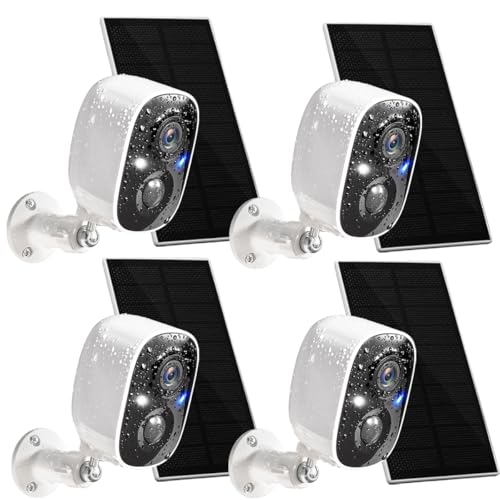
2K Security Camera System, 5GHz&2.4GHz WiFi Solar Wireless Cameras for Home Security, Wire-free Installation, AI Detection, Two-way Audio, Mobile alerts, SD/Cloud Storage, Color Night Vision, 4 Packs
Check price on Amazon
4CH Wired Security Camera System, AIWIXEN 4X 1080P Cam, DVR with 512GB HDD | Surveillance Cameras with Human Vehicle Detection, IP68 Waterproof, 24-7 Recording, Remote Access, Home Security CCTV Outdoor
Check price on Amazon
Hiseeu 5MP Home Security Camera System Outdoor, 2.4G/5G Wireless WiFi Pro | 24/7 Recording, 1TB HDD No Subscription, Wired Plug-in Powered Cameras, 4K NVR with 10.1" LCD Monitor, One-Way Audio, IP65
Check price on Amazon
Rraycom 5G/2.4G Security Cameras Wireless Outdoor,4Pack Cameras System | 2K Battery Powered AI Motion Detection Siren Alarm, Color Night Vision, 2-Way Talk, Waterproof, Works w/Alexa, Cloud/SD
Check price on Amazon
Hiseeu 5MP Outdoor WiFi Security Camera System, 10CH 8-Camera Kit, 3TB HDD | Color Night Vision, 2-Way Audio, IP66 Weatherproof, Storage, 24/7 Recording, No Monthly Fees
Check price on Amazon
Hiseeu Solar Security Cameras Wireless Outdoor System, 8 Cam-Kit, Expandable to 10CH, No Monthly Fee, Solar-Powered, Home Security Cameras System with 4MP Color Night Vision, 2.4G & 5G WiFi, 1TB HDD
Check price on Amazon