
Home Security System That Doesn't Require Internet
Protect your home without relying on Wi-Fi or broadband. Explore local storage, cellular, and wired security solutions that keep working when the internet goes down.
SEE RECOMMENDED SYSTEMSWhy Go Internet-Free? Internet outages, Wi-Fi dead zones, and privacy concerns are driving more homeowners toward offline security systems. Whether you live in a rural area with unreliable broadband or simply want full control over your footage, an internet-free security system delivers dependable protection without monthly fees or cloud dependency.
Why Choose a Security System Without Internet?
Traditional security cameras rely on your home Wi-Fi network to stream video, send alerts, and store footage in the cloud. But what happens when your internet goes down? Your entire security system goes offline with it. That's a serious vulnerability—especially when you consider that break-ins often happen when homeowners are away and least able to check on their systems.
A home security system that doesn't require internet solves this problem by recording locally to an SD card, DVR, or NVR. You get the same peace of mind without depending on an internet connection that may fail at the worst possible moment. These systems are also ideal for remote properties, vacation homes, and areas where broadband simply isn't available.
Beyond reliability, offline systems offer significant privacy advantages. Your footage stays on your property—not on a third-party server. There are no subscription fees, no forced cloud uploads, and no risk of a company changing its terms of service and locking you out of your own recordings.
How Do Internet-Free Security Systems Work?
An internet-free security system captures video and stores it locally, either on a built-in SD card, a dedicated DVR (Digital Video Recorder), or an NVR (Network Video Recorder) with a hard drive. You can view live footage and playback recordings directly on a monitor connected to the recorder, or via a local network if you choose to set one up.
There are three main types of offline security systems:
- Standalone cameras with local storage: These cameras record directly to an SD card inside the unit. They're simple to set up and don't require any additional hardware. Many battery-powered security cameras with SD cards fall into this category.
- DVR-based systems: Analog cameras connect to a central DVR unit that stores footage on an internal hard drive. These are reliable and cost-effective for multi-camera setups. A security camera system DVR with hard drive can record continuously for weeks before overwriting old footage.
- NVR-based systems: IP cameras connect to a Network Video Recorder, which stores footage on a hard drive. NVRs offer higher resolution and more advanced features than DVRs but typically cost more.
Some systems also support cellular connectivity as a backup. If your primary internet fails, the system can switch to a 4G or 5G network to send alerts and upload critical clips. A wireless security camera with SIM card is a good example of this hybrid approach.
Offline Security System Options Compared
Not all internet-free systems are created equal. Here's a side-by-side comparison of the most common options:
| Feature | SD Card Camera | DVR System | NVR System |
|---|---|---|---|
| Storage | MicroSD (up to 256GB) | Internal HDD (up to 8TB) | Internal HDD (up to 16TB) |
| Camera Count | 1–2 per unit | 4–16 cameras | 4–32 cameras |
| Resolution | 1080p–4K | 1080p–4K | 4K–8K |
| Installation | DIY, minimal | Moderate (wiring) | Moderate (network) |
| Remote Viewing | Local only (some via app) | Local monitor; app optional | Local monitor; app optional |
| Best For | Renters, small areas | Home, small business | Large properties |
| Typical Price | $50–$200 | $200–$800 | $400–$2,500+ |
For most homeowners, a DVR-based system offers the best balance of affordability, reliability, and storage capacity. If you only need to monitor one or two areas, a standalone SD card camera is the simplest and most cost-effective solution.
Key Features to Look For in an Offline Security System
When shopping for a security system that works without internet, prioritize these features:
1. Local Storage Capacity
The more storage you have, the longer you can retain footage before it's overwritten. Look for systems that support at least 1TB of storage if you plan to record continuously. For motion-triggered recording, 256GB may be sufficient. An outdoor security camera with local storage gives you full control over your recordings.
2. Night Vision Quality
Most break-ins happen at night. Choose a system with high-quality infrared or color night vision. A security camera with good night vision ensures you can identify faces and license plates even in complete darkness.
3. Motion Detection & Alerts
Even without internet, many systems can send push notifications via a local network or cellular backup. Look for cameras with adjustable motion sensitivity to reduce false alerts from passing cars or animals.
4. Weather Resistance
Outdoor cameras should be rated IP65 or higher to withstand rain, dust, and extreme temperatures. If you live in an area with harsh winters or heavy storms, this is non-negotiable.
5. Power Source
Battery-powered cameras offer flexible placement but require regular charging. Wired cameras provide continuous power but need an outlet nearby. Solar-powered options are ideal for locations without easy access to electricity. A motion sensor camera outdoor solar-powered can run indefinitely with minimal maintenance.
6. Two-Way Audio
Some offline systems include microphones and speakers, allowing you to communicate with visitors or deter intruders remotely. If this is important to you, look for home security cameras you can talk through.
Installation Tips for Internet-Free Security Systems
One of the biggest advantages of offline security systems is that you can install them yourself without needing a network administrator or professional installer. Here are some practical tips:
- Plan camera placement first: Identify entry points, blind spots, and areas with high traffic. Aim for overlapping coverage so there are no gaps.
- Mount cameras at the right height: 8–10 feet is ideal for most outdoor cameras—high enough to prevent tampering but low enough to capture clear facial details.
- Secure the DVR/NVR: Place your recorder in a locked cabinet or a hidden location. If a thief steals the recorder, your footage is gone.
- Test before finalizing: Run temporary cables and check camera angles, night vision, and recording quality before permanently mounting anything.
- Consider cable management: Use conduit or cable clips to protect wiring from weather and tampering. A camera you can install without drilling is a good option for renters.
If you're not comfortable with wiring, many battery-powered and wireless systems can be installed in under an hour with just a screwdriver. The easiest security camera system to install typically uses adhesive mounts or magnetic bases.
How Much Does an Internet-Free Security System Cost?
The cost of an offline security system varies widely depending on the number of cameras, resolution, and storage capacity. Here's a general breakdown:
| System Type | Typical Price Range | What You Get |
|---|---|---|
| Single SD card camera | $50–$200 | 1 camera, 1080p–2K, 32–256GB storage |
| 2-camera wireless kit | $150–$400 | 2 cameras, 1080p–4K, base station with storage |
| 4-camera DVR system | $200–$600 | 4 cameras, 1080p–4K, 1–2TB HDD |
| 8-camera DVR/NVR system | $400–$1,200 | 8 cameras, 4K, 2–4TB HDD, advanced features |
| 16+ camera professional system | $1,000–$2,500+ | 16+ cameras, 4K–8K, 4–8TB HDD, enterprise features |
Remember that internet-free systems have no monthly fees. Over three years, you'll save $300–$600 compared to cloud-based systems that charge $10–$20 per month. If you're comparing options, a security camera without monthly subscription pays for itself quickly.
For a more detailed breakdown of installation costs, see our guide on how much it costs to have security cameras installed.
Pros and Cons of Internet-Free Security Systems
✅ Advantages
- Works during internet outages
- No monthly subscription fees
- Full privacy—footage stays on-site
- No bandwidth usage or data caps
- Simple setup for standalone cameras
- Reliable in rural or remote areas
❌ Limitations
- No remote viewing without cellular backup
- Storage capacity is limited by hardware
- Physical theft of recorder loses footage
- Firmware updates require manual installation
- Fewer smart home integrations
For many homeowners, the benefits far outweigh the drawbacks. If remote viewing is essential, consider a hybrid system that uses cellular backup for alerts while storing footage locally. A wireless security camera with SIM card gives you the best of both worlds.
Recommended Internet-Free Security Systems
⚠️ AFFILIATE DISCLOSURE: This website contains affiliate links. As an affiliate Associate, we earn from qualifying purchases. If you make a purchase through these links, we may receive a small commission at no additional cost to you. Read our full affiliate policy.

15-Piece WiFi Home Security System, DIY Wireless Alarm Kit, No Subscription | 120dB Loud Alarm, 8-Hour Backup Battery, Instant App Alerts, DIY Installation, No Monthly Fee, Expandable Home Protection
Check price on Amazon
SimpliSafe 9 Piece Wireless Home Security System w/HD Camera - Optional 24/7 Professional Monitoring - No Contract - Compatible with Alexa and Google Assistant
Check price on Amazon
SimpliSafe 8 Piece Wireless Home Security System - Optional 24/7 Professional Monitoring - No Contract - Compatible with Alexa and Google Assistant , White
Check price on Amazon
Home Security Systems Alarm System for Home Security GSM/4G+WiFi (24-Piece) | 4.3" Touch Screen | SOS | App Instant Alerts | Wireless Smart System | Compatible with Alexa | No Monthly Fee
Check price on Amazon
Alarm System for Home Security,24Pcs WiFi+GSM/4G No Monthly Fee Wireless Security System, Phone App Control,Real-Time Alert,Auto Alarm Dial,Compatible with Alexa & Google,No Monthly Fee
Check price on Amazon
Home Security System, Alarm System for Home Security, 8-Piece Kit WiFi/GSM SMS Alarm System with Motion Detector, 120dB Alarm Siren, Door/Window Burglar Alarm, Smart Remote Control, Alexa-Compatible
Check price on Amazon
Hapippofa GEN 2 Wireless Home Security System, 16-Piece DIY Alarm Kit for House & Apartment, WiFi & 4G Touchscreen Hub, Door Sensors, Motion Detectors, App Alerts, 120dB Wired Siren, No Monthly Fee
Check price on Amazon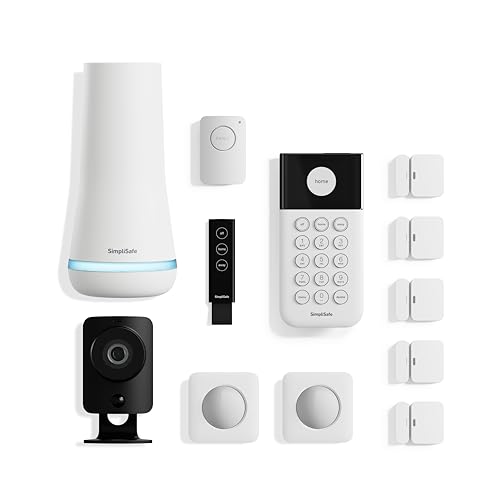
SimpliSafe 12 Piece Wireless Home Security System w/HD Camera - Optional 24/7 Professional Monitoring - No Contract - Compatible with Alexa and Google Assistant, White
Check price on AmazonBuying Guide: Which Offline Security System Is Right for You?
Choosing the right system depends on your specific needs. Here's a quick decision framework:
Choose an SD Card Camera If:
You're a renter or only need to monitor one or two areas. These cameras are affordable, easy to install, and require no additional hardware. A indoor battery-operated security camera with SD card storage is perfect for apartments.
Choose a DVR System If:
You own a home or small business and want to cover multiple entry points. A security camera system with hard drive offers reliable continuous recording and can be expanded as needed.
Choose an NVR System If:
You need high-resolution 4K footage, advanced motion detection, or plan to monitor a large property. NVR systems are more expensive but offer superior image quality and scalability.
No matter which type you choose, look for systems from reputable brands with good customer support and warranty coverage. A most reliable wireless security camera will serve you better long-term than a cheaper off-brand option.
Frequently Asked Questions
Yes, but you'll need a cellular-enabled camera or a system with a 4G/5G backup. A wireless surveillance camera without internet can send alerts and clips over a cellular network. Alternatively, some systems allow local network viewing through a router—no internet required, just a local connection.
Recording time depends on storage capacity, resolution, and whether you use continuous or motion-triggered recording. A 1TB hard drive can store about 2–4 weeks of continuous 1080p footage from four cameras. Motion-triggered recording can extend that to several months.
Absolutely—especially if you have unreliable internet, privacy concerns, or want to avoid monthly fees. A security camera without subscriptions is a one-time investment that pays for itself within a year or two compared to cloud-based alternatives.
Most wired systems will stop recording during a power outage unless connected to a UPS (Uninterruptible Power Supply). Battery-powered cameras continue working until their batteries are depleted. For maximum resilience, pair your system with a wireless security camera with battery backup.
Yes—many modern cameras use adhesive mounts, magnetic bases, or window mounts that require no drilling. Our guide on how to install an outdoor camera without drilling covers the best options for renters and temporary installations.
Ready to Secure Your Home Without Internet?
An internet-free security system gives you reliable protection, complete privacy, and no monthly fees. Browse our recommended systems above to find the perfect fit for your home.
VIEW TOP PICKSRelated Guides You Might Find Useful
- Home security systems that do not require internet
- Security system for home without internet
- Security camera that works without internet
- Wireless camera system without internet
- Outdoor security camera no WiFi needed
- Indoor security camera that doesn't require WiFi
- Top-rated security cameras without subscription
- Security cameras without subscriptions