
Security Camera Without Monthly Subscription
Protect your home with a reliable security camera that never charges you a recurring fee. Learn how to choose the best subscription-free system for your needs.
VIEW TOP PICKSWhy Go Subscription-Free? Monthly fees can add up to hundreds of dollars over the life of your camera. A security camera without a monthly subscription gives you full control over your footage, no hidden costs, and complete privacy. This guide will help you understand your options and make an informed decision.
What Does "No Monthly Subscription" Really Mean?
When you buy a security camera, you typically have two choices: pay a recurring fee for cloud storage and advanced features, or choose a model that stores footage locally and offers all its core features upfront. A security camera without monthly subscription relies on local storage—usually a microSD card, a USB hard drive, or a built-in NVR (Network Video Recorder)—to save your recordings. You access your footage through a mobile app or a local monitor without paying anything extra.
This approach is ideal for budget-conscious homeowners who want reliable surveillance without ongoing costs. It also appeals to privacy-focused users who prefer not to have their video footage stored on a third-party server. If you're looking for a system that works entirely offline, you might consider a home security system that does not require internet, which can be paired with local storage for a completely self-contained solution.
Key Benefits of Subscription-Free Security Cameras
- No Recurring Costs: You pay once for the hardware and never worry about monthly bills. This makes budgeting simple and predictable.
- Full Ownership of Footage: Your recordings stay on your device. You decide when to delete them, and no third party can access them without your permission.
- Works Without Internet: Many local-storage cameras continue recording even if your Wi-Fi goes down. This is crucial for security cameras that work without internet.
- Simple Setup: Most no-subscription cameras are designed for easy DIY installation. You don't need a professional to get started.
- Long-Term Savings: Over 2–3 years, the savings from avoiding subscription fees can often pay for the camera itself.
How to Choose the Right No-Subscription Camera
Not all subscription-free cameras are created equal. Here are the key factors to consider before making a purchase:
1. Storage Type
Local storage is the backbone of any no-subscription camera. Look for models that support microSD cards (up to 256GB or more), USB hard drives, or dedicated NVR systems. A security camera with recording capability that uses a hard drive is an excellent choice for continuous 24/7 recording. For a more robust setup, consider a security camera system DVR with hard drive.
2. Power Source
Battery-powered cameras offer flexibility and are easy to install, while wired cameras provide constant power and never need recharging. If you want a camera that plugs into a standard outlet, look for a security camera that plugs into outlet. For areas without outlets, a battery-operated outdoor security camera is a great alternative.
3. Night Vision & Image Quality
Good night vision is essential for 24/7 protection. Look for cameras with infrared or color night vision. A security camera with good night vision ensures you can see clearly even in complete darkness. For outdoor use, consider a long-range night vision security camera if you need to monitor large areas.
4. Motion Detection & Alerts
Advanced motion detection reduces false alerts and saves storage space. Some cameras can even follow motion automatically. If you want a camera that tracks movement, explore an outdoor security camera that follows motion. For areas that need extra deterrence, a motion detector flood light with camera combines lighting and surveillance in one unit.
5. Weather Resistance
Outdoor cameras must withstand rain, snow, and extreme temperatures. Look for an IP65 or higher rating. A outdoor security camera with local storage that is weatherproof will give you years of reliable service. For areas with harsh winters, a solar-powered outdoor camera with light can be a smart choice.
Subscription vs. No-Subscription: A Quick Comparison
| Feature | Subscription Camera | No-Subscription Camera |
|---|---|---|
| Monthly Cost | $3–$15 per month per camera | $0 (one-time purchase) |
| Storage | Cloud (limited free tier, paid upgrades) | Local (microSD, USB drive, NVR) |
| Internet Dependency | Required for most features | Optional; many work offline |
| Privacy | Footage stored on third-party servers | Footage stays on your device |
| Best For | Users who want AI features and cloud backup | Budget-conscious, privacy-focused users |
Pros and Cons of No-Subscription Security Cameras
Pros
- No recurring fees—save money long-term
- Complete privacy and data ownership
- Works during internet outages
- Simple, DIY-friendly installation
- No contracts or commitments
Cons
- Storage capacity limited by local hardware
- No cloud backup if camera is stolen
- Fewer AI-powered features (e.g., facial recognition)
- Remote access may require additional setup
Top Subscription-Free Security Cameras
Based on our research and user feedback, here are some of the best options available today. These cameras offer excellent value, reliable performance, and—most importantly—no monthly fees.
Best Overall: Wireless Outdoor Pan & Tilt Camera
This camera offers 360° coverage, 2K resolution, and supports a microSD card up to 256GB. It works with both 2.4GHz and 5GHz Wi-Fi, and you can access live view and recordings without any subscription. For a similar option, check out our guide to wireless outdoor pan and tilt security cameras.
Best for Privacy: Indoor Battery-Operated Camera
This indoor camera stores footage locally on a microSD card and requires no internet connection for basic operation. It's perfect for monitoring pets or elderly family members. Learn more about indoor battery-operated security cameras.
Best for Large Properties: Solar-Powered Camera with SIM Card
If you need coverage in remote areas without Wi-Fi, a solar-powered security camera with SIM card is an excellent choice. It uses cellular data to send alerts and can store recordings locally.
Ready to Protect Your Home Without Monthly Fees?
Browse our top-rated subscription-free security cameras and find the perfect fit for your budget and needs.
SHOP NOWInstallation Tips for Subscription-Free Cameras
Installing a security camera without a monthly subscription is easier than you might think. Here are some practical tips to get you started:
- Choose the Right Location: Place cameras at entry points, driveways, and backyards. For outdoor cameras, ensure they are within Wi-Fi range or use a wireless security camera with long-range motion detection.
- Test Before Mounting: Use your phone to check the camera's field of view and signal strength before drilling any holes.
- Secure Your Footage: If you're using a microSD card, consider encrypting it. For added security, a security camera system with hard drive keeps your recordings safe and organized.
- Consider a Doorbell Camera: A doorbell security camera without subscription is a great addition to any home, offering both convenience and security.
Frequently Asked Questions
Can a security camera work without Wi-Fi?
Yes! Many cameras support local storage and can record continuously without an internet connection. You can review footage directly from the SD card or a connected monitor. For more options, see our guide to security cameras that work without internet.
How much storage do I need?
It depends on your resolution and recording schedule. A 128GB microSD card can hold about 1–2 weeks of footage for a 1080p camera recording only when motion is detected. For 24/7 recording, consider a 1TB hard drive or larger.
Are no-subscription cameras less secure?
Not necessarily. Local storage actually enhances privacy because your footage never leaves your home. However, you should still secure your camera with a strong password and keep its firmware updated.
What if I want cloud backup later?
Some cameras offer optional cloud storage plans that you can add later. This gives you the flexibility to start with local storage and upgrade if your needs change.
Do I need a professional to install my camera?
Most wireless and battery-powered cameras are designed for DIY installation. However, if you're not comfortable working with tools, you can hire a professional. For cost estimates, see our guide to professional security camera installation cost.
Recommended Security Cameras Without Monthly Subscription
⚠️ AFFILIATE DISCLOSURE: This website contains affiliate links. As an affiliate Associate, we earn from qualifying purchases. If you make a purchase through these links, we may receive a small commission at no additional cost to you. Read our full affiliate policy.

Lifetime Free Data & No Monthly Fee 4G LTE Solar Cellular Security Camera Outdoor Wireless,No WiFi Needed, 360° PTZ, 2K Full Color Night Vision, Human Tracking, 2-Way Audio, 32GB SD Card, IP66-White
Check price on Amazon
Security Cameras Wireless Outdoor 5G& 2.4G, No Subscription, 2 Cam-Kit,4MP Solar Powered Home Security Cameras System With 360°PTZ,128GB Local Storage,Color Night Vision WiFi Cameras for Home Security
Check price on Amazon
VSKY 4G Cellular Security Camera, Lifetime Free Unlimited Data, 2K Pan Tilt | No Monthly Subscription Fee, No WiFi LTE Solar Powered IP65 Outdoor Cam with SIM Card, Color Night Vision, 360 Live Feed
Check price on Amazon
2026 Upgraded 2K Security Cameras Wireless Outdoor, Free Cloud Storage, 1-6 Months Battery Life, Waterproof, 2-Way Talk, AI Motion Detection Spotlight Siren Alarm Cameras for Home Security
Check price on Amazon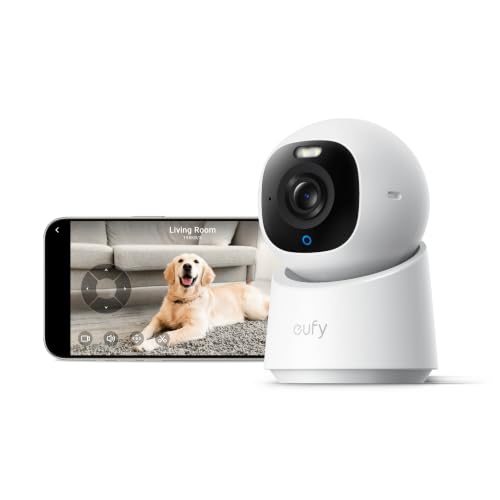
eufy Security 4K Indoor Camera E30, No Subscription, Work as Pet Camera | Nanny/Baby Camera, Pan&Tilt, AI Tracking, AI Detection, 24/7 Recording, Color Night Vision, Two-Way Audio,Works with HomeKit
Check price on Amazon
eufy Security SoloCam E30, 2K Solar Security Camera, 360° AI Tracking | Solar Powered, 2K Clarity, AI Detection, Pan & Tilt, No Monthly Fee, Built-in Local Storage, Wireless Outdoor
Check price on Amazon
aosu D1 Classic 4-Cam Kit, Security Cameras Wireless Outdoor, Solar Powered | No Subscription Required, 32GB Built-in Storage, 360° Auto Tracking, 2K (3MP) Full-Color Night Vision, Easy Install
Check price on AmazonFinal Thoughts
Choosing a security camera without a monthly subscription is a smart decision for homeowners who value privacy, affordability, and control. With a wide range of options available—from wireless security cameras that don't require a subscription to indoor outdoor security cameras without monthly fee—there's a solution for every budget and property type.
Whether you're looking for a simple indoor camera or a comprehensive whole-home system, the key is to understand your storage needs, power options, and desired features. By avoiding monthly fees, you keep more money in your pocket and maintain full ownership of your security data. For more options, explore our guide to security cameras without subscriptions and take the first step toward a safer, smarter home today.