
Doorbell Security Camera Without Subscription
Discover how to protect your front door with a video doorbell that never charges a monthly fee. Compare local storage, Wi-Fi, and battery-powered options that keep your recordings private and your wallet happy.
View Recommended ModelsWhy go subscription-free? A doorbell security camera without subscription stores footage locally on a microSD card, internal memory, or a home base. You keep full ownership of your recordings, avoid recurring costs, and maintain privacy without relying on cloud servers. The trade-off is that you must manage storage yourself and may lose remote access to older clips.
Why Choose a Doorbell Camera Without a Subscription?
Video doorbells have become a staple of modern home security. They let you see, hear, and speak to visitors from your phone, whether you are in the kitchen or across the country. However, many popular brands lock essential features—like recording history and package detection—behind a monthly cloud plan. If you want to avoid yet another recurring bill, a doorbell security camera without subscription is the answer. These devices record to a local microSD card or a base station, giving you instant access to clips without paying a cent after the initial purchase.
Beyond cost savings, subscription-free doorbells appeal to privacy-conscious homeowners. Your footage stays on your property rather than on a third-party server. You also avoid the risk of losing access to recordings if you stop paying or if the manufacturer changes its terms. For many users, the peace of mind that comes with local storage is worth the minor inconvenience of managing a memory card. If you are building a broader no-fee security setup, consider pairing your doorbell with security cameras without subscriptions or a security camera with recording capability for full coverage.
How Subscription-Free Doorbell Cameras Work
Local Storage via microSD
The most common approach. A microSD card (usually 32GB to 256GB) slots into the doorbell or an indoor chime. Footage loops continuously, overwriting the oldest clips when the card fills up. You can remove the card to review footage on a computer or access it through the companion app while the card remains inside.
Base Station with Hard Drive
Some systems include a home base that stores recordings from multiple cameras on an internal hard drive or USB drive. This is ideal if you plan to add more cameras later. The base station often supports security camera systems with a hard drive and can work without an internet connection for local viewing.
Onboard eMMC or Flash Memory
A few premium models have built-in memory (e.g., 8GB or 16GB) that cannot be expanded. This is convenient but limits recording history. These are best for users who only need to review recent events and do not want to handle a memory card.
Network Video Recorder (NVR) Integration
If you already own a security camera system with DVR and hard drive, some doorbells can stream to that recorder via RTSP or ONVIF. This centralizes all recordings and avoids the need for a separate storage solution.
Key Features to Look For
Resolution & Field of View
Look for at least 1080p HD; 2K or 4K is better for identifying faces and license plates. A wide field of view (160° or more) reduces blind spots. Some models offer a 180-degree wide angle, similar to an 180-degree wide-angle security camera outdoor.
Power Source
Battery-powered doorbells are easiest to install but require recharging every few weeks or months. Wired models tap into existing doorbell wiring for continuous power. If you rent or cannot drill, consider a wireless video doorbell no subscription with a removable battery.
Night Vision
Infrared or color night vision is essential for 24/7 monitoring. Check the range—30 feet is typical, but some models reach further. For comprehensive night coverage, pair with security cameras with good night vision.
Two-Way Audio
Speak to visitors or scare off intruders. Look for models with noise cancellation for clearer conversations. If you want this feature on other cameras, see home security cameras you can talk through.
Motion Detection Zones
Customizable zones reduce false alerts from passing cars or trees. Some advanced models use AI to distinguish people, packages, and animals. This is a common feature on highest-rated wireless security cameras.
Weather Resistance
An IP65 or IP66 rating ensures the doorbell survives rain, snow, and dust. This is non-negotiable for outdoor use. For more rugged outdoor options, explore most reliable outdoor security cameras.
Subscription-Free Doorbell Cameras vs. Cloud-Based Models
| Feature | Subscription-Free (Local Storage) | Cloud-Based (Subscription) |
|---|---|---|
| Monthly Cost | $0 after purchase | $3–$10+ per month per camera |
| Recording Storage | microSD card or local hard drive | Cloud servers |
| Remote Access | Yes, via app (while on same network or internet) | Yes, from anywhere |
| Privacy | High—footage stays on your property | Moderate—footage stored on third-party servers |
| Storage Capacity | Limited by card size (32GB–256GB typical) | Virtually unlimited (depends on plan) |
| Risk of Data Loss | If card is damaged or stolen | If you stop paying or company shuts down |
| Best For | Budget-conscious, privacy-focused users | Users who want unlimited history and advanced AI |
Pros and Cons of Going Subscription-Free
✅ Pros
- No recurring monthly fees—save hundreds over the lifetime of the device
- Full ownership and control of your video footage
- Works during internet outages (local recording continues)
- Easy to expand storage by swapping microSD cards
- Ideal for renters or those who dislike long-term contracts
❌ Cons
- You must manually manage storage and delete old clips if needed
- Remote access may require port forwarding or a stable Wi-Fi connection
- Advanced AI features (package detection, facial recognition) may be limited
- If the camera is stolen, the footage may be lost
- Some brands lock local storage behind a paywall or omit it entirely
Installation Tips for Your Doorbell Camera
Installing a subscription-free doorbell camera is usually a straightforward DIY project. Most battery-powered models come with adhesive mounts or screw-in brackets. If you are handy, you can complete the setup in under 30 minutes. For wired models, you may need to connect to existing doorbell wiring (typically 16–24 VAC). If you are uncomfortable with electrical work, consider hiring a professional—though this adds to the cost. For a broader look at installation expenses, see cost to have security cameras installed and professional security camera installation cost.
Position the doorbell at chest height (around 48 inches) for optimal face capture. Avoid pointing it directly at the sun or a reflective surface. If you cannot drill into your wall, explore install outdoor camera without drilling for alternative mounting solutions. For renters, a security camera that plugs into an outlet might be a better fit if you have an outdoor outlet near the door.
Top Use Cases for a No-Subscription Doorbell Camera
Package Theft Prevention
Receive instant alerts when a delivery arrives and capture footage of anyone who approaches your door. A subscription-free model stores the clip locally so you can share it with police if needed. Pair with a motion detector flood light with camera for added deterrence.
Rental Properties
Landlords and tenants alike appreciate doorbells that do not require permanent wiring or monthly fees. A wireless security camera with SIM card can be an alternative if Wi-Fi is unreliable. For a fully off-grid solution, consider a solar-powered security camera with SIM card.
Elderly or Assisted Living
Monitor visitors and deliveries for aging parents without forcing them to manage a subscription. Two-way audio lets you communicate directly. If you need indoor monitoring too, an indoor battery operated security camera or a battery-powered indoor security camera can complement the doorbell.
Off-Grid or Remote Cabins
No internet? No problem. Some doorbells record locally and only need Wi-Fi for live view. For truly disconnected locations, consider a security camera that works without internet or a home security system that does not require internet. You can also pair with a wireless surveillance camera without internet for full coverage.
Recommended Doorbell Security Cameras Without Subscription
⚠️ AFFILIATE DISCLOSURE: This website contains affiliate links. As an affiliate Associate, we earn from qualifying purchases. If you make a purchase through these links, we may receive a small commission at no additional cost to you. Read our full affiliate policy.
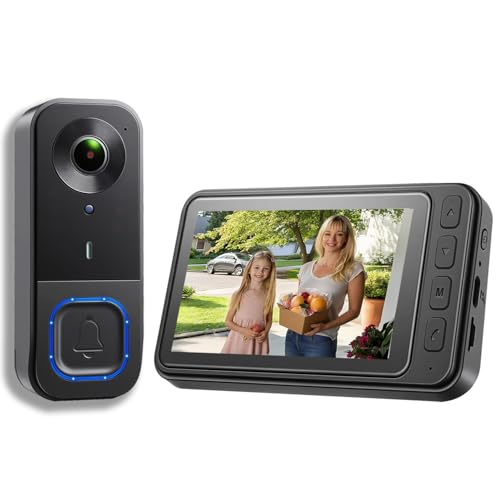
KALOGL Video Doorbell Wireless with Screen 1080p, No Subscription Door Bell Camera with Monitor Screen, Local Storage NO WiFi and APP Needed, Video Intercom Two-Way Audio,160° View,Night Vision
Check price on Amazon
TKMARS Doorbell Camera Wireless No Subscription with Monitor Screen, Waterproof Video Intercom with Active Wake-Up, No WiFi Needed, 170° Angle, Local Recording for Home/Apartment/Seniors
Check price on Amazon
Orbitell 1080p Wireless Wi-Fi Video Doorbell Camera with Two Way Audio, Night Vision, Cloud Storage, Smart AI Motion Detection, Support 2.4GHz Wi-Fi only
Check price on Amazon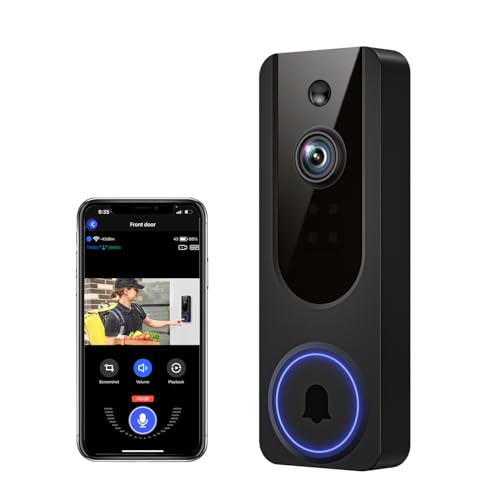
VanaOrbi 1080p WiFi Video Doorbell Camera Wireless, Battery Powered, AI Human and Motion Detection, 2 Way Talk, Night Vision, Cloud Storage, 2.4G WiFi Only, Indoor/Outdoor Surveillance
Check price on Amazon
KEPEAK Doorbell Camera Wireless, Video Door Bell with Monitor | No WiFi or No APP Needed for Front Door Home Security, Two-Way Audio, No Subscription Local Storage, Easy Setup
Check price on Amazon
Doorbell Camera Wireless No Subscription, 1080P Video Doorbell with Monitor | No WiFi, No APP, 4.3" IPS Monitor, 170°Wide-Angle Night Vision, Two-Way Audio & Wake-Up, IP65 Waterproof
Check price on Amazon
youkey Doorbell Camera Wireless No Subscription with Chime | Dual‑cam Video Doorbell with Head-to-Toe Video, 5G WiFi, 8GB Local Storage, Two-Way Talk, Works with Alexa & Google Home
Check price on Amazon
CEMANTA 2.5K Video Doorbell Camera Wireless with Chime,Free Cloud Storage | Voice Changer, Quick Voice Reply, 2.4G/5Ghz WiFi, 2-Way Audio, AI Motion Detection
Check price on AmazonBuying Checklist: What to Confirm Before You Buy
- Storage type: microSD slot, built-in memory, or base station? Confirm the maximum card size supported.
- Power: Battery, wired, or solar? Battery models need recharging; wired needs existing doorbell wiring.
- Wi-Fi band: 2.4GHz is standard; 5GHz offers faster speeds but shorter range. Some models support both.
- App features: Live view, two-way talk, motion zones, and local playback. Check if any features require a subscription.
- Weather rating: IP65 or higher for outdoor durability.
- Dimensions: Will it fit your doorframe or wall without obstructing the door?
- Warranty: At least 1 year; 2 years is better.
- Compatibility: Does it work with your existing smart home system (Alexa, Google Home)?
Common Issues and How to Fix Them
Motion alerts are too frequent
Adjust the motion sensitivity in the app and create activity zones that exclude busy streets or swaying trees. Some models let you set a cooldown period between alerts.
Footage is not recording to the microSD card
Ensure the card is formatted correctly (usually FAT32 or exFAT) and inserted fully. Check the app settings to confirm local recording is enabled. If the card is worn out, replace it with a high-endurance model designed for surveillance.
Battery drains too quickly
Frequent motion alerts, cold weather, and live view sessions drain the battery. Reduce sensitivity, disable constant live view, or consider a wired model. If you need a battery-operated camera with long life, look for battery-operated security camera motion detection models with optimized power management.
Wi-Fi signal is weak at the door
Move your router closer, add a Wi-Fi extender, or choose a doorbell that supports a wireless security camera with long-range motion detection. Some models can connect to a base station that bridges the signal.
Frequently Asked Questions
Can a doorbell camera work without Wi-Fi?
Yes, some models record locally to a microSD card even without Wi-Fi. However, you will not receive remote alerts or live view unless you connect to the internet. For a fully offline solution, consider a security camera that works without internet or a wireless camera system without internet.
Do subscription-free doorbells still offer cloud storage?
Some do, but it is usually optional. You can use local storage only and never pay a fee. Check the product specifications to confirm that local recording is supported without a subscription.
How long do recordings last on a microSD card?
It depends on card size, resolution, and motion frequency. A 64GB card at 1080p typically holds 1–2 weeks of typical activity. A 256GB card can hold a month or more. The camera overwrites the oldest footage when full.
Are subscription-free doorbells less secure?
Not necessarily. Local storage can be more secure because your footage is not on a third-party server. However, you must protect the camera from theft and secure your Wi-Fi network. Enable two-factor authentication on the app if available.
Can I use a doorbell camera without a subscription for a business?
Yes, many small businesses use them. For higher traffic areas, consider a model with a larger storage capacity or pair it with an outdoor security camera system for business that also avoids monthly fees.
Ready to Ditch the Monthly Fee?
Explore our top-rated doorbell cameras that record locally and never charge a subscription. Protect your home on your terms.
See Recommended ModelsRelated Guides
Security Cameras Without Subscriptions
Explore the full range of no-fee cameras for every corner of your home.
Wireless Video Doorbell No Subscription
Compare battery-powered doorbells that never require a monthly plan.
Top Rated Security Cameras Without Subscription
See which models users rate highest for reliability and value.
Security Camera Without Monthly Subscription
Broaden your search to all camera types with no recurring fees.
Indoor Outdoor Security Cameras Without Monthly Fee
Complete coverage for inside and outside your home, fee-free.
Wireless Security Cameras That Don't Require a Subscription
Wire-free options that store footage locally.