
Security Camera with Recording Capability: The Complete Buyer's Guide
Everything you need to know about security cameras that record — from local SD card storage and DVR/NVR systems to cloud recording and hybrid setups. Compare options, understand costs, and choose the right recording solution for your home or business.
Quick Summary: A security camera with recording capability is the core of any effective surveillance system. Without recording, a camera is only useful for live monitoring — you can't review events, gather evidence, or catch what you missed. This guide explains the four main recording methods (local SD card, DVR/NVR hard drive, cloud, and hybrid), their costs, pros and cons, and how to choose the best option for your property. Whether you want a simple battery-powered security camera with SD card or a full security camera system DVR with hard drive, this guide will help you decide with confidence.
Recommended Security Cameras with Recording Capability
⚠️ AFFILIATE DISCLOSURE: This website contains affiliate links. As an affiliate Associate, we earn from qualifying purchases. If you make a purchase through these links, we may receive a small commission at no additional cost to you. Read our full affiliate policy.
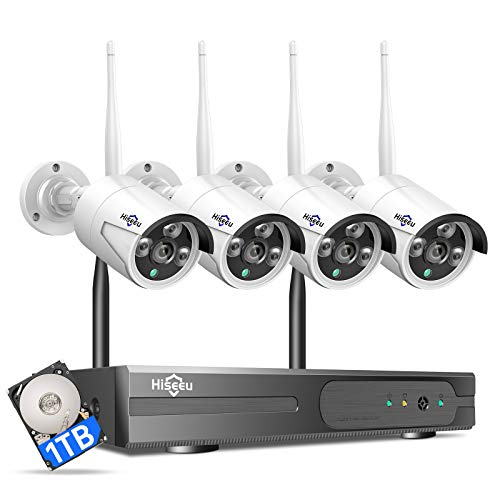
Hiseeu [24/7 Recording Home Security Camera System, No Subscription, 4K NVR with 4pcs 3MP Corded Plug-in Powered Outdoor Bullet Cameras, 2.4G/5G Wireless WiFi Connection, 1TB HDD, Night Vision, IP66
Check price on Amazon
Hiseeu 5MP Home Security Camera System Outdoor, 2.4G/5G Wireless WiFi Pro | 24/7 Recording, 1TB HDD No Subscription, Wired Plug-in Powered Cameras, 4K NVR with 10.1" LCD Monitor, One-Way Audio, IP65
Check price on Amazon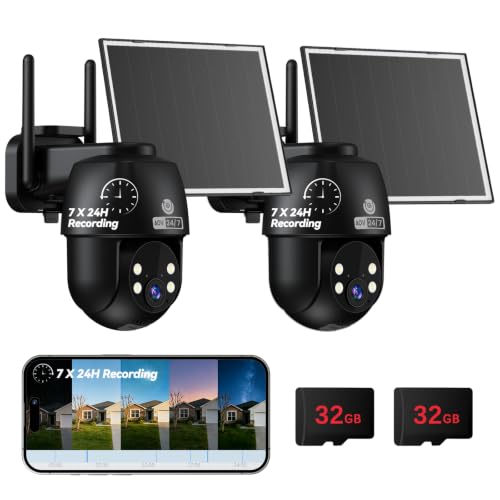
MUBVIEW 24/7 Continuous Recording Wireless Outdoor Security Camera | No Monthly Fee, 2.4G WiFi, 8X Zoom, 4MP 10W Solar Powered, 360° PTZ, Auto Tracking, SD Included, Charges Even Below 32°F
Check price on Amazon
firstrend Wireless Security Camera System with 500GHDD,WiFi Bullet Camera | No Monthly Fee, 24/7 Recording, AI Human Detection, Two-Way Audio, Motion Detection, Night Vision, IP66 Waterproof
Check price on Amazon
5G&2.4GHz Indoor Security Camera, 2K, Free Cloud, 24/7 TF Recording, Wired | AI Motion Detection, Easy App Setup, 2-Way Audio, Cameras for Home Security, Dog, Cat, Elder, Nanny, Pet Camera
Check price on Amazon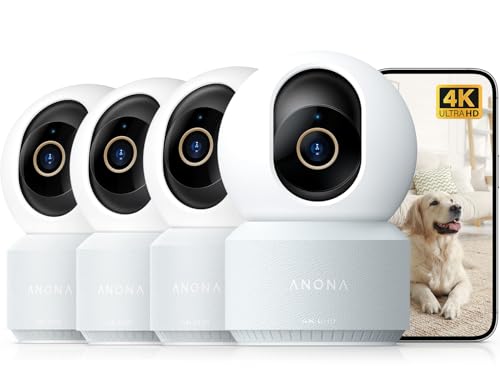
Anona 4K UHD Indoor Camera, Pet/Dog/Baby Security Camera with Phone App, 360°Pan-Tilt, 2.4G/5G Dual-Band Wi-Fi 6, Auto-Tracking, Person/Pet/Baby Crying Detection, Privacy Mode, Two-Way Audio, 4 Pack
Check price on Amazon
eufy Security Indoor/Outdoor Camera C31, Spotlight-Free PURECOLOR VISION | Spotlight-Free Color Night Vision, IP66, AI Human/Vehicle/Pet/Cry Detection, Plug-In Powered, 24/7Recording, No Subscription
Check price on Amazon
blurams 2Pack Security Cameras Outdoor Wired, 2K 360° PTZ Outdoor Security Camera, Weatherproof, 24/7 Recording with SD Card, Color Night Vision, AI Human Tracking, 2.4/5GHz WiFi6, Work with Alexa
Check price on AmazonWhy Recording Capability Is the Most Important Feature
When shopping for a security camera, resolution, night vision, and field of view often get the most attention. But recording capability is what transforms a camera from a live-view gadget into a true security tool. A camera that only streams live video is reactive — it helps you see what's happening right now. A camera that records is proactive — it preserves evidence, documents incidents, and lets you investigate events after they occur.
Here's why recording capability matters:
- Evidence preservation: If a break-in, package theft, or vandalism occurs, recorded footage is your primary evidence for police and insurance claims.
- Review and verification: You can review footage to confirm whether a motion alert was a real threat or a false alarm from a passing car or animal.
- Peace of mind while away: When you're traveling or at work, you can check recordings to verify everything is normal at home.
- Accountability: Recordings can document employee activity, delivery driver behavior, or contractor work at your property.
- Legal protection: In some jurisdictions, recorded footage can be used as evidence in legal proceedings.
Without recording, you're relying entirely on real-time monitoring — which is impractical for most people. That's why every serious security camera setup should include a recording method. If you're also concerned about nighttime performance, see our guide to security cameras with good night vision to pair recording with reliable low-light capture.
The 4 Main Recording Methods Explained
Security cameras with recording capability use one of four storage approaches. Each has distinct advantages and trade-offs. Understanding them is essential before you buy.
| Recording Method | How It Works | Best For | Typical Cost |
|---|---|---|---|
| Local SD Card | Camera stores footage directly on a microSD card inside the camera body. | Single-camera setups, simple installs, no monthly fees. | $40–$150 per camera |
| DVR / NVR with Hard Drive | Cameras connect to a central recorder with an internal hard drive (DVR for analog, NVR for IP cameras). | Multi-camera systems (4–16+ cameras), 24/7 continuous recording. | $200–$2,500+ for full system |
| Cloud Storage | Footage is uploaded to a remote server via internet; accessible from anywhere. | Renters, remote monitoring, automatic backup. | $3–$15/month per camera |
| Hybrid (Local + Cloud) | Camera records locally (SD or NVR) AND backs up key clips to the cloud. | Users who want redundancy and remote access without losing local control. | $80–$300 + optional subscription |
1. Local SD Card Recording
This is the simplest and most affordable recording method. A microSD card (typically 32GB to 256GB) is inserted into the camera, and footage is stored locally. Most cameras with this feature support loop recording, meaning older footage is automatically overwritten when the card fills up.
Local SD recording is ideal for a battery-powered security camera with SD card, since there's no need for a central recorder or internet connection. It's also common in wireless CCTV camera with SD card recorder setups where simplicity is a priority.
✓ Pros
- No monthly fees ever
- Works without internet
- Simple setup — just insert card
- Full privacy (footage stays local)
✗ Cons
- Limited storage (card capacity)
- If camera is stolen, footage is lost
- No remote access without additional setup
- Cards can wear out over time
2. DVR / NVR with Hard Drive
For multi-camera systems, a DVR (Digital Video Recorder) or NVR (Network Video Recorder) is the standard. These devices have an internal hard drive — typically 1TB to 8TB — that stores footage from all connected cameras. DVRs work with analog cameras, while NVRs work with IP cameras.
This is the best choice if you need continuous 24/7 recording across multiple cameras. A security camera system DVR with hard drive is a popular turnkey option for homes and small businesses. If you want the flexibility of both wired and wireless cameras, consider a security camera system wired and wireless that supports a central recorder.
✓ Pros
- Massive storage (weeks or months of footage)
- Supports 4–16+ cameras on one system
- 24/7 continuous recording possible
- No monthly fees
✗ Cons
- Higher upfront cost
- Requires professional or careful DIY installation
- Recorder itself is a single point of failure
- Remote access setup can be complex
3. Cloud Storage Recording
Cloud recording uploads footage to a remote server maintained by the camera manufacturer or a third-party service. You access recordings through a smartphone app or web portal. Most cloud plans are subscription-based, with tiers based on resolution, retention period, and number of cameras.
Cloud recording shines when you need remote access from anywhere and want automatic off-site backup. However, it depends on a stable internet connection and adds recurring costs. Many users prefer to avoid subscriptions entirely — in that case, explore security cameras without subscriptions or top-rated security cameras without subscription.
✓ Pros
- Access footage from anywhere
- Off-site backup (safe from theft/fire)
- No hardware to maintain
- Easy to share clips with police
✗ Cons
- Monthly/yearly subscription fees
- Requires reliable internet
- Privacy concerns (footage on third-party servers)
- Higher resolution = higher cost
4. Hybrid Recording (Local + Cloud)
Hybrid recording combines the best of both worlds: continuous local recording for full detail, plus cloud backup for critical events. For example, a camera might record 24/7 to an SD card or NVR, while simultaneously uploading motion-triggered clips to the cloud. This gives you redundancy and remote access without sacrificing local control.
Hybrid is ideal for users who want the security of off-site backup but still value privacy and don't want to rely entirely on the cloud. It's often the sweet spot for serious home security setups.
Key Features to Look For in a Recording Security Camera
Beyond the recording method, several features directly affect how well your camera records and how useful the footage will be.
Continuous vs. Motion-Triggered Recording
Continuous recording captures everything, 24/7 — no gaps. Motion-triggered recording only saves footage when movement is detected, conserving storage and battery life. Battery-powered cameras almost always use motion-triggered recording to extend battery life, while wired cameras can support continuous recording. Some systems let you switch between modes. For maximum coverage, look for a continuous recording outdoor security camera or a system that supports home security cameras that record 24/7.
Resolution and Frame Rate
Higher resolution (1080p, 2K, 4K) means more detail — crucial for identifying faces, license plates, and other evidence. However, higher resolution also consumes more storage. A 4K camera will fill a hard drive roughly four times faster than a 1080p camera. Balance resolution needs with storage capacity.
Storage Capacity and Retention
How long do you need to keep footage? A 128GB SD card might hold 1–2 weeks of 1080p motion-triggered footage. A 2TB hard drive in an NVR can hold 2–4 weeks of continuous 1080p recording from multiple cameras. If you need longer retention, plan for larger storage or cloud backup.
Night Vision and Low-Light Recording
Recording is only useful if the footage is clear. Cameras with good night vision — whether infrared (IR) or color night vision — ensure recordings remain usable after dark. Pair recording capability with strong night vision for 24-hour protection. See our guide to security cameras with good night vision for recommendations.
Power Source: Wired, Battery, or Solar
Power source affects recording reliability. Wired cameras can record continuously without battery concerns. Battery-powered cameras are easier to install but typically record only on motion to conserve power. Solar-powered cameras offer a middle ground — see solar-powered outdoor camera with light options. If you want battery flexibility with recording, look at a battery-operated security camera with motion detection or a battery-powered indoor security camera.
Remote Access and Notifications
Most modern recording cameras let you view live and recorded footage from a smartphone app. Motion alerts with snapshot previews help you quickly assess whether an event is worth reviewing. Some cameras even support two-way audio — useful for a home security camera you can talk through.
How to Choose the Right Recording Security Camera
Use this step-by-step framework to narrow down your options.
Step 1: Determine How Many Cameras You Need
A single camera covers one area — a front door, driveway, or backyard. For full property coverage, you'll likely need 2–4 cameras minimum, often more. If you need multiple cameras, a DVR/NVR system is usually more cost-effective than buying separate standalone cameras. For comprehensive coverage, consider an indoor outdoor home security camera system or a home security camera system wireless indoor outdoor.
Step 2: Decide on Storage Method
Ask yourself: Do I want to pay monthly fees? Do I need remote access? How long do I need to keep footage?
- No fees, simple setup: Go with local SD card recording.
- No fees, multiple cameras, 24/7 recording: Choose a DVR/NVR system.
- Remote access, off-site backup: Cloud or hybrid recording.
- No internet at all: Look for cameras and systems that record locally without any internet dependency — see home security systems that do not require internet or security system for home without internet.
Step 3: Choose Wired or Wireless
Wired cameras are more reliable and support continuous recording without battery concerns, but installation is more involved. Wireless cameras are easier to install but may need periodic battery charging and often rely on motion-triggered recording. If you want to avoid drilling, look for install outdoor camera without drilling solutions. If you prefer a fully wireless setup, see wireless outdoor security cameras without WiFi or wireless security camera with SIM card.
Step 4: Consider Installation and Maintenance
Some systems are designed for easy DIY installation — look for the easiest security camera system to install if you want to avoid professional help. If you prefer professional installation, factor in the professional security camera installation cost or the broader cost to have security cameras installed.
Step 5: Set a Budget
Here's a realistic breakdown of what you can expect to spend:
- Single camera with SD card recording: $40–$150
- 2–4 camera wireless system with base station or NVR: $200–$600
- Professional DVR/NVR system with hard drive and 4–8 cameras: $600–$2,500+
- Cloud subscription (if chosen): $3–$15 per camera per month
- Professional installation (optional): $100–$500+ depending on complexity
Prices are approximate market estimates and vary by brand, resolution, and features.
Common Use Cases for Recording Security Cameras
Home Protection
Homeowners use recording cameras to monitor entry points, driveways, backyards, and interior spaces. A security camera for home indoor and outdoor setup with local recording gives you evidence if a break-in occurs. For apartment dwellers or renters, an indoor battery-operated security camera with SD card recording is a flexible, no-damage option.
Business and Commercial
Businesses need reliable, high-capacity recording for liability, loss prevention, and employee safety. An outdoor security camera system for business with DVR/NVR recording is the standard. For businesses without internet, a system that does not require internet (or a business-grade equivalent) can still record locally while remaining fully functional.
Rental Properties and Airbnbs
Property managers use recording cameras to monitor guest activity, prevent parties, and document damage. A wireless security camera with SIM card is ideal for properties without Wi-Fi, while security cameras without subscriptions keep long-term costs low.
Construction Sites and Remote Locations
Off-grid locations need cameras that record without internet or power infrastructure. Solar-powered cameras with local storage — like a solar-powered security camera with SIM card — are built for this. For areas without Wi-Fi at all, see outdoor security camera no WiFi needed options.
Installation and Setup Tips for Recording Cameras
- Position cameras strategically: Aim for entry points, blind spots, and high-traffic areas. Mount at 8–10 feet high and angle slightly downward.
- Test recording before final mounting: Verify field of view, night vision, and recording triggers before permanently securing the camera.
- Secure your storage: If using local SD cards or DVR/NVR, place the recorder in a locked area. If the camera or recorder is stolen, local footage is gone.
- Set up motion zones: Configure motion detection zones to avoid false alerts from trees, roads, or pets. This saves storage and battery life.
- Check retention settings: Configure loop recording or retention periods so you don't lose important footage. Decide how many days of footage you need.
- Update firmware: Manufacturers release firmware updates that improve recording reliability, security, and features. Check regularly.
- Test remote access: If you rely on remote viewing or cloud backup, test the connection from outside your home network before you need it.
Frequently Asked Questions
The best option depends on your priorities. Local SD card storage is cheapest and requires no internet. DVR/NVR with a hard drive is best for multi-camera 24/7 recording. Cloud storage is best for remote access and off-site backup. Many users choose hybrid recording to get both local control and cloud redundancy.
Not necessarily. Cameras that record to a local SD card or a DVR/NVR can operate without any internet or Wi-Fi connection. However, Wi-Fi (or cellular) is required if you want remote viewing, smartphone notifications, or cloud storage. If you have no internet at your location, explore security cameras that work without internet or indoor security camera that doesn't require WiFi.
Continuous recording duration depends on storage capacity and resolution. A 128GB SD card holds roughly 1–2 weeks of 1080p footage. A 2TB hard drive in an NVR can store 2–4 weeks of continuous 1080p footage from multiple cameras. Higher resolution (4K) and more cameras reduce retention time. Battery-powered cameras usually record only on motion to conserve power.
Basic single-camera units with local SD recording start around $40–$150. Mid-range wireless systems with 2–4 cameras and a base station or NVR cost $200–$600. Professional DVR/NVR systems with hard drives and multiple 4K cameras range from $600–$2,500+. Cloud subscriptions, if chosen, add $3–$15 per camera per month.
Yes — most modern recording cameras support remote access via a smartphone app. For local-only cameras, you may need to set up port forwarding or a VPN, which can be technical. Cloud-connected cameras offer the easiest remote access. Some systems also support two-way audio for direct communication.
If the camera or recorder loses power, recording stops. To maintain recording during outages, use a UPS (uninterruptible power supply) for your DVR/NVR and router. Some cameras have internal batteries or support battery backup. For fully off-grid reliability, consider a solar-powered camera with light.
Ready to Choose Your Recording Security Camera?
Now that you understand recording methods, key features, and costs, you're ready to make an informed decision. Browse our recommended cameras above or explore more specialized guides below.
Explore More Security Camera Guides →Related Security Camera Guides
Expand your research with these related articles from AllCameraGuide:
- Security Camera System DVR with Hard Drive — Complete guide to DVR-based recording systems.
- Outdoor Security Camera with Local Storage — How to choose an outdoor camera that records locally.
- Security Cameras Without Subscriptions — Top options that record without monthly fees.
- Wireless Security Camera with SIM Card — Recording solutions for locations without Wi-Fi.
- Home Security Cameras That Record 24/7 — Continuous recording setups for homes.
- Solar-Powered Security Camera with SIM Card — Off-grid recording for remote locations.
- Easiest Security Camera System to Install — DIY-friendly recording systems.
- Security Cameras with Good Night Vision — Recording that works after dark.