
Stand Alone DVR Security Camera System: The Complete Guide
Discover how a self-contained DVR system can provide reliable, subscription-free surveillance for your home or business. Learn what to look for and how to choose the right one.
View Recommended SystemsWhen it comes to protecting your property, a stand alone DVR security camera system offers a level of reliability and independence that many modern cloud-based solutions simply cannot match. Unlike systems that rely on an internet connection and monthly subscriptions, a stand-alone DVR records footage locally to a built-in hard drive, giving you complete control over your data and ensuring your surveillance never goes down due to a network outage.
This guide will walk you through everything you need to know about stand-alone DVR systems. We'll cover how they work, their key advantages, what to look for when buying, and how they compare to alternative solutions. By the end, you'll have the confidence to choose the perfect system for your needs.
What Is a Stand Alone DVR Security Camera System?
A stand-alone DVR (Digital Video Recorder) system is a self-contained surveillance solution that includes a dedicated recording unit with a built-in hard drive. The DVR connects directly to your cameras—typically via coaxial cable or Ethernet—and records all video footage locally. This means you don't need a separate computer, cloud storage plan, or even an internet connection for the system to function.
The "stand-alone" designation refers to the fact that the DVR operates independently. It has its own operating system, user interface, and storage, making it a true all-in-one solution. You can view live feeds and playback recordings directly on a monitor connected to the DVR, or remotely via a smartphone app if you choose to connect it to your network.
For those who prefer a completely self-sufficient setup, a camera system that doesn't require WiFi is an excellent choice, as it ensures your security remains operational even during internet outages.
How Does a Stand-Alone DVR Work?
Understanding the basic workflow of a stand-alone DVR system will help you appreciate its value. Here's a simple breakdown:
- Capture: Your security cameras capture video footage of your property.
- Transmission: The video signal is sent to the DVR unit via wired (coaxial or Ethernet) or wireless connection.
- Processing: The DVR encodes and compresses the video using formats like H.264 or H.265 to save storage space.
- Storage: The compressed footage is written to the DVR's internal hard drive.
- Viewing: You can view live or recorded footage on a connected monitor, or remotely through a mobile app.
Because everything is handled locally, there are no ongoing fees and no reliance on third-party servers. This makes a stand-alone DVR an ideal choice for those who value privacy and want a security camera system without monthly fee.
Key Benefits of a Stand-Alone DVR System
Why should you consider a stand-alone DVR over a cloud-based or NVR (Network Video Recorder) system? Here are the most compelling advantages:
✅ Advantages
- No Monthly Fees: You buy the hardware once and own it forever. No subscription costs for storage or features.
- Local Storage: All footage is stored on a physical hard drive that you control, enhancing privacy and data security.
- Works Without Internet: The system continues to record even if your internet goes down.
- Reliable and Stable: Dedicated hardware means fewer points of failure compared to PC-based systems.
- Easy to Install: Many systems are designed for DIY installation with plug-and-play functionality.
- Cost-Effective for Multiple Cameras: A single DVR can support 4, 8, 16, or even 32 cameras, making it scalable.
⚠️ Considerations
- Limited Remote Access: While most modern DVRs offer remote viewing, setup can be more complex than cloud systems.
- Physical Storage Limits: You may need to upgrade or replace the hard drive as your storage needs grow.
- Wired Installation: Many systems require running cables, which can be challenging for some users.
- No Automatic Cloud Backup: If the DVR is stolen or damaged, you could lose your footage unless you back it up manually.
What to Look for in a Stand-Alone DVR System
Not all DVR systems are created equal. When shopping for a stand-alone DVR, keep these critical factors in mind:
1. Number of Channels
The number of channels determines how many cameras the DVR can support. Common options include 4, 8, 16, and 32 channels. For a typical home, an 8-channel wired security camera system offers a good balance of coverage and affordability. For larger properties or businesses, consider a 16-channel or higher model.
2. Resolution and Video Quality
Look for a DVR that supports at least 1080p Full HD recording. Higher-end models support 4K or even 8MP resolution for exceptional clarity. Keep in mind that higher resolution requires more storage space. For critical areas, a high-resolution security camera for home paired with a capable DVR is essential for identifying faces and license plates.
3. Storage Capacity
Stand-alone DVRs typically come with a pre-installed hard drive (often 1TB or 2TB) and support upgrades up to 8TB or more. Calculate your storage needs based on the number of cameras, resolution, frame rate, and how many days of footage you want to retain. As a rule of thumb, a 1TB drive can store about 1-2 weeks of continuous recording from 4 cameras at 1080p.
4. Remote Viewing Capabilities
Even though a stand-alone DVR works without the internet, most users still want remote access. Look for a DVR that offers a user-friendly mobile app (iOS and Android) and supports remote viewing via P2P or DDNS. This allows you to check in on your property from anywhere. For a system that excels at this, consider a wireless security camera system with remote viewing.
5. Camera Compatibility and Type
Ensure the DVR is compatible with the cameras you plan to use. Most DVRs work with analog (CVBS), AHD, CVI, or TVI cameras. Some also support IP cameras. If you already have cameras, check their compatibility. If you're starting fresh, look for a bundle that includes both the DVR and cameras. For outdoor use, you'll want weatherproof cameras—a outdoor use wired security camera system is a solid choice for reliability.
6. Advanced Features
Modern stand-alone DVRs come with a range of features that enhance their usefulness:
- Motion Detection: Alerts you to activity and can trigger recording. Look for systems with motion detection security camera systems for smart alerts.
- Night Vision: Essential for 24/7 surveillance. A home security camera system with night vision ensures you can see in complete darkness.
- Audio Recording: Some DVRs support microphones for audio capture. An audio and video security camera system can provide valuable evidence.
- Mobile Alerts: Push notifications to your phone when motion is detected. A home security camera that notifies your phone keeps you informed in real-time.
Stand-Alone DVR vs. NVR: Which Is Right for You?
While both DVRs and NVRs (Network Video Recorders) record video, they differ in how they connect to cameras. A DVR connects to analog or HD-over-coax cameras and processes the video signal itself. An NVR connects to IP cameras over a network and receives already-digitized video streams.
Stand-alone DVR systems are often more affordable, especially for existing analog camera setups. They are also simpler to install for those who prefer a direct wired connection. NVRs, on the other hand, offer higher scalability, better resolution support, and easier integration with smart home systems.
If you're looking for a hybrid solution, some systems support both. However, for a dedicated, reliable, and budget-friendly option, a stand-alone DVR remains a top choice. If you're considering a wireless setup, explore our guide on a wireless security camera system without subscription.
Installation Tips for Your Stand-Alone DVR System
Installing a stand-alone DVR system is a manageable DIY project. Here are some tips to ensure a smooth setup:
- Plan Your Camera Locations: Identify entry points, blind spots, and areas of high value. For outdoor guidance, see our tips on where to install security cameras outside home.
- Choose a Secure Location for the DVR: Place the DVR in a locked cabinet or a secure room to prevent tampering or theft.
- Use Quality Cables: For wired systems, use high-quality coaxial or Ethernet cables to ensure signal integrity.
- Test Before Mounting: Connect everything and test the system before permanently mounting cameras.
- Configure Remote Access: Set up the mobile app and test remote viewing to ensure you can access your system from anywhere.
If you prefer a simpler setup, consider an easy to install security camera for home that offers plug-and-play functionality.
Maintaining Your Stand-Alone DVR System
To ensure your DVR system lasts for years, regular maintenance is key. Here are a few best practices:
- Keep It Cool: Ensure proper ventilation around the DVR to prevent overheating.
- Check Storage: Monitor your hard drive's health and free space. Replace drives every 3-5 years or as needed.
- Update Firmware: Periodically check for firmware updates from the manufacturer to improve security and features.
- Clean Cameras: Dust and dirt can degrade image quality. Clean camera lenses regularly.
- Test Backups: If you back up critical footage, test your backup process to ensure it works.
Ready to Secure Your Property?
Explore our top-rated stand-alone DVR security camera systems below. With no monthly fees and reliable local recording, you can enjoy peace of mind without the hassle.
View Recommended SystemsRecommended Stand Alone DVR Security Camera Systems
⚠️ AFFILIATE DISCLOSURE: This website contains affiliate links. As an affiliate Associate, we earn from qualifying purchases. If you make a purchase through these links, we may receive a small commission at no additional cost to you. Read our full affiliate policy.
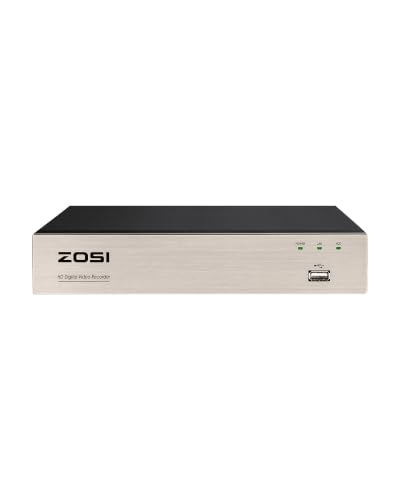
ZOSI H.265+ 8Channel 3K Lite Hybrid 4-in-1 Analog/AHD/TVI/CVI Surveillance Video Recorders Standalone CCTV DVR System for Analog 720P, 1080P Security Cameras, Remote Access, Motion Detection, No HDD
Check price on Amazon
4CH Wired Security Camera System, AIWIXEN 4X 1080P Cam, DVR with 512GB HDD | Surveillance Cameras with Human Vehicle Detection, IP68 Waterproof, 24-7 Recording, Remote Access, Home Security CCTV Outdoor
Check price on Amazon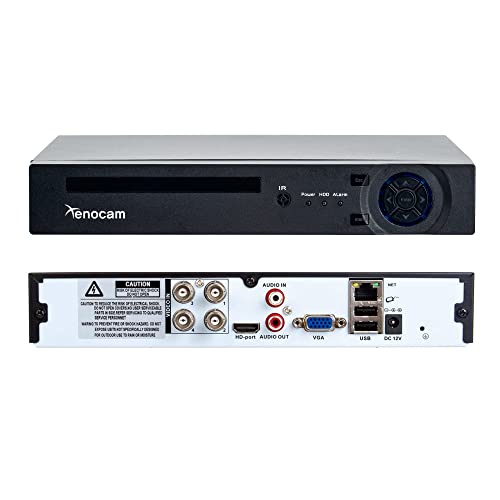
Xenocam 4CH 1080N Hybrid 5-in-1 AHD DVR (1080P NVR+1080N AHD+960H Analog+TVI+CVI) Standalone DVR CCTV Surveillance Security System Video Recorder Motion Detection, Hard Drive not Included
Check price on Amazon
4CH 1080P 5-in-1 HD Analog Hybrid DVR&NVR Supports Up to 5MP IP Camera+2MP AHD/TVI/CVI Camera and 960H Analog Camera Standalone DVR CCTV Surveillance Security System Video Recorder (No HDD)
Check price on Amazon
Xenocam 8CH 1080N Hybrid 5-in-1 AHD DVR (1080P NVR+1080N AHD+960H Analog+TVI+CVI) Standalone DVR CCTV Surveillance Security System Video Recorder Motion Detection HDD & Cameras not Included
Check price on Amazon
8CH 1080P 5-in-1 HD Analog Hybrid DVR&NVR Supports Up to 5MP IP Camera+1080P AHD/TVI/CVI/CVBS Analog Camera Standalone DVR CCTV Surveillance Security System Video Recorder (No Hard Driver)
Check price on Amazon
4CH Wired Security Camera System, AIWIXEN DVR with 512GB HDD, 4X 1080P Cam | Home Surveillance CCTV, Security Cameras with Human Vehicle Detection, IP68 Waterproof, Remote Access, 24-7 Recording
Check price on Amazon
ZOSI 8Channel Surveillance Video Recorders with Human Vehicle Detection,H.265+ Hybrid 1080P 4-in-1 HD-TVI Standalone CCTV DVR System for 720P,1080P Security Cameras,Easy Remote Access(NO Hard Drive)
Check price on AmazonFrequently Asked Questions
Do stand-alone DVR systems require the internet?
No, a stand-alone DVR system does not require an internet connection to record and store video. However, an internet connection is needed if you want to view your cameras remotely from a smartphone or computer.
How long do stand-alone DVR systems record?
Recording time depends on your hard drive capacity, number of cameras, resolution, and frame rate. A 1TB hard drive typically stores 1-2 weeks of continuous footage from 4 cameras at 1080p. You can extend recording time by using motion detection or scheduling.
Can I add more cameras to my stand-alone DVR later?
Yes, as long as your DVR has available channels. For example, an 8-channel DVR can support up to 8 cameras. If you start with 4, you can add 4 more later. Just ensure the new cameras are compatible with your DVR.
What happens if the DVR is stolen?
If your DVR is stolen, you lose the locally stored footage. To mitigate this risk, place the DVR in a secure, hidden location, and consider backing up critical footage to an external drive or cloud service periodically.
Is a stand-alone DVR better than a cloud-based system?
It depends on your priorities. A stand-alone DVR offers no monthly fees, local storage, and works without internet. Cloud systems offer easier remote access and automatic off-site backup but come with subscription costs. Many users prefer a hybrid approach: a stand-alone DVR for primary recording with optional cloud backup for critical events.
Final Thoughts
A stand-alone DVR security camera system is a robust, cost-effective, and reliable solution for anyone serious about property surveillance. By keeping your footage local and eliminating monthly fees, you gain full control over your security infrastructure. Whether you're protecting a small home or a large business, there's a stand-alone DVR system that fits your needs and budget.
We hope this guide has provided you with the knowledge you need to make an informed decision. Remember to consider your channel requirements, resolution needs, storage capacity, and remote viewing preferences. With the right system in place, you can enjoy peace of mind knowing your property is protected 24/7.