
Webcam Stand Guide: Stability, Angles & Setup for Better Video
Discover how the right webcam stand transforms your video quality. From desk mounts to flexible arms, find the perfect support for streaming, calls, and content creation.
VIEW TOP PICKSWhy a Webcam Stand Matters: A stable, adjustable webcam stand is the unsung hero of any professional video setup. It eliminates shaky footage, provides consistent framing, and allows you to find the perfect eye-level angle. Whether you're a streamer, remote worker, or content creator, investing in a quality stand is one of the simplest upgrades for better video presence.
Why Your Webcam Deserves a Better Stand
Most webcams come with a basic clip that attaches to your monitor or laptop lid. While convenient, these built-in mounts often limit your positioning, can cause vibration, and don't allow for precise angle adjustments. A dedicated webcam stand solves these problems by offering a stable base, flexible height, and full tilt control.
For creators who need to switch between different setups—like a face cam for streaming or a wide shot for tutorials—a stand that allows quick repositioning is essential. Similarly, if you're building a multi-camera rig, having a consistent mounting system (like a tripod mount) makes it easier to swap gear and maintain consistent framing across shots.
📐 Perfect Angles
Achieve eye-level framing and eliminate awkward upward angles that distort your face.
🔒 Rock-Solid Stability
Eliminate vibrations from typing, desk bumps, or monitor wobble for smooth, professional video.
🔄 Flexible Positioning
Move your webcam to the best spot for lighting and background, not just where your monitor sits.
🧹 Decluttered Desk
Free up monitor space and keep your setup clean with a dedicated stand or arm.
Types of Webcam Stands: Find Your Ideal Match
Not all stands are created equal. The best choice depends on your desk setup, the weight of your webcam, and how often you need to adjust it. Here are the most common types:
1. Desktop Tripod Stands
These are the most versatile and portable options. A small tripod can sit directly on your desk, offering adjustable height and tilt. Many come with a standard 1/4-inch screw, making them compatible with a wide range of webcams and even compact cameras. If you also use a small digital camera for vlogging, a tripod stand can double as a support for that device too.
2. Flexible Gooseneck Arms
These clamp to your desk and use a flexible neck to position the webcam precisely where you want it. They're excellent for overhead shots or unique angles. However, they can be prone to bouncing if not tightened properly. For creators who need a stable overhead view, a more rigid solution like an overhead camera mount might be a better fit.
3. Monitor-Mounted Arms
These attach to your monitor or a desk edge and extend outward, giving you more freedom than a built-in clip. They often have articulating joints for precise positioning. This is a popular choice for streamers who want their webcam at eye level without taking up desk space.
4. Wall or Clamp Mounts
For permanent setups or when desk space is at a premium, wall-mounted or heavy-duty clamp mounts offer the ultimate stability. They're ideal for studio environments where the camera position rarely changes.
Key Features to Look For in a Webcam Stand
When shopping for a stand, keep these factors in mind to ensure you get the right fit for your needs:
- Compatibility: Check the mounting mechanism. Most webcams use a standard 1/4"-20 thread, but some use proprietary clips. Ensure the stand matches your webcam's mount.
- Weight Capacity: If you have a heavier webcam or plan to use a small camera, verify the stand can support the weight without sagging.
- Adjustability: Look for stands with multiple pivot points (tilt, pan, rotation) for maximum flexibility.
- Build Quality: Metal components generally offer better durability and stability than plastic ones.
- Footprint: Consider how much desk space the stand will occupy. Clamp-style stands save space, while tripods need a flat surface.
If you're also looking to improve your audio or lighting, a stable stand is just one part of the puzzle. Pairing your webcam with proper photography lighting can dramatically improve your video quality, especially in dim rooms.
Recommended Webcam Stands
⚠️ AFFILIATE DISCLOSURE: This website contains affiliate links. As an affiliate Associate, we earn from qualifying purchases. If you make a purchase through these links, we may receive a small commission at no additional cost to you. Read our full affiliate policy.

InnoGear Webcam Stand Arm for Desk Camera Mount Holder for Logitech Webcam | for C922 C930e C920S C920 C615 C960 C920x BRIO 4K NexiGo N60, Heavy Base, Gooseneck, Max Height 20.9", Eye-level Framing
Check price on Amazon
30 Inch Webcam Stand Camera Mount, Upgraded Thick Base Flexible Gooseneck Camera Stand Desk Webcam Mount Clamp for Logitech Webcams C930e C930 C920 C922x C922 Brio 4K C925e C615, Gopro Hero 8 7 6 5 4
Check price on Amazon
Urciwos Webcam Stand, 12.6 Inch Web Cam Stand for Desk, Adjustable Webcam Mount Camera Stand for Logitech Webcam C922 C930e C920S C920 C615 C960 C920x BRIO 4K NexiGo N60, Phones, Cameras
Check price on Amazon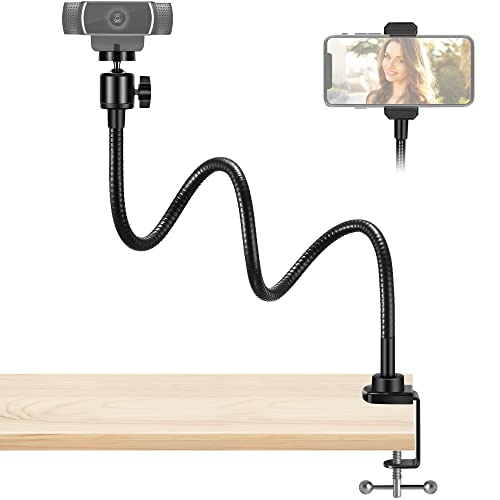
InnoGear Webcam Stand Gooseneck Camera Arm Stands Desk Mount Phone Holder | for Logitech Webcam BRIO 4K C960 C920 C920S C922 C922x C925e C930 C930e C615 NexiGo N60, Quick Setup, Eye Level Positioning
Check price on Amazon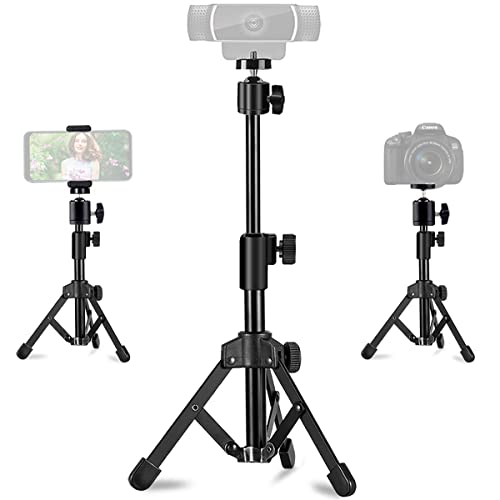
Webcam Tripod Stand Extendable Desktops Tripod for Camera/Phone/Webcam, Desk Tripods Webcam Mount Holder Compatible with Logitech Webcams C925e C922x C922 C930e C930 C920 C615 /iPhone/Ring Light
Check price on Amazon
KDD Webcam Stand Camera Desk Mount with Phone Holder & 5/8" Screw - 22" Flexible Projector Stand Gooseneck Desk Mic Stand for Logitech C922 C930e C920 C615 C960 Brio 4K, GoPro, Blue Yeti Snowball Ice
Check price on Amazon
SMALLRIG 22" Magic Arm Clamp, Overhead Phone Mount Holder Stand, Camera Arm | Flexible Desk Camera Mount, Articulating Friction Boom Arm, for POV Shot, Filming, Light, Webcam, Action Camera
Check price on Amazon
JCWINY Webcam Stand, 28 Inch Web Cam Stand for Desk, Adjustable Webcam Mount Camera Stand for Logitech Webcam C922 C930e C920S C920 C615 C960 C920x BRIO 4K NexiGo N60 and Others
Check price on AmazonSetup Tips: Get the Most from Your Webcam Stand
Once you have your stand, proper setup is key to professional-looking video. Here are a few quick tips:
- Position at Eye Level: Place the webcam so the lens is directly at your eye level. This creates a natural, engaging angle.
- Light Your Face: Ensure your light source is in front of you, not behind. A stand that lets you position the camera near a window or softbox helps.
- Stabilize the Base: If using a tripod, make sure all legs are locked and the surface is level. For clamp mounts, tighten securely to avoid vibrations.
- Manage Cables: Use cable clips or ties to prevent cables from pulling on the webcam and causing movement.
- Test and Adjust: Before your call or stream, do a quick test recording to check framing, focus, and stability.
For those who need to move around during a presentation, a wireless webcam combined with a flexible stand can offer greater freedom. And if you ever need to capture high-quality video on the go, a small vlogging camera with a compact tripod can serve a similar purpose.
Keeping Your Webcam Stand in Top Shape
Webcam stands are simple devices, but a little care goes a long way. Periodically check screws and joints for tightness. Clean dusty surfaces with a dry or slightly damp cloth. If your stand has rubber feet, ensure they're free of debris to maintain grip. For long-term storage, loosen the joints to relieve tension on the materials.
If you use your webcam for security or monitoring when not in use, consider how a stable stand contributes to reliable footage. For more permanent installations, a surveillance camera system might be more appropriate, but for casual monitoring, a well-positioned webcam on a sturdy stand can work in a pinch.
Final Thoughts: Elevate Your Video Presence
A quality webcam stand is a small investment that yields immediate improvements in your video calls, streams, and recordings. By providing stability and precise angle control, it helps you look and sound more professional. Whether you choose a simple desktop tripod or a heavy-duty clamp mount, the key is to match the stand to your workflow and workspace.
Ready to upgrade? Browse our recommended webcam stands above and take the first step toward better video today.