
Wireless Camera with Continuous Recording: Complete Guide
Everything you need to know about 24/7 wireless security cameras. Learn how to choose, install, and maintain a system that never misses a moment.
VIEW RECOMMENDED CAMERASWhy Continuous Recording Matters: Unlike motion-triggered cameras that only record when activity is detected, a wireless camera with continuous recording captures every second of the day. This means you never miss critical footage—whether it's a package delivery, a suspicious vehicle, or an unexpected event. In this guide, we'll help you understand how these systems work, what to look for, and how to choose the best one for your home or business.
What Is a Wireless Camera with Continuous Recording?
A wireless camera with continuous recording is a security device that captures video 24 hours a day, 7 days a week, without interruption. Unlike traditional motion-activated cameras that start recording only when movement is detected, these cameras maintain a constant video feed. This is particularly valuable for locations where you need complete coverage—such as entryways, driveways, or business premises.
The "wireless" aspect refers to the camera's ability to transmit video and receive power without physical cables running to a DVR or NVR. However, it's important to understand that "wireless" can mean different things: some cameras are fully wireless (battery-powered and Wi-Fi connected), while others may still require a power source but transmit data wirelessly. For true 24/7 recording, most experts recommend a camera that is connected to a constant power source, as battery-powered models often cannot sustain continuous recording for more than a few hours or days.
If you're looking for a system that can record without interruption and without the hassle of running cables, you'll want to explore options like wireless security cameras that record 24/7. These systems are designed specifically for round-the-clock surveillance and often include advanced features like night vision, two-way audio, and remote viewing.
How Does Continuous Recording Work?
Continuous recording works by keeping the camera's image sensor active at all times. The video feed is then transmitted to a storage device—either a local hard drive (like a DVR or NVR), a cloud server, or a memory card. The key components that make this possible include:
Power Source
Continuous recording demands a reliable power supply. While battery-powered cameras are convenient, they typically can't sustain 24/7 recording for long periods. For true continuous operation, you'll need a camera connected to a wall outlet or a solar-powered system with sufficient battery backup.
Storage Capacity
Recording 24/7 generates a lot of data. You'll need a storage solution that can handle the volume—typically a high-capacity hard drive (1TB or more) or a cloud subscription plan. Local storage via NVR or DVR is often preferred for its one-time cost and no monthly fees.
Network Bandwidth
Wireless cameras rely on your Wi-Fi network to transmit video. Continuous recording requires a stable, high-bandwidth connection to avoid dropped frames or interruptions. A dual-band router and a dedicated network for your cameras can help.
Recording Mode
Most systems offer multiple recording modes: continuous, motion-triggered, or scheduled. Continuous mode ensures every moment is captured, but you can often set up rules to switch to motion-only during certain hours to save storage.
For those who want a hassle-free experience, a wireless security camera system without subscription is an excellent choice. These systems store footage locally on a hard drive, so you don't have to pay monthly fees. Similarly, a home security camera system with no subscription can provide continuous recording without ongoing costs.
Key Features to Look For in a Wireless Continuous Recording Camera
When shopping for a wireless camera with continuous recording, pay attention to these critical features:
- Resolution: Look for at least 1080p, but 2K or 4K is better for capturing fine details like license plates or faces. Higher resolution also means more storage consumption, so balance quality with capacity.
- Night Vision: Continuous recording shouldn't stop when the sun goes down. Choose a camera with infrared or color night vision. You can find models with night vision and audio for comprehensive coverage.
- Field of View: A wider field of view (e.g., 130° or more) reduces blind spots. Some cameras offer 180-degree coverage, which is ideal for large areas.
- Storage Options: Decide between local storage (NVR/DVR with hard drive) and cloud storage. Local storage is often more cost-effective for continuous recording. A wireless security camera with hard drive is a popular choice.
- Power Source: For continuous recording, you'll likely need a camera that plugs into an outlet. If you need a wire-free option, consider a solar-powered wireless security camera system with NVR.
- Remote Viewing: Ensure the camera offers a mobile app for live viewing and playback. Look for systems that allow security cameras that work with your phone.
- Audio: Two-way audio is a bonus for communicating with visitors or deterring intruders. Check out wireless security cameras with 2-way audio.
Pros and Cons of Continuous Recording
✅ Pros
- Never miss a moment—every event is captured.
- Provides a complete timeline for investigations.
- Deters criminals who know they're being recorded.
- Useful for monitoring pets, children, or elderly relatives.
- Can be used as evidence in legal proceedings.
❌ Cons
- Requires significant storage space.
- Higher power consumption.
- Can be overwhelming to review hours of footage.
- May require a more robust network.
- Battery-powered models may not be suitable.
If you're concerned about storage or power, you might consider a hybrid approach: use continuous recording during critical hours and motion detection at other times. Many systems allow you to customize recording schedules. For example, a WiFi security camera with motion detection can be set to record continuously only when you're away.
Installation and Setup Tips for Continuous Recording
Setting up a wireless camera with continuous recording is generally straightforward, but a few best practices will ensure optimal performance:
- Choose the Right Location: Place cameras at strategic points—entryways, driveways, backyards, and blind spots. For outdoor use, ensure the camera is weatherproof. If you need guidance, read our guide on where to install security cameras outside your home.
- Ensure Strong Wi-Fi Signal: Weak signals can cause dropouts. Consider a Wi-Fi extender or a mesh network if needed. For areas with no Wi-Fi, look for a camera system that doesn't require WiFi.
- Power Considerations: If you're using a plug-in camera, make sure an outlet is nearby. For outdoor cameras, you may need a weatherproof outlet or an extension cable. Alternatively, a wireless rechargeable outdoor security camera can be an option, but remember that continuous recording will drain the battery quickly.
- Storage Setup: If using an NVR or DVR, install a surveillance-grade hard drive (e.g., WD Purple or Seagate SkyHawk). For cloud storage, choose a plan that offers enough retention. A wireless security camera system with hard drive is a reliable choice for local storage.
- Configure Recording Settings: Set the camera to continuous recording mode. Adjust resolution and frame rate to balance quality and storage. Many systems allow you to set a schedule—for example, continuous recording during the night and motion-only during the day.
- Test Everything: After installation, test the live view, playback, and mobile app. Make sure you can access footage remotely. If you need help, our guide on security cameras I can view on my phone can be useful.
Top Use Cases for Wireless Continuous Recording Cameras
Continuous recording cameras are versatile and can be used in various scenarios:
- Home Security: Monitor your property 24/7, especially when you're away. A home security camera system with night vision ensures coverage even in the dark.
- Business Surveillance: Protect your assets, monitor employees, and prevent theft. An affordable security camera for small business can be a wise investment.
- Construction Sites: Keep an eye on equipment and materials around the clock.
- Vacation Rentals: Monitor guest activity and ensure property rules are followed.
- Pet Monitoring: Watch your pets during the day and capture any mischief.
- Elderly Care: Ensure the safety of elderly family members.
For outdoor use, you'll want a camera that can withstand the elements. Look for outdoor use wireless surveillance cameras that are weather-resistant and offer continuous recording. If you need a comprehensive system, an outdoor use wireless security camera system can cover multiple areas.
Storage and Bandwidth Considerations
Continuous recording generates a significant amount of data. Here's what you need to know:
- Storage Calculation: A single 1080p camera recording 24/7 can use around 20-30 GB per day. For a 30-day retention, you'd need roughly 600-900 GB. For 4K cameras, double or triple that. Therefore, a 2TB hard drive is often the minimum for a multi-camera system.
- Local vs. Cloud: Local storage (NVR/DVR) is typically more cost-effective for continuous recording. Cloud storage plans often have limits on retention and bandwidth. If you prefer no monthly fees, a security camera system with no subscription is ideal.
- Bandwidth: Streaming continuous video requires upload bandwidth. If you have multiple cameras, your internet speed should be sufficient. A wired connection to your NVR can reduce Wi-Fi congestion.
- Compression: H.265 compression is more efficient than H.264, saving storage and bandwidth. Look for cameras that support H.265.
For those who want a system that records continuously without relying on the internet, a wireless security camera with hard drive is a great option. It stores footage locally and doesn't require a cloud subscription.
Recommended Wireless Cameras with Continuous Recording
⚠️ AFFILIATE DISCLOSURE: This website contains affiliate links. As an affiliate Associate, we earn from qualifying purchases. If you make a purchase through these links, we may receive a small commission at no additional cost to you. Read our full affiliate policy.
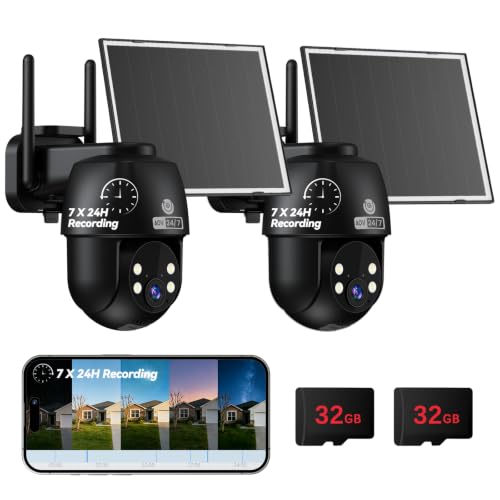
MUBVIEW 24/7 Continuous Recording Wireless Outdoor Security Camera | No Monthly Fee, 2.4G WiFi, 8X Zoom, 4MP 10W Solar Powered, 360° PTZ, Auto Tracking, SD Included, Charges Even Below 32°F
Check price on Amazon
TKENPRO 2K Solar Camera Outdoor Wireless, 2.4GHz Wi-Fi Connected | 24/7 Continuous Recording, Human Auto Tracking, 2K Color Night Vision, 360° Panoramic View, IP65
Check price on Amazon
LongPlu 4K Outdoor Camera Wireless Battery Powered, WIFI6 Security Camera | 24/7 Recording, 2.4GHz & 5GHz Wi-Fi, IP65 Waterproof, Color Night Vision, Person/Car Detection, Spotlight, SD/Cloud Storage
Check price on Amazon
SEHMUA 2K Solar Security Cameras Wireless Outdoor, 24/7 Recording, 2 Pack | 2.4GHz & 5GHz WiFi Connected, 24-Hour Continuous Recording, Instant APP Alerts, 2K Color Night Vision, PTZ View
Check price on Amazon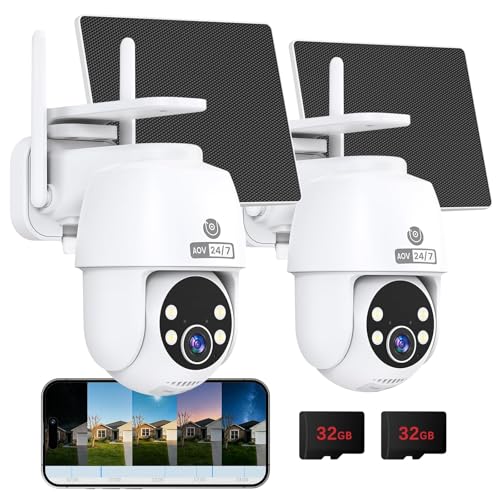
MUBVIEW 24/7 Continuous Recording Wireless Outdoor Security Camera | No Monthly Fee, 2.4G WiFi, 8X Zoom, 4MP 10W Solar Powered, 360° PTZ, Auto Tracking, SD Included, Charges Even Below 32°F
Check price on Amazon
4K 12MP Solar Security Cameras Wireless Outdoor, Four Lens & 360° PTZ Linkage Camera with Solar Panel, 24/7 AOV Recording, Auto Motion Tracking, Color Night Vision, 2.4G/5G WiFi, IP66 Waterproof
Check price on Amazon
HXVIEW 4G LTE Cellular Solar Security Camera Outdoor Wireless, No WiFi | 24/7 Continuous Recording, 15000mAh Battery and 8W Solar Panel, Auto Tracking, AI Detection, with SIM Card and 32GB SD Card
Check price on Amazon
MUBVIEW 24/7 Continuous Recording Wireless Outdoor Security Camera | No Monthly Fee, 2.4G WiFi, 8X Zoom, 4MP 10W Solar Powered, 360° PTZ, Auto Tracking, SD Included, Charges Even Below 32°F
Check price on AmazonFrequently Asked Questions
Can a wireless camera record continuously on battery?
Most battery-powered cameras cannot sustain continuous recording for more than a few hours. They are designed for motion-triggered recording to conserve battery. For true 24/7 recording, you'll need a camera connected to a constant power source.
Do I need a subscription for continuous recording?
Not necessarily. Many systems allow continuous recording to a local hard drive without a subscription. However, cloud-based continuous recording usually requires a monthly plan. Look for a wireless security camera system without subscription if you want to avoid fees.
How much storage do I need for 24/7 recording?
It depends on the number of cameras, resolution, and retention period. As a rule of thumb, a 1080p camera recording 24/7 uses about 20-30 GB per day. For a 4-camera system with 30-day retention, you'll need around 2-4 TB.
Can I view continuous recording remotely?
Yes, most modern wireless cameras offer remote viewing via a mobile app. You can check live footage and playback recorded video from anywhere. Ensure the system supports wireless remote cameras for surveillance.
What happens if the internet goes down?
If your camera records to a local NVR or DVR, it will continue recording even without internet. You just won't be able to view it remotely until the connection is restored. For this reason, local storage is often preferred for critical surveillance.
Are wireless continuous recording cameras expensive?
Prices vary widely. Basic single-camera setups can start around $50-$100, while multi-camera systems with NVR can range from $300 to $1,000+. Professional-grade systems can cost more. The investment is often worth it for the peace of mind.
Ready to Upgrade Your Security?
Continuous recording gives you complete peace of mind. Browse our recommended cameras above and choose the best system for your needs.
SHOP NOWConclusion
A wireless camera with continuous recording is a powerful tool for anyone serious about security. It ensures that no moment is missed, providing a complete record of activity around your property. While it requires careful consideration of power, storage, and bandwidth, the benefits far outweigh the challenges. Whether you're protecting your home, monitoring a business, or keeping an eye on loved ones, a continuous recording system offers unmatched reliability.
When choosing a system, prioritize features like high resolution, night vision, and robust storage. If you want to avoid monthly fees, opt for a local storage solution. And if you need outdoor coverage, make sure the cameras are weatherproof. With the right setup, you can enjoy 24/7 surveillance and the confidence that comes with it.
For more insights, explore our guides on outdoor security camera with continuous recording and continuous recording security camera wireless to deepen your understanding.