
Wireless Security Cameras That Record 24/7
Discover how to achieve uninterrupted, always-on surveillance without the hassle of wires. Compare power options, storage solutions, and features to find the perfect 24/7 recording system for your home or business.
START EXPLORINGAllCameraGuide Philosophy: A security camera is only as good as its ability to capture the moments that matter. True 24/7 recording means no gaps, no missed events, and complete peace of mind. This guide will help you understand the technology behind continuous recording and choose the right system for your needs.
Why 24/7 Recording Matters for Your Security
When it comes to protecting your home or business, motion-triggered recording is often the default setting for many wireless cameras. While this approach saves storage space and battery life, it comes with a significant drawback: you only see what the camera decides is important. If an event happens just outside the motion sensor's range, or if the trigger is delayed, you could miss critical evidence.
This is where 24/7 continuous recording changes the game. Instead of relying on motion detection, these systems capture every single second of footage, creating an unbroken timeline of activity. This is particularly valuable for businesses that need to monitor cash registers, homeowners who want to keep an eye on a specific area, or anyone who simply wants the assurance that nothing will be missed.
However, achieving true 24/7 recording with a wireless camera requires careful consideration of three key factors: power, storage, and connectivity. Unlike their wired counterparts, wireless cameras are not tethered to a constant power source, which means they must either be plugged in, use a large battery, or rely on solar power. Similarly, storing days or weeks of continuous footage requires a robust local storage solution or a subscription-based cloud plan.
In this guide, we will walk you through everything you need to know about wireless camera with continuous recording, from the technical requirements to the best practices for installation and maintenance. By the end, you will have a clear understanding of how to build a reliable 24/7 surveillance system that fits your budget and lifestyle.
Recommended Wireless Security Cameras for 24/7 Recording
⚠️ AFFILIATE DISCLOSURE: This website contains affiliate links. As an affiliate Associate, we earn from qualifying purchases. If you make a purchase through these links, we may receive a small commission at no additional cost to you. Read our full affiliate policy.
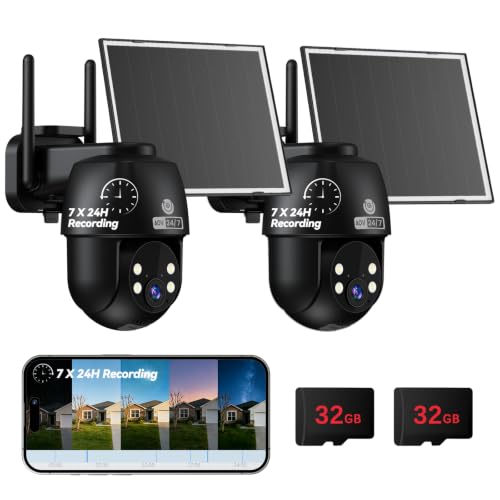
MUBVIEW 24/7 Continuous Recording Wireless Outdoor Security Camera | No Monthly Fee, 2.4G WiFi, 8X Zoom, 4MP 10W Solar Powered, 360° PTZ, Auto Tracking, SD Included, Charges Even Below 32°F
Check price on Amazon
TKENPRO 2K Solar Camera Outdoor Wireless, 2.4GHz Wi-Fi Connected | 24/7 Continuous Recording, Human Auto Tracking, 2K Color Night Vision, 360° Panoramic View, IP65
Check price on Amazon
Camcamp Home Security Camera System Wireless Outdoor, 4 Plug-in Cameras | 8 Views; PTZ Auto Tracking; 10CH NVR with 500GB HDD; 24/7 Recording; No Monthly Fee
Check price on Amazon
2K Security Camera System, 5GHz&2.4GHz WiFi Solar Wireless Cameras for Home Security, Wire-free Installation, AI Detection, Two-way Audio, Mobile alerts, SD/Cloud Storage, Color Night Vision, 4 Packs
Check price on Amazon
CAMCAMP Home Security Camera System Wireless Outdoor WiFi 5G 24/7 Recording | Auto Human Tracking 355° View 2-Way Audio Color Night Vision Plug-in Powered 1080PHD Video Surveillance System 16CH NVR 500GB
Check price on Amazon
HXVIEW 4G LTE Cellular Solar Security Camera Outdoor Wireless, No WiFi | 24/7 Continuous Recording, 15000mAh Battery and 8W Solar Panel, Auto Tracking, AI Detection, with SIM Card and 32GB SD Card
Check price on Amazon
ELYSOO No WiFi Security Camera Outdoor, Always-on Video, 4MP 360° Full View | 4G LTE Cellular Security Camera Solar, Built-in SIM Card, 24/7 Recording, Color Night Vision, Instant Alerts for Remote Areas
Check price on Amazon
Camcamp Wireless Security Camera System with 10 Inch Monitor, 8 PTZ Cameras | 1080P HD Outdoor, Works with No Internet, 500GB Locally Storage, No Monthly Fee, 24/7 Loop Recording, NVR Expandable to 10CH
Check price on AmazonHow Wireless Cameras Achieve 24/7 Recording
Understanding the mechanics behind continuous recording will help you make an informed decision. Here are the three core components that make 24/7 wireless surveillance possible:
1. Power Source: The Foundation of Continuous Operation
The biggest challenge for wireless cameras is power. A battery-powered camera that records 24/7 will drain its battery in a matter of days, which is why most battery-operated models rely on motion-triggered recording to conserve energy. To achieve true 24/7 recording, you need a camera that is either:
- Plugged into a constant power source – This is the most reliable method. Many wireless cameras come with a power adapter that plugs into a standard outlet. As long as the outlet has power, the camera will record continuously.
- Solar-powered with a backup battery – Solar panels can keep a camera charged during daylight hours, but you will need a substantial battery to maintain recording through the night and cloudy days. This setup is best for areas with abundant sunlight.
- PoE (Power over Ethernet) – While technically wired, some systems use a single Ethernet cable for both power and data, eliminating the need for a separate power outlet. This is a hybrid solution that offers the reliability of wired power with the flexibility of a wireless data connection.
If you are looking for a system that does not rely on Wi-Fi for data transmission, consider a camera system that doesn't require WiFi, which often uses a local cellular or proprietary wireless signal. For outdoor installations where power outlets are scarce, a solar powered wireless security camera system with NVR can be an excellent choice, as it combines solar charging with a dedicated network video recorder for continuous storage.
2. Storage: Where Does All the Footage Go?
Recording 24/7 generates a massive amount of data. A single 1080p camera can produce around 20-30 GB of footage per day, depending on the compression and frame rate. For a multi-camera system, you could be looking at hundreds of gigabytes per week. Therefore, you need a storage solution that can handle this volume:
- Local NVR/DVR with a large hard drive – A network video recorder (NVR) or digital video recorder (DVR) with a 1TB, 2TB, or even 4TB hard drive is the most cost-effective way to store continuous footage. Many systems allow you to expand storage by adding additional hard drives. Look for a wireless security camera with hard drive if you prefer a self-contained solution.
- Cloud storage with a subscription – Some brands offer cloud plans that support continuous recording, but these are often more expensive and may have bandwidth limitations. If you want to avoid monthly fees, a wireless security camera system without subscription that uses local storage is your best bet.
- MicroSD card (for single cameras) – Some standalone wireless cameras support microSD cards up to 256GB or 512GB. While this can work for a single camera, it is not ideal for multi-camera systems due to the limited capacity and the risk of card failure.
For a more detailed comparison of storage options, see our guide on home security camera system no subscription.
3. Connectivity: Ensuring a Stable Signal
Even with a constant power source and ample storage, your camera needs a reliable connection to transmit footage to the recorder or cloud. Wi-Fi is the most common method, but it can be prone to interference, especially in crowded urban areas or large homes with thick walls. To ensure uninterrupted 24/7 recording:
- Use a dedicated Wi-Fi network for your security cameras, separate from your main home network.
- Ensure your router is positioned centrally and that the signal reaches all camera locations. A Wi-Fi extender or mesh system can help.
- For the most reliable connection, consider a system that uses a proprietary wireless protocol (like those found in many outdoor use wireless security camera system kits) which is less susceptible to interference than standard Wi-Fi.
24/7 Recording vs. Motion-Activated Recording
To help you decide which approach is right for you, here is a side-by-side comparison:
| Feature | 24/7 Continuous Recording | Motion-Activated Recording |
|---|---|---|
| Coverage | Captures every moment, no gaps | Only records when motion is detected |
| Power Requirement | Requires constant power (plug-in or solar with large battery) | Can run on battery for months |
| Storage Needs | High – requires large HDD or cloud plan | Low – only stores event clips |
| Best For | Businesses, high-traffic areas, critical monitoring | Residential perimeter, low-traffic areas, battery-powered setups |
| Cost | Higher upfront (NVR + HDD) but no subscription needed | Lower upfront, but may require cloud subscription for alerts |
| Reliability | High – no missed events due to sensor failure | Moderate – can miss events if sensor is triggered late or not at all |
If your priority is capturing every single detail, 24/7 recording is the clear winner. However, if you are looking for a simple, battery-powered setup for a low-traffic area, motion-activated recording may be sufficient. For a deeper dive into motion detection technology, see our article on WiFi security camera with motion detection.
Pros and Cons of 24/7 Wireless Security Cameras
✅ Pros
- Never miss a moment – complete timeline of events
- Ideal for evidence collection and liability protection
- No reliance on motion sensors that can fail or be bypassed
- Can be more cost-effective long-term if using local storage (no subscription)
- Peace of mind knowing your property is always being watched
❌ Cons
- Requires a constant power source, limiting placement options
- Generates massive amounts of data, requiring large storage
- Can be overwhelming to review hours of footage
- Higher upfront cost for NVR and hard drives
- Not suitable for battery-only cameras in remote locations
Key Features to Look For in a 24/7 Wireless Camera
When shopping for a wireless camera that can record 24/7, keep these features in mind:
- Constant Power Option: Look for a camera that can be plugged into an outlet or supports solar charging with a large battery. Avoid models that are battery-only if you need continuous recording.
- Local Storage Support: An NVR or DVR with a pre-installed hard drive (or the ability to add one) is essential. A wireless security camera system with hard drive is a popular choice for this reason.
- High-Capacity Storage: Aim for at least 1TB of storage for a single camera, and 2TB+ for multiple cameras. You can always expand later.
- Reliable Connectivity: Choose a system with a strong wireless signal or consider a hybrid approach with a wired backhaul.
- Remote Viewing: Ensure the system supports a mobile app for live viewing and playback. Look for security cameras that work with your phone for easy access.
- Night Vision: 24/7 recording includes nighttime, so you need security cameras with night vision and audio to capture clear footage in low light.
- Weather Resistance: For outdoor use, look for an IP65 or IP66 rating. If you are installing outside, consider a outdoor use wireless security camera designed for the elements.
Installation Tips for Continuous Recording
Proper installation is crucial for reliable 24/7 operation. Here are some best practices:
- Plan Your Power: Identify locations near power outlets. If you must use an extension cord, ensure it is rated for outdoor use and protected from moisture.
- Position for Coverage: Place cameras to cover entry points, driveways, and blind spots. For tips on placement, see our guide on where to install security cameras outside home.
- Secure Your Network: Use strong passwords and enable encryption on your Wi-Fi network. If you are concerned about wireless interference, consider a security camera system connects to phone that uses a dedicated hotspot.
- Test Before Final Mounting: Set up the camera and NVR on a temporary basis to ensure the signal is strong and the field of view is correct.
- Regular Maintenance: Clean the lens regularly and check that the power and network connections are secure. For more tips, see our camera care & maintenance hub.
Frequently Asked Questions
Can a battery-powered wireless camera record 24/7?
Technically, yes, but the battery will drain very quickly—often within a day or two. Most battery-powered cameras are designed for motion-activated recording to conserve energy. If you need 24/7 recording, you should use a camera that is plugged into a constant power source or a solar-powered model with a large battery.
How much storage do I need for 24/7 recording?
For a single 1080p camera recording continuously, you can expect to use about 20-30 GB per day. For a 4-camera system, that's roughly 80-120 GB per day, or about 2.4-3.6 TB per month. A 2TB hard drive will give you about 2-3 weeks of storage for a 4-camera system, while a 4TB drive will double that. Many NVRs support multiple hard drives for expanded storage.
Do I need a subscription for 24/7 recording?
Not necessarily. If you use a local NVR or DVR with a hard drive, you can record 24/7 without any monthly fees. This is one of the main advantages of a wireless security camera system without subscription. However, if you want cloud backup or advanced AI features, a subscription may be required.
What is the difference between 24/7 recording and continuous recording?
They are essentially the same thing. "24/7 recording" and "continuous recording" both refer to a camera that records non-stop, 24 hours a day, 7 days a week. Some brands may use one term over the other, but the functionality is identical.
Can I view 24/7 footage remotely?
Yes, most modern wireless security cameras allow you to view live footage and playback recorded video from your smartphone or computer. Look for a system that supports wireless security camera with remote viewing for easy access from anywhere.
Are wireless cameras reliable for 24/7 recording?
Yes, as long as they are properly powered and have a strong network connection. The key is to use a camera that is designed for continuous operation and to ensure it has a stable power source and a reliable Wi-Fi signal. Many users find that a wireless security camera system with remote viewing offers the perfect balance of flexibility and reliability.
Ready to Upgrade to 24/7 Surveillance?
Explore our recommended wireless security cameras that are designed for continuous recording. Whether you need a single camera or a full 8-channel system, we have you covered.
View Recommended CamerasFinal Thoughts
Investing in a wireless security camera system that records 24/7 is one of the best decisions you can make for the safety of your home or business. While it requires a bit more planning regarding power and storage, the peace of mind that comes from knowing every moment is captured is invaluable.
When choosing a system, prioritize models that offer constant power options, support large local storage, and provide reliable connectivity. Whether you opt for a simple outdoor security camera that records 24/7 or a comprehensive multi-camera setup, the key is to ensure that your system is always on and always recording.
For more guidance on building your ideal security setup, explore our other guides on top rated surveillance cameras for home and affordable security cameras for small business. With the right equipment and a little planning, you can achieve seamless 24/7 surveillance that protects what matters most.