
Cameras That Don't Require Subscription
Stop paying monthly fees. Discover the best no-subscription cameras that store footage locally, protect your privacy, and save you money in the long run.
View Top PicksWhy Choose a Camera Without a Subscription?
The security camera market has shifted dramatically toward subscription-based models. While cloud storage offers convenience, it comes at a recurring cost that can add up to hundreds of dollars over the lifetime of your device. For many homeowners and business owners, this ongoing expense is simply not justifiable—especially when local storage options are more capable than ever.
Cameras that don't require a subscription put you in full control of your footage. You decide where your data lives, how long you keep it, and who has access. There's no monthly bill, no risk of price hikes, and no dependency on a company's cloud servers staying online. If you're looking for a reliable setup without the strings attached, exploring security camera systems without subscription is the smartest first step.
Beyond cost savings, no-subscription cameras offer tangible privacy benefits. Your recordings stay on a local SD card, DVR, or NVR—not on a third-party server. For anyone concerned about data breaches or unauthorized access, this is a significant advantage. Whether you need a simple home camera system without subscription or a more robust multi-camera setup, the options are plentiful and affordable.
Quick Tip: A typical cloud subscription costs $3–$15 per month per camera. Over three years, that's $108–$540 per camera—often more than the camera itself. A no-subscription camera pays for itself almost immediately.
How Do Subscription-Free Cameras Work?
Instead of uploading footage to the cloud, these cameras record to local storage media. The most common options are microSD cards (typically up to 256GB), USB hard drives connected to a hub, or dedicated DVR/NVR systems with internal hard drives. You simply insert the storage, configure the recording settings, and the camera handles the rest.
Remote viewing is still possible without a subscription. Most modern no-fee cameras let you access live feeds and playback through a free mobile app, as long as your phone and the camera are on the same network—or through a secure peer-to-peer connection when you're away. Features like motion detection alerts, two-way audio, and night vision are usually included at no extra cost, though some advanced AI features may be limited.
For those who prefer a fully self-contained system, a stand-alone security camera with SD card is an excellent choice. It requires no internet connection at all, making it ideal for remote locations, rental properties, or anywhere Wi-Fi is unreliable. If you want to monitor your home without depending on the cloud, a security camera that works without WiFi gives you complete independence.
Types of Cameras That Don't Require Subscription
1. Wireless Battery-Powered Cameras
These are the most flexible options for renters and DIY installers. They run on rechargeable batteries, connect via Wi-Fi, and record to an SD card or a local base station. Many models offer weatherproofing for outdoor use. A wireless battery-powered security camera system can be installed in minutes without drilling or wiring. For outdoor coverage, consider a wireless outdoor security camera with motion light that doubles as a deterrent.
2. Solar-Powered Cameras
If you want to avoid recharging batteries entirely, solar-powered cameras are the answer. They harness sunlight to keep the battery topped up, providing continuous operation in most climates. A solar-powered security camera with WiFi is perfect for driveways, gardens, and remote gates. For larger properties, a solar-powered wireless security camera system with DVR offers comprehensive coverage without any monthly fees.
3. Wired DVR/NVR Systems
For maximum reliability and continuous recording, wired systems remain the gold standard. They use a dedicated DVR or NVR with a built-in hard drive, recording 24/7 without eating into your bandwidth. A wired security camera system with monitor lets you view footage directly on a screen without needing a phone or computer. If you want remote access too, a wired security camera system with remote viewing gives you the best of both worlds.
4. Indoor Cameras with Local Storage
Indoor cameras are often the first line of defense for apartment dwellers and small business owners. A wireless security camera with SD card is a simple, affordable way to keep an eye on your space. For broader coverage, in-home surveillance cameras wireless can be placed in multiple rooms and managed from a single app. If you need a camera that connects directly to your phone without a hub, a security camera that connects to your phone is a convenient choice.
Best Cameras Without Subscription
⚠️ AFFILIATE DISCLOSURE: This website contains affiliate links. As an affiliate Associate, we earn from qualifying purchases. If you make a purchase through these links, we may receive a small commission at no additional cost to you. Read our full affiliate policy.

Psync MaaX V1 2.5K Outdoor/Indoor Wired Security Camera, Color Night Vision | Built-in 64GB Storage, No Subscription Required, IP65, 24/7 Recording, WiFi, Two-Way Talk, Dual-Band WiFi, Motion Detection
Check price on Amazon
SEHMUA Home Security Cameras Wireless Outdoor, Solar Powered, 2-Cam System | No Subscription Required, Local Storage in SehmuaHub, 360° PTZ for Whole Home Surveillance, 4MP HD Color Night Vision
Check price on Amazon
Doorbell Camera Wireless No Subscription, 1080P Video Doorbell with Monitor | No WiFi, No APP, 4.3" IPS Monitor, 170°Wide-Angle Night Vision, Two-Way Audio & Wake-Up, IP65 Waterproof
Check price on Amazon
xpai H80 4K Indoor Camera for Home Security, No Subscription, 360° Pan/Tilt with AI Human & Pet Detection, Cry Detection, Auto Tracking, Baby Monitor, Pet Camera with Phone App
Check price on Amazon
youkey 2K Indoor Secuirty Camera, 360° View Baby Monitor, Pet/Dog Camera | No Subscription, Human/Pet/Crying Detection, Auto-Tracking, Night Vision, 2-Way Audio, Local Storage, Work with Alexa/Google
Check price on Amazon
Doorbell Camera Wireless,Head-to-Toe Video - No Subscription Required,2K HD Live View,Two-Way Talk,Smart Video Doorbell with Chime,Motion Alerts,Compatible with Alexa &Google(2.4G WiFi)
Check price on Amazon
aosu 5MP Ultra HD Wireless & Wired Video Doorbell Camera | No Subscription Required, 8GB Local Storage, Head-to-Toe View, Triple Motion Detection, 2.4/5 GHz WiFi
Check price on Amazon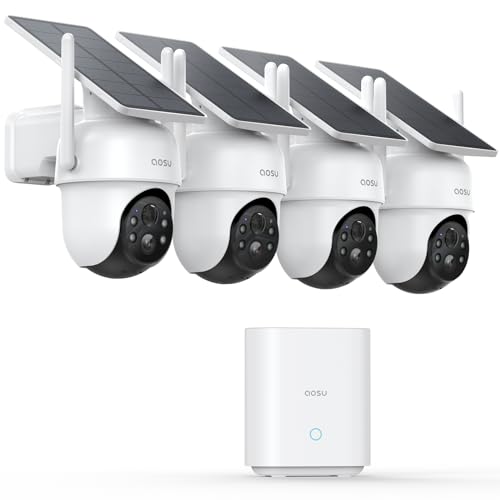
aosu D1 Classic 4-Cam Kit, Security Cameras Wireless Outdoor, Solar Powered | No Subscription Required, 32GB Built-in Storage, 360° Auto Tracking, 2K (3MP) Full-Color Night Vision, Easy Install
Check price on AmazonNo-Subscription Camera Comparison
To help you choose the right camera for your needs, here's a quick comparison of the main types:
| Feature | Battery Wireless | Solar Powered | Wired DVR/NVR | Indoor SD Card |
|---|---|---|---|---|
| Installation | Very Easy | Easy | Professional Recommended | Very Easy |
| Power Source | Rechargeable Battery | Solar + Battery | AC Power | AC Power |
| Storage | SD Card / Base Station | SD Card / DVR | Internal HDD | SD Card |
| Remote Viewing | Yes (Free App) | Yes (Free App) | Yes (Free App) | Yes (Free App) |
| Continuous Recording | Limited | Limited | 24/7 | 24/7 (with power) |
| Best For | Renters, DIY | Outdoor, Remote | Business, Large Homes | Apartments, Small Spaces |
| Price Range | $50–$200 | $80–$300 | $200–$800 | $30–$100 |
When choosing, think about your long-term needs. If you want a set-and-forget solution, a 24/7 continuous recording security camera with a DVR is hard to beat. If you're renting or want to avoid wiring, battery or solar options are more practical. For a small business, a small business security camera system with local storage balances cost and capability.
Key Features to Look For in a No-Subscription Camera
Not all cameras are created equal. When shopping for a subscription-free model, prioritize these features:
- Local Storage Capacity: Look for support for at least 128GB microSD cards or a DVR/NVR with a 1TB+ hard drive. More storage means longer retention before overwriting.
- Free Remote Access: The mobile app should not require a paid plan for live view or playback. Check reviews to confirm there are no hidden fees.
- Night Vision: Infrared or color night vision is essential for 24-hour monitoring. A home security camera with night vision ensures you can see clearly after dark.
- Motion Detection: Adjustable sensitivity and zones reduce false alerts. Some cameras offer AI-based person/vehicle detection without a subscription.
- Weatherproofing: For outdoor use, look for IP65 or higher ratings. An outdoor security camera with night vision should withstand rain, snow, and heat.
- Two-Way Audio: A wireless security camera with two-way audio lets you communicate with visitors or warn off intruders.
- Power Options: Battery, solar, or wired—choose based on your installation environment. A battery-powered cellular security camera is ideal for locations without Wi-Fi.
If you need a system that works entirely offline, a security camera that doesn't require WiFi stores footage locally and doesn't need an internet connection for recording. This is perfect for cabins, construction sites, or any location where network access is limited. For a complete guide on setting up such a system, see our article on home security cameras that don't need WiFi.
Installation Tips for Subscription-Free Cameras
Installing a no-subscription camera is generally straightforward, but a few best practices will ensure optimal performance:
- Position for Coverage: Place cameras at least 8–10 feet high, angled downward to capture faces and avoid glare. For outdoor use, an outdoor use security camera for home should cover entry points, driveways, and blind spots.
- Test Wi-Fi Signal: If using a wireless camera, ensure a strong signal at the installation point. A wireless outdoor security camera with WiFi needs stable connectivity for remote viewing.
- Secure the Storage: If using an SD card, format it in the camera and set it to overwrite when full. For DVR/NVR systems, place the recorder in a locked area to prevent tampering.
- Use a Monitor for Easy Viewing: A security camera with monitor no WiFi needed is ideal for quick glances without pulling out your phone. For doorbell coverage, a wireless front door camera with monitor adds convenience.
- Consider Solar for Hard-to-Reach Areas: A solar-powered wireless surveillance camera eliminates the need for wiring or frequent battery changes.
If you prefer professional help, many installers now specialize in no-subscription systems. The cost of home security system installation varies, but it's a one-time expense that eliminates recurring fees. For larger properties, residential security camera installation services can design a custom layout. Businesses may benefit from commercial security camera installation tailored to their specific needs.
Common Mistakes to Avoid
Buying a no-subscription camera seems simple, but many buyers make avoidable mistakes:
- Assuming All Cameras Work Without Fees: Some brands advertise "free" but lock essential features behind a paywall. Always read the fine print. Look for explicit statements like security cameras for home no subscription required.
- Underestimating Storage Needs: A 32GB card may only hold a few days of footage. For continuous recording, invest in a larger card or a DVR with a 2TB+ drive.
- Ignoring Compatibility: Ensure the camera works with your phone (iOS/Android) and your Wi-Fi band (2.4GHz vs 5GHz). Some cameras only support 2.4GHz.
- Placing Cameras Too Far from Router: Weak signal causes dropped connections and missed recordings. Use a Wi-Fi extender if needed.
- Forgetting About Power: Battery cameras need recharging every few months. Solar models need adequate sunlight. Wired cameras need an outlet nearby.
By avoiding these pitfalls, you'll enjoy a seamless experience with your WiFi security camera without subscription. If you're still unsure which type suits your situation, our guide on what is a good security camera system can help you narrow down the options.
Frequently Asked Questions
Do no-subscription cameras still allow remote viewing?
Yes. Most modern no-fee cameras include a free mobile app that lets you view live feeds and recorded clips from anywhere, as long as the camera is connected to the internet. The difference is that the footage is stored locally, not in the cloud.
How long can a camera record without a subscription?
It depends on your storage capacity. A 128GB microSD card can hold roughly 1–2 weeks of motion-triggered recordings or 2–3 days of continuous 1080p footage. A DVR with a 2TB hard drive can store months of continuous recording.
Are no-subscription cameras less secure?
Not necessarily. Local storage actually reduces exposure to cloud-based breaches. However, you should still secure your Wi-Fi network, use strong passwords, and keep firmware updated to protect against unauthorized access.
Can I add cloud storage later if I change my mind?
Many cameras that support local storage also offer optional cloud plans. You can start with local storage and upgrade to cloud later if you need off-site backup. This flexibility is a major advantage.
What happens if the camera is stolen?
If the camera records to a local SD card inside the unit, the footage is lost if the camera is stolen. To mitigate this, choose a system where the DVR/NVR is hidden separately, or use a camera that uploads clips to a free cloud tier (if available).
Final Thoughts: Take Control of Your Security Without Recurring Fees
Cameras that don't require a subscription are no longer a compromise—they're a smart, practical choice for anyone who values privacy, budget control, and independence. With local storage, free remote viewing, and a wide range of models for every scenario, you can build a reliable security system without committing to monthly payments.
Whether you choose a simple home security camera system without subscription or a comprehensive multi-camera setup, the key is to match the camera to your specific needs. Consider your installation environment, storage requirements, and remote access preferences. With the right choice, you'll enjoy peace of mind for years to come—without a single recurring bill.
Ready to get started? Browse our recommended cameras above and take the first step toward a subscription-free security solution today.