
Security Cameras for Home No Subscription
Protect your home without monthly fees. Discover how to choose, install, and operate subscription-free security cameras that store footage locally and give you full control over your privacy and budget.
Why Choose a Security Camera Without a Subscription?
When you buy a security camera for your home, the last thing you want is another recurring bill. Subscription-based cameras often lock essential features—like cloud recording, person detection, and remote viewing—behind a monthly paywall. For many homeowners, that ongoing cost is a dealbreaker. The good news is that security cameras for home no subscription are widely available and more capable than ever. These cameras typically record to a local microSD card, a built-in hard drive, or a network video recorder (NVR), so you own your footage outright and never pay a monthly fee.
Beyond saving money, subscription-free cameras offer real privacy advantages. Your video stays on your property instead of being uploaded to a third-party cloud. That means no one else can access your recordings, and your data isn't subject to a company's changing terms of service. If you're comparing options, our guide to security camera systems without subscription breaks down the key differences between cloud-dependent and local-storage models.
Another benefit is reliability. Cloud services can go down, change pricing, or discontinue support for older cameras. A local recording setup keeps working as long as you have power and storage. For homeowners who want a dependable, long-term solution, subscription-free is often the smarter choice. You can also explore security cameras for home without subscription for a broader overview of models and features.
How Do No-Subscription Security Cameras Work?
Subscription-free cameras rely on local storage instead of the cloud. The most common options are microSD cards (typically 32GB to 256GB), USB hard drives, or dedicated NVRs with built-in hard drives. When motion is detected, the camera records the clip directly to the local storage. You can then review footage through a mobile app over your home Wi-Fi network, or remotely if the camera supports peer-to-peer (P2P) connections.
Remote viewing without a subscription is possible, but it usually requires the camera to connect to the internet. The video stream is sent directly from your camera to your phone, not stored in the cloud. This is different from cloud-based cameras, which upload every clip to a server. If you want a camera that works entirely offline, look for models that support security cameras that don't require WiFi or home security cameras that don't need WiFi. These often use a cellular connection or a local monitor instead.
For homes with poor Wi-Fi coverage, a wireless security camera system with monitor is a practical alternative. The monitor receives the video signal directly from the camera, so you don't need an internet connection at all. Similarly, a security camera with monitor no WiFi needed is ideal for renters or anyone who wants a simple, plug-and-play setup.
Key Features to Look For in a No-Subscription Camera
Not all subscription-free cameras are created equal. Here are the features that matter most when you're shopping for a security camera for home no subscription.
1. Local Storage Capacity
Check the maximum microSD card size the camera supports. A 128GB card can hold roughly two weeks of motion-triggered clips for a typical home. If you want continuous recording, look for a camera that supports a larger card or an NVR. Some cameras also offer home security camera with local storage via a USB hard drive, which is better for long-term retention.
2. Video Resolution and Night Vision
1080p is the minimum for clear identification, but 2K or 4K is better if you need to read license plates or recognize faces. For nighttime coverage, choose a camera with home security cameras with night vision or color night vision. A 4K ultra HD security camera with color night vision gives you the best detail after dark.
3. Power Source
Battery-powered cameras are easy to install but need recharging. Wired cameras are more reliable but require drilling. Solar-powered models are a great middle ground—they stay charged with sunlight and don't need an outlet. If you're considering solar, look at solar powered security camera with WiFi or solar powered security camera with SD card for a fully wireless, subscription-free setup.
4. Weather Resistance
For outdoor use, make sure the camera is rated IP65 or higher. An outdoor use security cameras for home should withstand rain, dust, and extreme temperatures. If you live in a harsh climate, consider a wireless outdoor security cameras with WiFi that's specifically designed for durability.
5. Smart Detection
Basic motion detection triggers alerts for anything that moves—including trees and cars. Better cameras use person detection, pet detection, or vehicle detection to reduce false alerts. Some models even offer outdoor motion sensor light with camera functionality, combining lighting and recording in one unit.
Types of Subscription-Free Security Cameras
There are several form factors to choose from, each suited to different needs.
Indoor Cameras
Indoor cameras are small, discreet, and often pan and tilt to cover a whole room. They're ideal for monitoring pets, babies, or entryways. A wireless security camera with two-way audio lets you talk to family members or warn off intruders. For a completely wireless option, consider a wireless indoor and outdoor security cameras that can be moved between locations.
Outdoor Cameras
Outdoor cameras need to be weatherproof and often have better night vision. A wireless outdoor security cameras with night vision is a popular choice for driveways and backyards. If you want a camera that also lights up your yard, a motion sensor flood lights with camera is a great two-in-one solution.
Video Doorbells
Video doorbells let you see and speak to visitors from your phone. Many models require a subscription for cloud recording, but subscription-free options exist. A wireless doorbell camera with monitor stores footage locally and includes a dedicated screen for viewing. For a front-door setup with a monitor, check out a front door security camera with monitor.
Complete Systems with NVR or DVR
If you want to cover multiple areas, a multi-camera system with a recorder is the most cost-effective approach. A wireless security camera system with monitor includes a screen for live viewing and local storage. For a wired setup, a wired security camera system with monitor offers reliable, uninterrupted recording. You can also explore wireless outdoor security cameras with DVR for a hybrid solution.
Installation Tips for DIY Home Security Cameras
One of the biggest advantages of subscription-free cameras is that you can install them yourself. Here's how to get it right.
Plan your coverage. Identify entry points, blind spots, and high-traffic areas. Most homes need at least one camera at the front door, one at the back door, and one covering the driveway. For a comprehensive guide, see our article on home security camera system installation.
Mount cameras at the right height. Aim for 8–10 feet above the ground. This prevents tampering and gives a good viewing angle. For outdoor cameras, make sure the mount is secure and the cable is protected from weather. If you're installing a wireless outdoor security camera with motion light, position it where the light won't blind the camera at night.
Optimize Wi-Fi signal. Wireless cameras need a strong signal. If your Wi-Fi doesn't reach the camera location, consider a mesh system or a camera with a wireless security camera with SD card that supports local recording even when the network is down.
Test before you commit. Before drilling permanent holes, mount the camera temporarily and check the view. Adjust the angle to avoid glare, obstructions, and privacy violations. If you're not comfortable installing yourself, you can always hire a pro—see security camera installation services or residential security camera installation.
Privacy and Legal Considerations
Even with local storage, you should be mindful of privacy laws. In most places, you can record your own property, but you cannot record areas where people have a reasonable expectation of privacy, such as a neighbor's window or a public bathroom. Always point cameras at your own property and avoid capturing audio where it's illegal to do so.
If you're a renter, check your lease before installing cameras. Some landlords prohibit permanent modifications. A temporary construction security cameras setup or a no-drill mount can be a good workaround. For businesses, a small business security camera system with local storage is often the best choice for both privacy and cost.
Recommended Security Cameras for Home Without Subscription
⚠️ AFFILIATE DISCLOSURE: This website contains affiliate links. As an affiliate Associate, we earn from qualifying purchases. If you make a purchase through these links, we may receive a small commission at no additional cost to you. Read our full affiliate policy.

Security Cameras Wireless Outdoor 5G& 2.4G, No Subscription, 2 Cam-Kit,4MP Solar Powered Home Security Cameras System With 360°PTZ,128GB Local Storage,Color Night Vision WiFi Cameras for Home Security
Check price on Amazon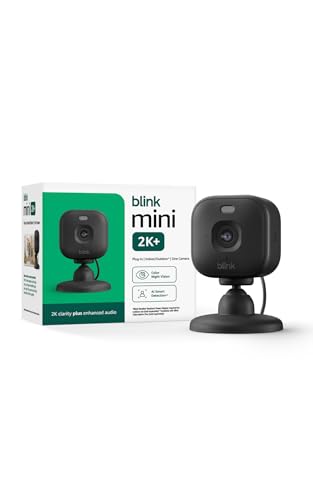
Blink Mini 2K+ (newest model) – Plug-in Home & Pet Indoor Security Camera with 2K video resolution, night vision, enhanced audio, motion detection – 1 camera (Black)
Check price on Amazon
Jooedi Security Cameras Wireless Outdoor, Indoor Camera for Home Security | No Subscription Required, 2K Battery Powered, Color Night Vision, Spotlight Siren Alarm, AI Motion Detection, 2.4G WiFi
Check price on Amazon
4MP Security Cameras Wireless Outdoor, No Subscription 128GB Local Storage, Solar Powered Cameras For Home Security, PTZ Auto Tracking, 4Cam-Kit, Color Night Vision Home Security Camera System,5G&2.4G
Check price on Amazon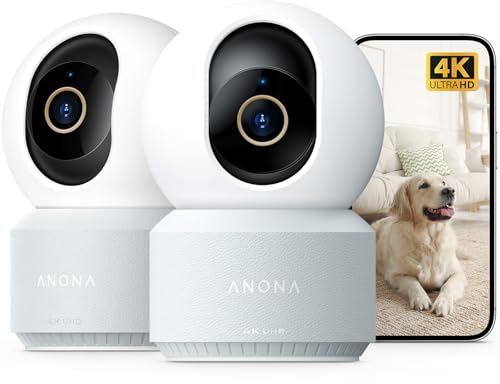
Anona 4K UHD Indoor Camera, Pet/Dog/Baby Security Camera with Phone App, 360°Pan-Tilt, 5G/2.4G Dual-Band Wi-Fi 6, Auto-Tracking, Person/Pet/Baby Crying Detection, Privacy Mode, Two-Way Audio, 2 Pack
Check price on Amazon
2026 Upgraded 2K Security Cameras Wireless Outdoor, Free Cloud Storage, 1-6 Months Battery Life, Waterproof, 2-Way Talk, AI Motion Detection Spotlight Siren Alarm Cameras for Home Security
Check price on Amazon
xpai H80 4K Indoor Camera for Home Security, No Subscription, 360° Pan/Tilt with AI Human & Pet Detection, Cry Detection, Auto Tracking, Baby Monitor, Pet Camera with Phone App
Check price on Amazon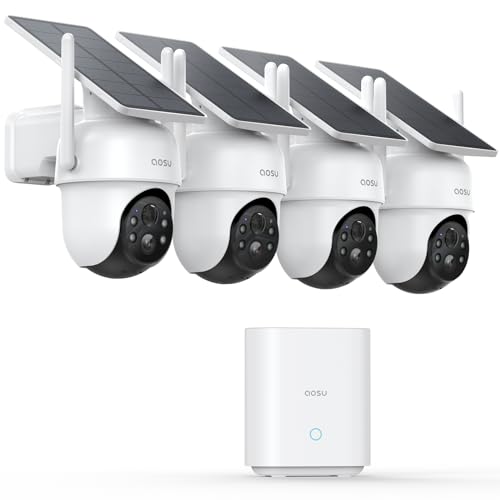
aosu D1 Classic 4-Cam Kit, Security Cameras Wireless Outdoor, Solar Powered | No Subscription Required, 32GB Built-in Storage, 360° Auto Tracking, 2K (3MP) Full-Color Night Vision, Easy Install
Check price on AmazonMaintenance and Troubleshooting
Subscription-free cameras are low-maintenance, but a little care goes a long way. Clean the lens regularly with a microfiber cloth to keep the image sharp. Check the microSD card every few months—if it's full, the camera may stop recording. Many cameras support loop recording, which overwrites the oldest footage automatically. If your camera stops connecting, reboot your router and the camera. For more tips, see our guide to security cameras with continuous recording.
If you're using a battery-powered camera, keep spare batteries charged. A battery powered security camera system is convenient, but you don't want it to die during a critical moment. Solar models like a solar powered wireless surveillance cameras can reduce maintenance even further.
Final Thoughts: Take Control of Your Home Security
Choosing security cameras for home no subscription is one of the smartest decisions you can make for your home and your wallet. You get full ownership of your footage, no recurring fees, and reliable performance that doesn't depend on a company's cloud servers. Whether you choose a single indoor camera or a full multi-camera system with an NVR, the key is to focus on local storage, good resolution, and reliable connectivity.
Before you buy, think about where you'll mount each camera, how you'll power it, and how you'll review footage. If you need more guidance, explore our related articles on what is a good security camera for home and what is a good security camera system. With the right setup, you can enjoy peace of mind without the monthly bill.