
Small Business Security Camera System: The Complete Buyer's Guide
Protect your storefront, office, or warehouse with the right surveillance setup. Learn how to choose, install, and maintain a system that fits your budget and security needs.
Explore Recommended SystemsWhy this guide matters: A small business security camera system is no longer a luxury—it is a necessity. Whether you run a retail shop, a restaurant, a clinic, or a warehouse, the right camera system deters theft, protects your employees, and gives you peace of mind. This guide walks you through every decision you need to make before buying.
Why Every Small Business Needs a Security Camera System
Security threats come in many forms: shoplifting, employee theft, vandalism, and even false liability claims. A well-placed business security camera installation acts as both a deterrent and a source of irrefutable evidence. According to industry studies, businesses with visible cameras reduce theft attempts significantly and resolve disputes faster.
Beyond crime prevention, cameras help you monitor operations, improve employee productivity, and ensure customer safety. For business owners who cannot be on-site at all times, a reliable video surveillance system for business offers remote visibility from a smartphone or computer, anywhere in the world.
If you are still deciding whether a full system is right for you, start by understanding what makes a good security camera system and how it differs from a basic home setup.
Key Features to Look For in a Small Business System
Not all cameras are built for commercial use. Small businesses have unique needs: longer recording retention, multiple camera angles, and often a mix of indoor and outdoor coverage. Here are the features that matter most.
Resolution & Clarity
Look for at least 1080p, but 4K is increasingly affordable. A 4K Ultra HD security camera with color night vision captures license plates and facial details that lower resolutions miss.
Night Vision
Businesses operate beyond daylight hours. Choose cameras with infrared or color night vision. A outdoor security camera with night vision is essential for parking lots and entrances.
Storage & Recording
Decide between local storage (NVR/DVR) and cloud storage. A 24/7 continuous recording security camera ensures you never miss a moment, while a security camera system without subscription saves on monthly fees.
Wireless vs. Wired
Wired systems are more reliable for permanent installations. For rental spaces or temporary setups, a wireless security camera system with remote viewing and no monthly fee offers flexibility.
Remote Access
Monitor your business from anywhere. A security camera that connects to your phone lets you check live feeds, review footage, and receive motion alerts in real time.
Power & Reliability
Power outages should not disable your security. Consider a battery-powered security camera system or a solar-powered security camera with WiFi for uninterrupted protection.
Wired vs. Wireless vs. Battery-Powered: Which Is Right for Your Business?
The choice between wired, wireless, and battery-powered systems depends on your building layout, budget, and how much maintenance you are willing to handle. Here is a direct comparison.
| Feature | Wired System | Wireless System | Battery-Powered |
|---|---|---|---|
| Reliability | Excellent – no signal interference | Good – depends on WiFi strength | Good – depends on battery life |
| Installation Cost | Higher – requires cabling | Moderate – plug-and-play | Low – no wiring needed |
| Maintenance | Low – set and forget | Low – occasional firmware updates | High – regular battery changes |
| Best For | Permanent office/retail setups | Rental spaces, pop-up shops | Temporary sites, remote areas |
| Typical Cost | $400–$2,500+ | $200–$1,200 | $150–$900 |
For most small businesses with a permanent location, a wired system with a DVR recorder for TV without subscription offers the best balance of reliability and long-term value. If you need a monitor at the front desk, a wired security camera system with monitor keeps everything self-contained.
For businesses that cannot run cables—such as leased retail spaces—a wireless security camera system with monitor or an outdoor wireless security camera system is a practical alternative. If you want to avoid subscriptions entirely, consider a wireless security camera with no subscription.
Indoor vs. Outdoor Coverage: Building a Complete Perimeter
A truly effective small business security setup covers both inside and outside. Indoor cameras monitor cash registers, stockrooms, and employee areas. Outdoor cameras watch entrances, parking lots, and loading docks.
For outdoor coverage, look for weatherproof ratings (IP65 or higher). A wireless outdoor security camera with night vision handles rain, dust, and darkness. If you want audio evidence as well, an outdoor security camera with audio recording captures conversations at entry points.
For indoor coverage, a wireless indoor and outdoor security camera set gives you flexibility to move units as your needs change. If you prefer a single system that handles everything, an indoor outdoor wireless security camera package is a smart choice.
Motion-activated lighting adds another layer of deterrence. An outdoor motion sensor light with camera or a motion sensor flood light with camera startles intruders and illuminates dark areas for better footage.
How Much Does a Small Business Security Camera System Cost?
Costs vary widely based on the number of cameras, resolution, storage method, and whether you hire a professional installer. Here is a realistic breakdown for small businesses.
Basic DIY Kit (2–4 Cameras)
$200–$600 — Ideal for a small office or single-room retail space. Includes wireless cameras, a base station, and basic app access. No monthly fee options available.
Mid-Range System (4–8 Cameras)
$600–$1,500 — Suitable for restaurants, clinics, and small warehouses. Includes 1080p or 4K cameras, NVR/DVR, and professional installation.
Professional Installation (8+ Cameras)
$1,500–$5,000+ — For multi-room businesses, parking lots, and large retail floors. Includes cabling, mounting, configuration, and staff training.
Monthly Monitoring (Optional)
$10–$60/month — Cloud storage and professional monitoring. Many businesses prefer a security camera system without subscription to keep costs predictable.
If you need help estimating installation labor, review the cost of home security system installation as a baseline—commercial installations typically cost 20–40% more due to larger coverage areas and more complex wiring.
DIY vs. Professional Installation: What Should You Choose?
Many modern systems are designed for easy self-installation. A easy-to-install outdoor security camera can be mounted and connected in under 30 minutes. This is a great option if you are comfortable with basic tools and WiFi setup.
However, for multi-camera systems covering large areas, professional installation ensures proper angles, secure cabling, and optimal recording settings. A professional security camera installation also includes warranty support and compliance with local regulations.
If you need installation services for a commercial space, look for security camera installation services that specialize in business environments. For residential-sized businesses, a residential security camera installation provider may also handle small commercial jobs.
Recommended Small Business Security Camera Systems
⚠️ AFFILIATE DISCLOSURE: This website contains affiliate links. As an affiliate Associate, we earn from qualifying purchases. If you make a purchase through these links, we may receive a small commission at no additional cost to you. Read our full affiliate policy.

ANNKE 3K Lite Wired Security Camera System Outdoor, 8x 2MP Cameras, 1TB HDD | AI Human/Vehicle Detection, 8CH H.265+ Surveillance DVR and IP67-Rated Home CCTV Camera, IR Night Vision, 24/7 Recording
Check price on Amazon
ANNKE 8CH 3K Lite 2MP CCTV Wired Security Camera System Outdoor, 1TB HDD | AI Human/Vehicle Detection, 4pcs 1080P Analog Cams, 3.6mm Lens, Home & Business Surveillance, IP67, Outdoor Surveillance
Check price on Amazon
Cromorc 5MP Wireless Security Camera System, Wired Plug-in Powered, 1TB HDD | Expandable 10CH 8MP NVR, 10" Monitor, 24/7 Recording, Motion Detection, 1-Way Audio, Home Business CCTV Surveillance Outdoor
Check price on Amazon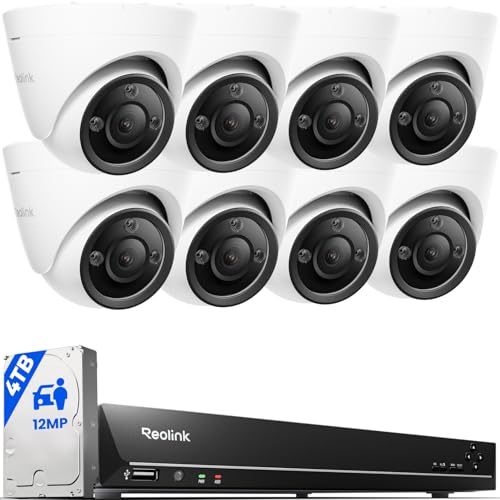
REOLINK 16CH 12MP PoE Security Camera System with 4TB HDD RLK16-1200D8-A | 8pcs H.265 12MP Security PoE Cams, Person Vehicle Pet Detection, Two-Way Talk, Spotlights Color Night Vision, home security
Check price on Amazon
REOLINK 16CH 4K Security Dome Camera System with 4TB HDD RLK16-800D8 | 8pcs 8MP PoE Cameras, Smart Person/Vehicle Detection, 16CH NVR, H.265, 24/7 Recording, High Bitrate & Clear Stream
Check price on Amazon
ANNKE 8CH H.265+ 3K Lite Wired Security Camera System, 4X 2MP Cam, 1TB HDD | 8 Channel DVR with AI Human/Vehicle Detection, Outdoor CCTV Cameras, IP67 Weatherproof, IR Night Vision, No Monthly Fees
Check price on Amazon
REOLINK 5MP 8CH Home Security Camera System with 2TB HDD RLK8-520D4-5MP | 4pcs 5MP Wired PoE IP Cameras Outdoor with Person/Pet/Vehicle Detection, 4K 8CH NVR with 2TB HDD for 24-7 Recording
Check price on Amazon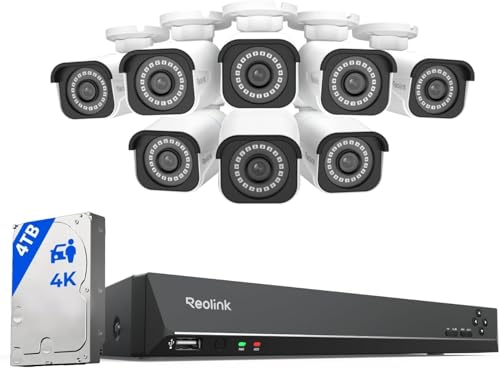
REOLINK 16CH 4K Security Bullet Camera System with 4TB HDD RLK16-800B8 | 8pcs H.265 PoE IP Cameras Wired with Person Vehicle Detection, 8MP/4K 16CH NVR with 4TB HDD for 24-7 Recording
Check price on AmazonCloud vs. Local Storage: Which Is Better for Your Business?
Storage is one of the most important decisions you will make. Cloud storage offers remote access and automatic backups, but usually requires a monthly fee. Local storage (via NVR, DVR, or SD card) is a one-time cost and keeps footage on-site.
For businesses that want zero recurring costs, a home security camera with local storage approach works equally well for commercial spaces. Many cameras support wireless security camera with SD card recording, which is perfect for small setups.
If you prefer a hybrid approach, a solar-powered wireless security camera system with DVR combines renewable power with local recording—ideal for outdoor areas without electrical outlets.
For businesses that cannot rely on internet connectivity, a security camera that works without WiFi or a security camera that doesn't require WiFi ensures you are never blind, even during outages.
Pros and Cons of Installing a Business Security Camera System
✅ Advantages
- Deters theft, shoplifting, and vandalism
- Provides evidence for insurance claims and legal disputes
- Enables remote monitoring of multiple locations
- Improves employee accountability and safety
- Reduces liability risks from false injury claims
- Can be integrated with alarms and access control
❌ Disadvantages
- Upfront equipment and installation costs
- Ongoing maintenance and firmware updates
- Potential privacy concerns with employees and customers
- Cloud storage subscriptions add up over time
- Requires reliable internet for remote viewing
- Professional installation can be expensive
Maintenance Tips for Long-Term Reliability
A security system is only as good as its maintenance. Dusty lenses, outdated firmware, and full storage drives can render your cameras useless when you need them most. Follow these best practices:
1. Clean lenses monthly. Use a microfiber cloth and lens cleaner. Dust and spiderwebs are common causes of blurry footage.
2. Check recordings weekly. Ensure your system is actually recording and that timestamps are correct.
3. Update firmware quarterly. Manufacturers release security patches and performance improvements regularly.
4. Test night vision monthly. Walk through the coverage area after dark to confirm clarity.
5. Review storage capacity. If you use local storage, ensure the drive has enough space for your retention policy (typically 30–90 days).
For businesses in harsh climates, consider a solar-powered security camera with SD card to reduce wiring vulnerabilities. If you operate in remote areas, an intelligent solar energy alert PTZ camera offers pan-tilt-zoom coverage without grid power.
Legal Considerations for Business Surveillance
Before installing cameras, understand your legal obligations. In most jurisdictions, you must:
• Inform employees that surveillance is in place (typically via signage or employee handbook).
• Avoid recording in private areas such as restrooms, changing rooms, or break areas with reasonable privacy expectations.
• Comply with data protection laws (e.g., GDPR, CCPA) if you store footage of customers or employees.
• Check local ordinances regarding audio recording—some regions require consent for audio capture.
When in doubt, consult a legal professional. A properly installed and disclosed system protects your business without creating liability.
Frequently Asked Questions
Most small businesses need 4–8 cameras. A single-room retail shop may need 2–4, while a restaurant with a dining area, kitchen, and entrance typically needs 6–8. Start by identifying critical points: entrances, cash registers, stockrooms, and parking areas.
Yes, many modern wireless systems are designed for DIY installation. However, for multi-camera wired systems or complex layouts, professional installation is recommended to ensure proper coverage and compliance.
Not necessarily. Many systems offer local storage via NVR, DVR, or SD card without any monthly fee. A security camera system without subscription is ideal for budget-conscious businesses. Cloud storage subscriptions are optional and add remote backup convenience.
1080p is the minimum for identifying faces and license plates. 4K is increasingly affordable and recommended for large areas or where zooming into footage is necessary. A high-resolution security camera outdoor model ensures you capture critical details.
Most businesses retain footage for 30–90 days. Check local regulations and insurance requirements. Some industries (e.g., finance, healthcare) may have longer retention mandates.
Yes. A security camera that works without WiFi records locally and does not require internet for basic operation. Remote viewing requires internet, but local recording continues regardless.
Ready to Protect Your Business?
Compare the best small business security camera systems, read reviews, and find the perfect setup for your budget. Our recommended products are selected for reliability, features, and value.
View Recommended SystemsFinal Thoughts
Investing in a small business security camera system is one of the smartest decisions you can make as a business owner. It protects your assets, your employees, and your reputation. By understanding your options—wired vs. wireless, cloud vs. local, DIY vs. professional—you can build a system that fits your budget and grows with your business.
Start with a clear assessment of your coverage needs, choose cameras with the right resolution and night vision, and decide on a storage method that works for your workflow. Whether you choose a wireless security camera for business or a full commercial security camera installation, the key is consistency: maintain your system, review footage regularly, and update your setup as your business evolves.