
Video Surveillance Systems for Business: The Complete Buyer's Guide
Protect your company with the right commercial security camera system. From small retail shops to large corporate campuses, learn how to choose, install, and manage a professional video surveillance solution that fits your budget and security needs.
View Recommended SystemsWhy This Guide Matters: A business video surveillance system is more than just cameras—it's your first line of defense against theft, liability claims, and operational blind spots. Whether you need a small business security camera system or an enterprise-grade commercial solution, this guide will help you make an informed decision with confidence.
Why Every Business Needs a Professional Video Surveillance System
In today's competitive landscape, video surveillance systems for business are no longer a luxury—they are a fundamental operational tool. A well-designed commercial security camera installation does more than deter criminals; it provides actionable evidence, improves employee safety, and streamlines business operations.
According to industry data, businesses with visible surveillance systems reduce theft by up to 60%. Beyond loss prevention, business owners use footage to resolve customer disputes, monitor employee productivity, and ensure compliance with health and safety regulations. Whether you run a retail store, warehouse, restaurant, or office, a tailored security camera installation for business is a smart investment.
🔒 Loss Prevention
Deter internal and external theft with visible, high-definition cameras. Reduce shrinkage and protect your inventory 24/7.
⚖️ Liability Protection
Resolve slip-and-fall claims, customer disputes, and employee incidents with reliable video evidence and clear timestamps.
📊 Operational Insights
Analyze foot traffic, monitor queue lengths, and optimize staff scheduling based on real-time surveillance data.
Types of Video Surveillance Systems for Business
Choosing the right system depends on your business size, budget, and security requirements. Here are the four main categories available today:
Wired Systems (DVR/NVR)
The most reliable option for permanent installations. Wired systems use coaxial cables or Ethernet with Power over Ethernet (PoE). Best for large facilities requiring stable, high-bandwidth performance. Many businesses choose a wired security camera system with monitor for centralized viewing.
- High reliability and signal stability
- Supports 4K and multi-camera setups
- Requires professional installation
Wireless Systems
Flexible and faster to deploy, wireless systems transmit video via Wi-Fi or cellular networks. Ideal for businesses that lease space or need rapid setup. Explore options like a wireless security cameras for business setup for scalable coverage.
- Quick installation, minimal cabling
- Easy to expand and relocate
- Depends on stable Wi-Fi signal
PoE (Power over Ethernet) Systems
PoE systems combine power and data transmission over a single Ethernet cable. They are the industry standard for modern commercial security camera installations. Combine with a wired security camera system with remote viewing for 24/7 access.
- Single-cable installation
- Scalable for large buildings
- Supports advanced analytics
Cloud-Based & Hybrid Systems
Cloud cameras store footage off-site with subscription plans. Hybrid systems combine local NVR storage with cloud backup. For businesses avoiding monthly fees, consider a security camera system without subscription.
- Remote access from anywhere
- No on-site hardware maintenance
- Monthly fees may apply
Essential Features for Commercial Surveillance Systems
Not all cameras are created equal. For business use, prioritize these features:
| Feature | Why It Matters for Business | Recommended Spec |
|---|---|---|
| Resolution | Identify faces, license plates, and fine details for evidence | 4K Ultra HD (8MP) or 1080p minimum |
| Night Vision | Protect your business after hours when most incidents occur | Color night vision or IR up to 100ft |
| Storage | Retain footage for investigations and legal requirements | Local NVR + cloud backup, 30+ days |
| Remote Viewing | Monitor your business from anywhere via smartphone | iOS/Android app with real-time alerts |
| Motion Detection | Reduce false alerts and save storage space | AI-powered human/vehicle detection |
| Weatherproofing | Protect outdoor cameras from rain, dust, and extreme temps | IP66 or IP67 rating |
For businesses that need continuous monitoring, look for a 24/7 continuous recording security camera or a system with continuous recording capabilities. If you operate in areas without reliable internet, a battery-powered cellular security camera can keep you covered.
Installation Options: DIY vs. Professional
One of the biggest decisions is whether to install the system yourself or hire a professional. Here's what you need to know:
DIY Installation
Modern wireless systems are designed for easy setup. If you choose a easy-to-install outdoor security camera, you can have basic coverage running in a few hours. Ideal for small offices and retail spaces.
- Lower upfront cost
- No waiting for appointments
- Best for plug-and-play wireless systems
Professional Installation
For large facilities, multi-camera setups, or complex wiring, hire a certified installer. A professional security camera installation ensures optimal camera placement, proper cabling, and network configuration.
- Expert camera placement
- Proper cable management
- Warranty and support included
Learn more about security camera installation services and installation costs.
How Much Do Business Surveillance Systems Cost?
Budgeting for a commercial video surveillance system depends on several factors. Here's a realistic breakdown for 2026:
| Business Size | Recommended Cameras | Estimated Total Cost |
|---|---|---|
| Small Shop / Office | 2–4 cameras | $400–$1,500 |
| Medium Retail / Restaurant | 4–8 cameras | $1,200–$3,500 |
| Large Warehouse / Campus | 8–16+ cameras | $3,000–$10,000+ |
| Enterprise / Multi-site | 16+ cameras with NVR | $10,000+ |
Keep in mind that ongoing costs may include cloud storage subscriptions, maintenance, and monitoring services. For businesses that prefer no recurring fees, consider a wireless security camera with no subscription or a security camera that doesn't require a subscription.
Surveillance Solutions by Industry
🏪 Retail & Convenience Stores
Prevent shoplifting, monitor cash registers, and track customer flow. Use cameras with audio recording for dispute resolution at checkout counters.
🏭 Warehouses & Logistics
Monitor loading docks, inventory zones, and employee safety. A high-definition wireless camera with wide-angle coverage is ideal for large open spaces.
🍽️ Restaurants & Hospitality
Oversee kitchen operations, dining areas, and entrances. Combine indoor and outdoor wireless cameras for complete coverage.
🏢 Corporate Offices
Secure entry points, server rooms, and parking areas. Consider two-way audio cameras for reception areas and access control integration.
Legal & Privacy Considerations for Business Surveillance
Before installing any video surveillance system, ensure compliance with local, state, and federal laws. Key points to remember:
- Notify employees: Post visible signs in areas under surveillance. Most jurisdictions require employee notification.
- Avoid private areas: Never install cameras in restrooms, changing rooms, or break areas where privacy is expected.
- Data retention: Establish a retention policy (typically 30–90 days) and secure footage against unauthorized access.
- Audio recording: Some states require consent for audio recording. Check local laws before enabling audio on your cameras.
If you're unsure, consult with a legal professional. For more details on installation compliance, see our guide on security camera system installation.
Recommended Video Surveillance Systems for Business
⚠️ AFFILIATE DISCLOSURE: This website contains affiliate links. As an affiliate Associate, we earn from qualifying purchases. If you make a purchase through these links, we may receive a small commission at no additional cost to you. Read our full affiliate policy.

4COVR 16 Channel PoE Security Camera System for Business, 4TB, LY54AX5M1616 | 16x 5MP IK10 Vandal-Proof IP67 Dome Commercial IP Camera, Night Vision, 16CH NVR, AI Human Vehicle Detection, 24/7 Recording
Check price on Amazon
CAMCAMP Home Security Camera System Wireless Outdoor WiFi 5G 24/7 Recording | Auto Human Tracking 355° View 2-Way Audio Color Night Vision Plug-in Powered 1080PHD Video Surveillance System 16CH NVR 500GB
Check price on Amazon
Hiseeu 5MP Home Security Camera System Outdoor, 2.4G/5G Wireless WiFi Pro | 24/7 Recording, 1TB HDD No Subscription, Wired Plug-in Powered Cameras, 4K NVR with 10.1" LCD Monitor, One-Way Audio, IP65
Check price on Amazon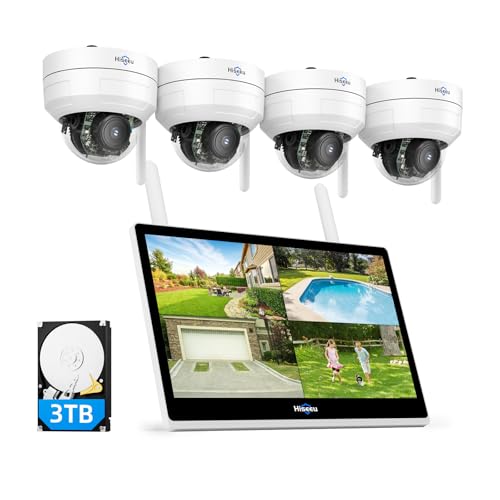
Hiseeu Wireless Security Camera System, 5MP 4 Cam-Kit, 14" LCD, 3TB HDD | 10CH NVR, 4PCS 5MP PTZ Dome Cameras, Auto Tracking, Explosion-Proof Outdoor WiFi Surveillance System
Check price on Amazon
CAMCAMP 16CH Security Camera System Wireless for Home Business WiFi Outdoor | 355° Full View Auto Human Tracking, Smart Color Night Vision, 2-Way Audio, 500GB HDD No Monthly Fee Commercial& Home CCTV Kit
Check price on Amazon
【Human Track】Hiseeu 4K PoE PTZ Security Camera System, 6pcs 5MP PTZ Cameras | 300°Pan 90°Tilt, Auto Human Tracking,Free Remote Accesss, 2-Way Audio, Waterproof, Color Night Vision,3TB HDD for 7/24 Record
Check price on Amazon
4CH Wired Security Camera System, AIWIXEN DVR with 512GB HDD, 4X 1080P Cam | Home Surveillance CCTV, Security Cameras with Human Vehicle Detection, IP68 Waterproof, Remote Access, 24-7 Recording
Check price on Amazon
ZOSI 3K Lite Security Camera System Indoor Outdoor,AI Human/Vehicle Detection,Night Vision,Remote Access,4pcs 1080P 1920TVL Weatherproof Surveillance Cameras,H.265+ 8CH 5MP Lite CCTV DVR(NO HDD)
Check price on AmazonFinal Recommendations: Choosing the Right System
When selecting a video surveillance system for your business, ask yourself these questions:
1. What is my coverage area?
Small offices need 2–4 cameras; warehouses may need 12+. Map out entrances, exits, cash handling areas, and blind spots.
2. Do I need remote access?
If you manage multiple locations or travel frequently, a wireless system with remote viewing and no monthly fee is ideal.
3. What's my budget?
Entry-level systems start around $400. For comprehensive coverage, expect $1,500–$5,000. Prioritize resolution and night vision.
4. Do I need night vision?
Yes—most business incidents occur after hours. Choose wireless security cameras with night vision or home/business cameras with night vision.
Ready to Protect Your Business?
Explore our top-rated commercial surveillance systems and get professional-grade security at competitive prices. Browse the recommended products above or view the full list.
Shop Business Surveillance SystemsRelated Resources & Guides
- What Is a Good Security Camera System? — Understand the fundamentals before you buy.
- Small Business Security Camera System — Tailored solutions for startups and small shops.
- Commercial Security Camera Installation — Professional installation tips and best practices.
- Wireless Indoor and Outdoor Security Cameras — Flexible coverage for any business layout.
- Security Cameras That Don't Require Subscription — Save on monthly fees.