
Security Camera Installation Services: A Complete Guide
Professional installation ensures your security system works flawlessly from day one. Discover what to expect, how much it costs, and how to choose the right expert for your home or business.
VIEW INSTALLATION-READY KITSWhy Professional Installation Matters: A high-quality security camera is only as good as its installation. Proper placement, secure wiring, and correct network configuration are critical for reliable 24/7 surveillance. This guide will walk you through every aspect of hiring and working with professional security camera installation services.
Why Hire a Professional Security Camera Installer?
While DIY security cameras have become more user-friendly, professional installation offers distinct advantages that go beyond simply mounting a device. A certified technician ensures optimal camera placement for maximum coverage, hides unsightly wiring for a clean aesthetic, and configures your network for secure remote viewing. For complex systems involving multiple cameras, home security camera system installation is often best left to the experts. They can also integrate your cameras with existing smart home ecosystems or alarm systems, creating a cohesive security network. If you are planning a large-scale deployment for a company, commercial security camera installation requires specialized knowledge of building codes and network infrastructure that only a professional can provide.
Types of Security Camera Installation Services
Installation services vary depending on the complexity of the job and the type of property. Here are the most common categories:
- Residential Installation: This typically involves installing 4 to 8 cameras around a single-family home. Technicians often run cables through attics or crawl spaces and set up a local DVR or NVR. For a seamless setup, many homeowners choose a residential security camera installation service that includes camera mounting, wiring, and mobile app configuration.
- Commercial & Business Installation: Businesses require more robust systems with higher resolution, longer retention times, and often integration with access control. Security cameras for business installation projects may involve multiple buildings, parking lots, and complex network setups. A professional security camera installation company will conduct a site survey to identify blind spots and ensure compliance with local regulations.
- Wireless & Smart Home Installation: Even wireless systems benefit from professional setup. A technician can optimize Wi-Fi signal strength, position cameras to avoid interference, and link them to your smart hub. For those using a wireless security camera system with remote viewing (no monthly fee), professional installation ensures the base station and cameras are paired correctly for reliable performance.
What to Expect During Professional Installation
Understanding the installation process helps you prepare and ensures you get the most value from the service. A typical professional installation follows these steps:
- Site Survey & Consultation: The installer will walk your property to identify entry points, vulnerabilities, and the best camera angles. They will discuss your goals, such as monitoring a front door security camera with monitor or covering a large backyard.
- System Design & Quote: Based on the survey, you'll receive a detailed plan outlining camera models, placement, cabling routes, and total cost. This is the time to ask questions about the cost of home security system installation and any potential add-ons.
- Installation Day: Technicians will mount cameras, run cables (if wired), and install the recorder or hub. They will test each camera for image quality, night vision, and motion detection. For a wired security camera system with remote viewing, they will ensure the network is configured for secure external access.
- Configuration & Training: The final step is setting up the mobile app, configuring alerts, and showing you how to view live feeds and playback recordings. If you have a security camera system without a subscription, they will ensure local storage (like an SD card or NVR) is working correctly.
How Much Do Security Camera Installation Services Cost?
The cost of professional installation depends on several factors, including the number of cameras, the type of system (wired vs. wireless), and the complexity of the building's structure. Here are typical price ranges:
- Basic Residential Installation (4 cameras): $300–$800. This usually covers mounting, wiring, and basic setup. If you have a wireless indoor and outdoor security cameras system, the cost may be lower due to less cabling.
- Advanced Residential Installation (8+ cameras): $800–$1,500+. This includes more complex wiring, possibly a wired security camera system with monitor, and integration with smart home devices.
- Commercial Installation: $2,500+. For businesses, video surveillance systems for business often require multiple technicians, specialized equipment, and network integration. The final price can vary widely based on the number of cameras and site challenges.
Keep in mind that these prices are for labor only; the cost of the camera system itself is separate. For a DIY-friendly alternative, you might consider an easiest outdoor security camera to install, but for maximum reliability, professional service is recommended.
How to Choose the Right Installation Service
Not all installers are created equal. To ensure a high-quality job, look for the following:
- Licensing and Insurance: Verify that the company is licensed and insured. This protects you from liability in case of accidents during installation.
- Experience with Your System Type: If you have a specific brand or a wireless battery-powered security camera system, choose an installer with experience in that technology.
- Warranty on Workmanship: A reputable company will offer a warranty on their installation work, separate from the manufacturer's warranty on the equipment.
- Customer Reviews: Check online reviews and ask for references. A good installer will have a proven track record and happy customers.
- Clear Pricing: Get a written quote that details all costs, including any potential fees for running extra cable or installing a security camera with monitor (no Wi-Fi needed).
DIY vs. Professional Installation: Which is Right for You?
For a single, easy-to-mount camera, DIY might be sufficient. However, for a comprehensive system, professional installation is often worth the investment. If you are unsure, consider the following:
- Choose DIY if: You are handy, have a simple wireless security camera system with monitor, and are comfortable with basic networking.
- Choose Professional if: You need multiple cameras, want a clean wired setup, require 24/7 continuous recording security camera functionality, or need to integrate with a larger home security system with cameras and sensors.
Even for a single camera, if you want a security camera that connects to phone seamlessly, a professional can save you time and frustration.
Installation-Ready Security Camera Systems
⚠️ AFFILIATE DISCLOSURE: This website contains affiliate links. As an affiliate Associate, we earn from qualifying purchases. If you make a purchase through these links, we may receive a small commission at no additional cost to you. Read our full affiliate policy.

SECURITY CAMERA INSTALLATION HANDBOOK : A Practical Beginner’s Guide to Choosing, Installing, Configuring, and Maintaining CCTV and IP Camera Systems
Check price on Amazon
SEHMUA 4G LTE Cellular Solar Security Camera Wireless Outdoor, No Wi-Fi Solar Powered Camera, 360° Live View, 2K Color Night Vision, PIR Motion Sensor, Two-Way Talk, Built-in SIM Card
Check price on Amazon
CCTV Security Systems for Beginners: A Practical Guide to CCTV Cameras, Installation, Wiring, DVR and NVR Setup, Remote Monitoring, Maintenance, and Troubleshooting
Check price on Amazon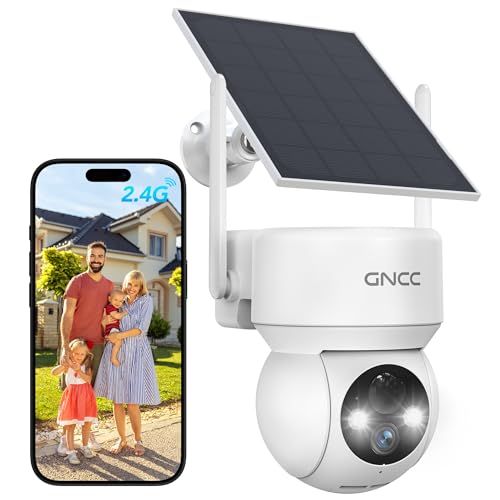
GNCC Solar Security Cameras Wireless Outdoor 2.4G WiFi, SD/Cloud Storage | Solar & Battery 360° Security Cameras, Color Night Vision, PIR Motion Detection, Spotlight & Siren Alarm, IP65 Waterproof
Check price on Amazon
CCTV CAMERAS INSTALLATION GUIDE FOR BEGINNERS : Security Cameras for your Indoor and Outdoor Surveillance with Night Vision and Motion Detection
Check price on Amazon
2026 Upgraded 2K Security Cameras Wireless Outdoor, Free Cloud Storage, 1-6 Months Battery Life, Waterproof, 2-Way Talk, AI Motion Detection Spotlight Siren Alarm Cameras for Home Security
Check price on Amazon
DEKCO Wired 2K Security Camera Outdoor, 180° Pan & 270° Coverage, 24/7 Constant Power Surveillance, Full Color Night Vision, AI Human Detection, Cloud Storage Edition, Spotlight & Siren
Check price on Amazon