
Cell Phone Tripod: The Ultimate Stability Solution
Transform your smartphone into a professional camera rig. Learn how to choose the perfect cell phone tripod for stable photos, smooth videos, and hands-free convenience.
Why a Cell Phone Tripod Matters: Smartphone cameras have advanced dramatically, but even the best phone camera can't compensate for shaky hands. A quality cell phone tripod unlocks new creative possibilities — from long-exposure night shots to steady video calls and professional content creation. Whether you're a vlogger, photographer, or someone who just wants sharper vacation photos, the right tripod is a game-changer.
Why Every Smartphone Owner Needs a Tripod
Modern smartphones are capable of capturing stunning 4K video and high-resolution photos, but image stabilization has its limits. A cell phone tripod eliminates camera shake, allowing you to capture crystal-clear images in any lighting condition. If you're also considering a dedicated camera for more advanced work, a point-and-shoot camera or a 35mm camera can complement your smartphone setup, but a tripod remains the most affordable upgrade for immediate quality improvement.
Beyond photography, a tripod is essential for video calls, live streaming, time-lapse photography, and vlogging. Content creators who use a camera for blogging and vlogging understand the value of stable footage. For smartphone-based creators, a tripod with a Bluetooth selfie stick function offers the best of both worlds — portability and stability.
Types of Cell Phone Tripods: Find Your Perfect Match
Not all tripods are created equal. The right choice depends on your usage scenario, portability needs, and budget. Here's a breakdown of the most common types:
1. Mini Tripods (Tabletop)
Compact and lightweight, mini tripods are perfect for desk setups, tabletop photography, and travel. They typically range from $10–$30 and fold down to fit in a pocket. These are ideal for phone camera stand applications where space is limited. Many mini tripods feature flexible legs that can wrap around objects for creative angles.
2. Flexible Tripods (GorillaPod Style)
These tripods have bendable legs that can grip uneven surfaces, railings, or tree branches. They're excellent for outdoor adventures and cost between $15–$50. A flexible tripod is a great companion for a small camera for recording as well, making it a versatile investment.
3. Full-Size Tripods
For professional work, full-size tripods offer maximum stability and height adjustment. They range from $30–$150 and are essential for studio photography, event coverage, and long video shoots. If you're serious about content creation, pairing a full-size tripod with a selfie light for phone creates a complete production setup.
4. Phone Tripod Stands with Remote
Many modern tripods come with a detachable Bluetooth remote, allowing you to trigger photos and videos from a distance. This is particularly useful for group photos and solo content creation. A phone tripod stand with remote functionality is a must-have for vloggers and social media influencers.
5. Phone Recorder Stands
Designed specifically for video recording, these stands often include microphone mounts and cable management. They're popular among podcasters and interviewers. A phone recorder stand can be combined with external microphones for professional-grade audio.
Cell Phone Tripod Comparison: Features at a Glance
Use this comparison table to quickly identify which type of tripod best suits your needs:
| Type | Best For | Height Range | Price Range | Portability |
|---|---|---|---|---|
| Mini Tripod | Tabletop, travel | 3–8 inches | $10–$30 | Excellent |
| Flexible Tripod | Outdoor, uneven surfaces | 5–12 inches | $15–$50 | Very Good |
| Full-Size Tripod | Professional video, studio | 20–70 inches | $30–$150 | Moderate |
| Tripod with Remote | Vlogging, group photos | 10–50 inches | $20–$80 | Good |
| Recorder Stand | Podcasting, interviews | 15–60 inches | $25–$100 | Moderate |
When choosing between these options, consider how you'll use your tripod most often. If you're primarily a traveler, a mini or flexible tripod is your best bet. For home studio work, a full-size tripod with a shoe mount adapter for accessories is ideal.
Key Features to Look For in a Cell Phone Tripod
Before making a purchase, evaluate these critical features to ensure you get the best value for your money:
Build Quality and Materials
Aluminum and carbon fiber are lightweight yet durable options. Plastic tripods are affordable but may not withstand heavy use. If you also own a pro camera or high-resolution mirrorless camera, consider a tripod that can support both your phone and dedicated camera for maximum versatility.
Phone Mount Compatibility
Ensure the phone clamp can accommodate your device's width, especially if you use a thick case. Universal mounts typically fit phones from 2.2 to 3.7 inches wide. Some mounts also support mini video cameras and small action cameras.
Height Adjustment and Stability
Look for tripods with sturdy leg locks and a stable base. A center column with a hook for adding weight (like a sandbag) enhances stability in windy conditions. For outdoor shoots, a tripod that pairs well with an outdoor camera system setup can be a valuable addition to your gear collection.
Head Type: Ball vs. Pan-and-Tilt
Ball heads offer quick, flexible adjustments and are great for photography. Pan-and-tilt heads provide smooth horizontal and vertical movement, ideal for video panning. Your choice depends on whether you prioritize speed or smooth motion.
Bluetooth Remote and App Integration
A detachable Bluetooth remote lets you shoot from up to 30 feet away. Some tripods integrate with camera apps for advanced features like time-lapse and interval shooting. This is especially useful if you're using your phone alongside a video and photo camera for dual-angle coverage.
Recommended Cell Phone Tripods
⚠️ AFFILIATE DISCLOSURE: This website contains affiliate links. As an affiliate Associate, we earn from qualifying purchases. If you make a purchase through these links, we may receive a small commission at no additional cost to you. Read our full affiliate policy.
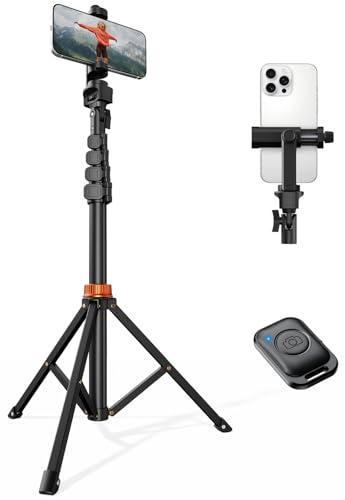
VIMOSE 66" Phone Tripod, Tripod for iPhone with Remote & Phone Stand
Check price on Amazon
EUCOS 62" Phone Tripod, Tripod for iPhone & Selfie Stick with Remote
Check price on Amazon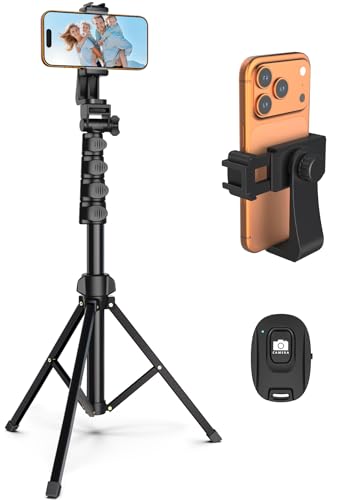
Liphisy 64” Tripod for Cell Phone & Camera with Remote and Phone Holder
Check price on Amazon
SENSYNE 62" Phone Tripod, Extendable Selfie Stick with Wireless Remote
Check price on Amazon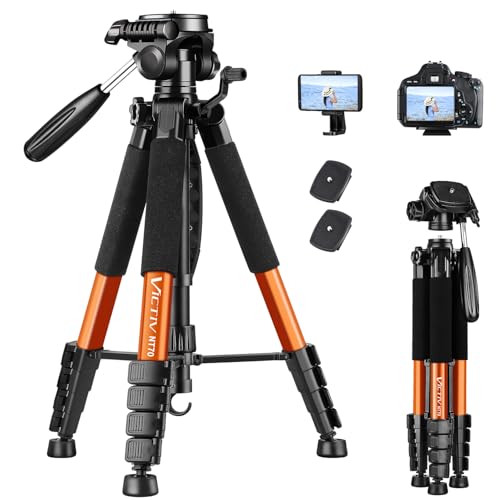
Victiv Tripod, 74” Camera Tripod for Cell Phone with Phone Holder, Orange
Check price on Amazon
Selfie Stick Tripod for Phone with Remote Control & Holder, 50 Inch, Black
Check price on Amazon
Extendable Phone Tripod for iPhone, Selfie Stick with Remote & Phone Holder
Check price on Amazon
Amazon Basics 64-inch Extendable Tripod for iPhones and Smartphones, Selfie Stick Mode and Phone Tripod Mode, Black
Check price on AmazonHow to Choose the Right Cell Phone Tripod for Your Needs
With so many options available, narrowing down your choice can feel overwhelming. Here's a practical framework to guide your decision:
Step 1: Define Your Primary Use Case
Are you a traveler who needs something portable? A vlogger who needs a reliable stand for talking-head videos? A photographer experimenting with long exposures? Your primary use case will dictate the type, size, and features you need. If you're also exploring small cameras for recording, choose a tripod that can handle multiple devices.
Step 2: Set a Realistic Budget
Cell phone tripods range from under $15 to over $150. Budget tripods ($10–$25) are fine for occasional use, but if you're creating content regularly, invest in the $30–$80 range for better durability and features. Professional-grade options above $100 offer superior stability and build quality.
Step 3: Consider Future Needs
If you plan to expand your gear collection — perhaps adding a camcorder for hunting, a macro camera, or a cinema camera — choose a tripod with a higher weight capacity and universal mounting options. A versatile tripod today saves you money tomorrow.
Step 4: Read Reviews and Check Warranty
Customer reviews reveal real-world performance issues that specs don't show. Look for tripods with at least a 1-year warranty. Brands with strong customer support are worth the slightly higher price.
Tips for Getting the Most Out of Your Cell Phone Tripod
A tripod is an investment — proper care ensures it lasts for years. Here are some practical tips:
- Clean after outdoor use: Sand and dirt can clog leg locks. Wipe down your tripod with a damp cloth after every outdoor session. If you use your tripod alongside an outdoor wired camera setup, establish a cleaning routine for all your gear.
- Store properly: Keep your tripod in a carry bag when not in use. Avoid storing it in extreme temperatures, which can warp plastic components.
- Check screws and locks regularly: Tighten any loose screws and test leg locks before important shoots.
- Use a counterweight: In windy conditions, hang a backpack or sandbag from the center hook to increase stability.
- Pair with the right accessories: A selfie light for phone and a Bluetooth selfie stick expand your creative options without adding much weight to your bag.
Ready to Stabilize Your Smartphone Photography?
Browse our curated selection of top-rated cell phone tripods above. Whether you need a portable mini tripod or a professional full-size stand, we've got you covered.
View Recommended TripodsFrequently Asked Questions About Cell Phone Tripods
What is the best cell phone tripod for beginners?
For beginners, a flexible tripod (GorillaPod style) or a mini tripod with a Bluetooth remote offers the best balance of price, portability, and functionality. Expect to spend around $20–$40 for a quality starter tripod.
Can I use a cell phone tripod with a camera?
Many tripods come with a universal 1/4-inch screw mount that fits both smartphones and cameras. If you own a point-and-shoot or a 35mm camera, check the tripod's weight capacity before mounting heavier gear.
How tall should a cell phone tripod be?
For tabletop use, 3–8 inches is sufficient. For standing shots and vlogging, aim for a tripod that extends to at least 50 inches. Full-size tripods reaching 60–70 inches are ideal for professional video work.
Do I need a Bluetooth remote with my tripod?
A Bluetooth remote is highly recommended for solo content creation, group photos, and video recording. It allows you to trigger the shutter without touching your phone, eliminating shake.
What's the difference between a phone tripod and a phone camera stand?
While the terms are often used interchangeably, a phone camera stand typically refers to a desk-mounted holder, while a tripod has legs for freestanding use. Both serve to stabilize your phone, but tripods offer more height flexibility.
Can I use a cell phone tripod for live streaming?
Absolutely. A sturdy tripod with a phone mount is essential for live streaming on platforms like YouTube, Instagram, and TikTok. Pair it with a selfie light for phone for professional-looking broadcasts.
Final Thoughts: Invest in Stability, Elevate Your Content
A cell phone tripod is one of the most affordable and impactful upgrades you can make to your smartphone photography and videography setup. Whether you're capturing family memories, building a YouTube channel, or documenting your travels, the right tripod provides the stability and flexibility you need to get the perfect shot.
Remember to consider your primary use case, budget, and future gear plans when making your choice. And if you're expanding your equipment collection beyond smartphone accessories, explore our guides on small cameras for recording, cameras for blogging and vlogging, and phone tripod stands to build a complete content creation toolkit.
Ready to get started? Check out our recommended cell phone tripods above and take the first step toward shake-free, professional-quality content today.