
House Cameras That Connect to Your Phone
Keep an eye on your home from anywhere. Discover the best smartphone-connected cameras for remote viewing, real-time alerts, and total peace of mind.
VIEW TOP PICKSWhy Phone-Connected Cameras Matter: In today's fast-paced world, being able to check on your home from your smartphone is not a luxury—it's a necessity. Whether you're at work, traveling, or simply in another room, house cameras that connect to your phone give you instant access to live feeds, recorded clips, and smart alerts. This guide will help you understand the technology, choose the right features, and find the perfect camera for your home.
How Do Phone-Connected House Cameras Work?
These cameras use your home's Wi-Fi network to transmit video and audio to a cloud server or a local storage device. Through a dedicated mobile app (available for iOS and Android), you can view live footage, receive motion alerts, and even talk to visitors using two-way audio. Some models also support cellular connectivity, making them ideal for locations without reliable Wi-Fi.
For those who prefer not to rely on the internet, there are security cameras that don't use internet, which store footage locally on an SD card. However, if you want the convenience of remote viewing, a phone-connected camera is the way to go.
Key Features to Look For
📱 Mobile App Quality
The app is your control center. Look for intuitive navigation, fast loading times, and reliable push notifications. The best apps let you customize motion zones and schedule alerts.
📶 Wi-Fi vs. Cellular
Wi-Fi cameras are cost-effective but depend on your home network. Cellular cameras use a SIM card for connectivity, making them perfect for remote areas or as a backup. Learn more about security cameras with built-in cellular service.
💾 Local vs. Cloud Storage
Local storage (SD card) means no monthly fees, but you can't access recordings if the camera is stolen. Cloud storage offers remote access but usually requires a subscription. Consider a security camera that does not require a subscription if you want to avoid recurring costs.
🔋 Power Source
Wired cameras are reliable but require an outlet. Battery-powered models offer flexibility, while solar-powered cameras are eco-friendly and ideal for outdoor use. Check out battery-powered security cameras with night vision for wire-free options.
🌙 Night Vision
Infrared or color night vision ensures clear footage even in complete darkness. This is crucial for outdoor security. Look for models with a range of at least 30 feet.
🔔 Smart Alerts & AI
Advanced cameras can distinguish between people, pets, and vehicles, reducing false alerts. Some even offer package detection and facial recognition.
Pros and Cons of Phone-Connected Cameras
✅ Pros
- Remote access from anywhere in the world
- Real-time notifications and alerts
- Two-way audio for communication
- Easy installation and setup
- Integration with smart home ecosystems
❌ Cons
- Dependence on internet connection
- Potential monthly cloud storage fees
- Privacy concerns with cloud data
- Battery life limitations for wireless models
- Can be vulnerable to hacking if not secured
Best House Cameras That Connect to Your Phone
⚠️ AFFILIATE DISCLOSURE: This website contains affiliate links. As an affiliate Associate, we earn from qualifying purchases. If you make a purchase through these links, we may receive a small commission at no additional cost to you. Read our full affiliate policy.

youkey 2.5K Indoor Pet Security Camera, Two-Way Audio Chat to Your Pets, AI Pet/Human Detection, 360° AI Human Tracking, Privacy Mode, No Monthly Fees, Night Vision, WiFi 6(2.4GHz & 5GHz)
Check price on Amazon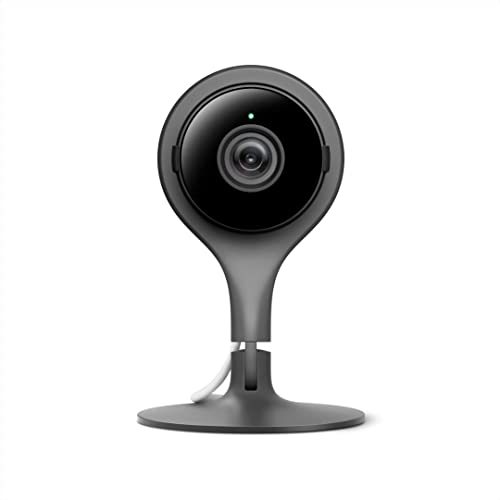
Google Nest Cam Indoor - 1st Generation - Wired Indoor Camera - Control with Your Phone and Get Mobile Alerts - Surveillance Camera with 24/7 Live Video and Night Vision
Check price on Amazon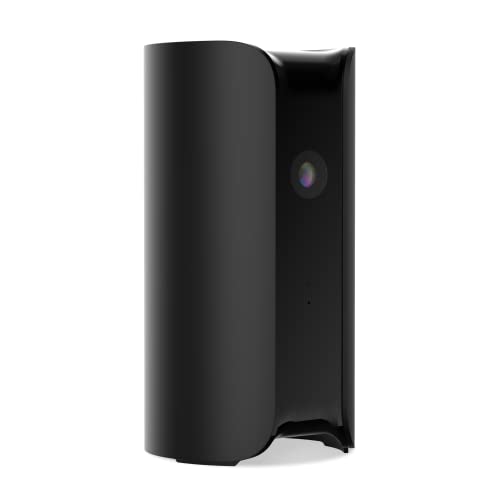
Canary View Indoor Home Security Camera 1080p HD WiFi IP | 24/7 Watch Live Video, Motion Alerts, Two-Way Talk, Night Vision, 10x Zoom, Private Mode, Works with Alexa, Google Assistant and More
Check price on Amazon
XXAXX 2K Ultra HD WiFi Hidden Camera Indoor, Live Video to Phone App,Alarm | 2K Ultra HD | 130° Wide Angel | Smart Motion Detection | Support SD Card up to 256GB | Easy to Use
Check price on Amazon
SeaLife SportDiver Ultra Underwater Smartphone Scuba Housing – Dive to 130', Waterproof Photography, Easy Camera Controls, with Leak Alarms, Fits Most Phones
Check price on Amazon
Canary Flex Indoor/Outdoor, Wire-free or Plugged-in, Weatherproof HD Security Camera - Black
Check price on Amazon
Google Nest Cam Indoor - 1st Generation - Wired Indoor Camera - Control with Your Phone and Get Mobile Alerts - Surveillance Camera with 24/7 Live Video and Night Vision (New Open Box)
Check price on Amazon
SeaLife SportDiver S Compact Smartphone Scuba Housing – Dive to 100', Waterproof Photography, Easy Camera Controls, with Leak Alarms, Fits iPhones and Most Smartphones
Check price on AmazonQuick Comparison: Wi-Fi vs. Cellular vs. No-Subscription
| Feature | Wi-Fi Cameras | Cellular Cameras | No-Subscription Cameras |
|---|---|---|---|
| Connectivity | Home Wi-Fi network | SIM card (4G LTE) | Wi-Fi or local storage |
| Remote Viewing | Yes, via app | Yes, via app | Yes, but limited without cloud |
| Monthly Fees | Optional cloud plans | Data plan required | None |
| Best For | Homes with stable Wi-Fi | Remote locations, backup | Budget-conscious users |
| Price Range | $30–$150 | $100–$300 | $40–$200 |
For a deeper dive into specific models, explore our guide on home security camera systems with remote viewing.
Installation & Setup Tips
Setting up a phone-connected camera is usually a simple process, but a few best practices can make a big difference:
- Position for Coverage: Place cameras at entry points, driveways, and backyards. For outdoor use, consider what is a good outdoor security camera.
- Secure Your Network: Use a strong password and enable two-factor authentication on your camera app.
- Optimize Wi-Fi: Ensure your camera is within range of your router. If not, consider a mesh system or a wireless security camera with receiver.
- Test Alerts: Adjust motion sensitivity to avoid false alarms from passing cars or pets.
No-Subscription and No-Internet Options
Many homeowners prefer to avoid recurring fees. Fortunately, there are excellent outdoor security cameras without monthly fee that store footage locally on an SD card. These cameras still connect to your phone via Wi-Fi for live viewing, but you won't get cloud backups.
If you need a camera in a location without internet, look for wireless cameras that work without Wi-Fi. These often use a dedicated monitor or cellular connection. For a comprehensive list, see our guide on security cameras that do not use internet.
Frequently Asked Questions
Final Thoughts
House cameras that connect to your phone offer unparalleled convenience and peace of mind. Whether you choose a simple Wi-Fi model or a advanced cellular system, the key is to match the camera's features to your lifestyle. Consider your internet reliability, budget for subscriptions, and desired video quality. With the right camera, you can monitor your home from anywhere, anytime.
For more help, browse our related guides on indoor cameras that work with 5GHz Wi-Fi and wireless outdoor security cameras for sale.