
Outdoor Security Camera No Subscription: Complete Guide
Protect your home without monthly fees. Discover the best outdoor security cameras that record locally, work without Wi-Fi, and save you money long-term.
View Recommended CamerasWhy Go Subscription-Free? Monthly cloud storage fees can add up to hundreds of dollars over a camera's lifetime. A no-subscription outdoor camera lets you keep full control of your footage using local storage like SD cards or a DVR/NVR system — no recurring costs, no privacy concerns.
Why Choose an Outdoor Security Camera Without a Subscription?
The security camera market has shifted dramatically. While many brands push cloud-based subscription plans, a growing number of homeowners are searching for an outdoor security camera with no subscription — and for good reason. Subscription-free cameras offer long-term savings, better privacy, and reliable operation even when your internet goes down.
When you buy a no-subscription camera, you typically get local storage via microSD card, a built-in DVR, or a network video recorder (NVR). This means your footage stays on your property, not on a third-party server. For many users, this is a non-negotiable advantage.
If you're still comparing options, our guide on what makes a good outdoor security camera can help you understand the core features to prioritize before making a purchase.
Key Features to Look For
Local Storage
MicroSD cards up to 256GB or NVR/DVR systems let you store weeks of footage without paying a dime. Look for cameras that support continuous or motion-triggered recording.
No Monthly Fees
The best no-subscription cameras include free apps for live viewing and playback. You should never be forced to pay for basic features like motion alerts or remote access.
Weather Resistance
IP65 or IP67 ratings ensure your camera survives rain, dust, and extreme temperatures. This is essential for any outdoor camera without Wi-Fi connection.
Night Vision
Infrared or color night vision up to 30 meters is standard. Some premium models offer solar-powered night vision for completely wireless operation.
Motion Detection
AI-powered person detection reduces false alerts. Look for cameras with adjustable sensitivity and zone-based detection for better accuracy.
Power Options
Battery, solar, or wired — choose based on your installation location. Wireless battery outdoor security cameras offer the most flexibility.
Recommended Outdoor Security Cameras Without Subscription
⚠️ AFFILIATE DISCLOSURE: This website contains affiliate links. As an affiliate Associate, we earn from qualifying purchases. If you make a purchase through these links, we may receive a small commission at no additional cost to you. Read our full affiliate policy.

Security Cameras Wireless Outdoor 5G& 2.4G, No Subscription, 2 Cam-Kit,4MP Solar Powered Home Security Cameras System With 360°PTZ,128GB Local Storage,Color Night Vision WiFi Cameras for Home Security
Check price on Amazon
2026 Upgraded 2K Security Cameras Wireless Outdoor, Free Cloud Storage, 1-6 Months Battery Life, Waterproof, 2-Way Talk, AI Motion Detection Spotlight Siren Alarm Cameras for Home Security
Check price on Amazon
Jooedi Security Cameras Wireless Outdoor, Indoor Camera for Home Security | No Subscription Required, 2K Battery Powered, Color Night Vision, Spotlight Siren Alarm, AI Motion Detection, 2.4G WiFi
Check price on Amazon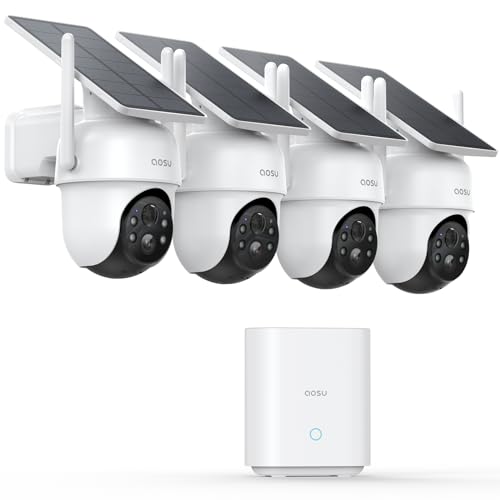
aosu D1 Classic 4-Cam Kit, Security Cameras Wireless Outdoor, Solar Powered | No Subscription Required, 32GB Built-in Storage, 360° Auto Tracking, 2K (3MP) Full-Color Night Vision, Easy Install
Check price on Amazon
aosu 2K QHD Battery Security Cameras Wireless Outdoor System, 2-Cam-Kit | True 2K HD Night Vision, No Subscription Required, Long Battery Life, 166° Wide View, Spotlight & Siren Alarm, Motion Alert
Check price on Amazon
2026 Enhanced 2K UHD Security Cameras Wireless Outdoor – Free Cloud & SD Storage, Dual-Band WiFi 2.4G/5G, Full-Color Night Vision, 6-Month Battery, Motion Alerts, IP66 Weatherproof, 2-Way Talk
Check price on Amazon
eufy Security eufyCam C37, Solar Cameras Wireless Outdoor,2K Resolution | 360° Pan & Tilt AI Tracking, Human/Pet/Vehicle Detection, Flexible Solar Panel, Color Night Vision, No Monthly Fee
Check price on Amazon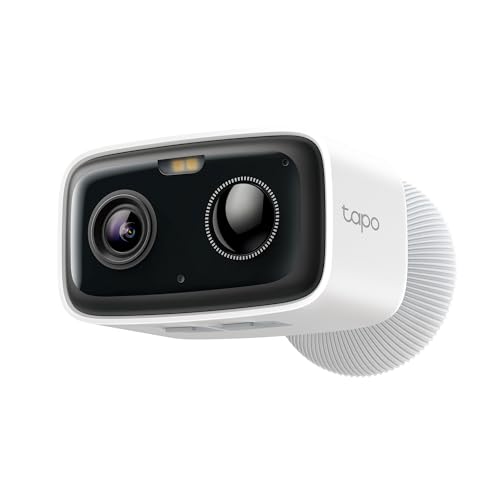
Tapo 1080p Outdoor Wireless Security Camera, Up to 180-Day Battery, C400 | Person Detection, Color Night Vision, Subscription-Free Local Storage or Optional Cloud, Works with Alexa & Google Assistant
Check price on AmazonSubscription vs. No-Subscription: What's the Difference?
Before you commit, it's important to understand exactly what you're getting — and what you're giving up — when you choose a no-subscription model. The table below breaks down the key differences.
| Feature | Subscription Camera | No-Subscription Camera |
|---|---|---|
| Monthly Cost | $3–$15 per month | $0 |
| Storage | Cloud only | Local (SD card, NVR, DVR) |
| Privacy | Footage on third-party servers | Footage stays on your property |
| Internet Dependency | Required for most features | Works offline with local recording |
| Remote Access | Included with subscription | Free app-based access |
| Long-Term Cost | $180–$900 over 5 years | One-time purchase only |
Pros and Cons of No-Subscription Cameras
Advantages
- No recurring monthly or annual fees
- Full ownership of your footage
- Works without internet (local recording)
- Better privacy and data security
- Predictable one-time cost
- No risk of price increases
Limitations
- Limited storage capacity (SD card)
- No cloud backup by default
- Manual footage management
- Remote access may require port forwarding
- Fewer AI features on budget models
- Physical theft risk for local storage
Installation Tips for Outdoor Cameras
Proper installation is critical for any outdoor security camera, but it's especially important for no-subscription models that rely on local storage. Here are the key steps:
1. Choose the Right Location: Mount cameras 8–10 feet high, angled slightly downward. Avoid pointing directly at the sun or reflective surfaces. For renters or those who want to avoid wiring, consider a security camera that screws into a light fixture.
2. Secure Your Power Source: Battery-powered models need recharging every 3–6 months. Solar models, like a solar-powered outdoor security camera with night vision, eliminate this chore entirely.
3. Optimize Wi-Fi Signal: If your camera uses Wi-Fi, ensure a strong signal at the mounting location. For areas with weak signal, consider a wireless security camera that does not require internet.
4. Set Up Local Storage: Insert a high-endurance microSD card (Class 10 or higher). Format it before first use. For multi-camera setups, an NVR system offers centralized storage.
5. Test Motion Zones: Walk around your property to test detection. Adjust sensitivity and zones to avoid false alerts from passing cars or trees.
If you're planning a full system, our guide on the average cost of security camera installation can help you budget for professional help if needed.
Power Options: Battery, Solar, or Wired?
One of the biggest decisions for any outdoor camera is how to power it. Here's a quick breakdown:
Battery-Powered: Easiest to install, no wiring needed. Look for models with long battery life (6+ months) and consider a battery-powered security camera with night vision for 24/7 coverage.
Solar-Powered: Perfect for locations with direct sunlight. A wireless solar-powered outdoor security camera never needs recharging. Great for remote areas or where running wires is impractical.
Wired: Most reliable power source. Continuous recording without battery concerns. Best for permanent installations where you can run cables. Consider a wired home security camera system for maximum reliability.
Do You Need Internet for a No-Subscription Camera?
Not necessarily. Many no-subscription cameras work perfectly without an internet connection. They record to a local SD card or NVR, and you can view footage by connecting directly to the device or via a local network.
If you need remote access from your phone, you'll need internet — but you still won't pay a subscription fee. The camera connects to your Wi-Fi, and the free app handles the rest. For areas without Wi-Fi, consider a security camera with built-in cellular service or a security camera that works with a mobile hotspot.
If you want complete independence from the internet, look for a security camera that doesn't use internet or a security system that doesn't need Wi-Fi.
Top Scenarios for No-Subscription Cameras
Home Perimeter Security
Monitor your yard, driveway, and entrances without monthly fees. Pair with wireless security cameras with motion detection for full coverage.
Rental Properties
Landlords love no-subscription cameras because they don't add recurring costs. A wireless doorbell camera for an apartment is a great starting point.
Remote Cabins & Farms
No Wi-Fi? No problem. Use a security camera that does not use internet with cellular backup or local recording.
Construction Sites
Monitor equipment and materials 24/7. A solar-powered security camera for construction sites is ideal for remote locations.
Buying Checklist: What to Verify Before You Buy
Before you add a camera to your cart, run through this checklist to ensure you're getting exactly what you need:
- ✅ No hidden fees: Confirm the app doesn't require a subscription for basic features.
- ✅ Local storage support: Check for microSD slot or NVR compatibility.
- ✅ Weather rating: IP65 or higher for outdoor use.
- ✅ Night vision range: At least 30 feet for outdoor coverage.
- ✅ Field of view: 110° or wider for broad coverage.
- ✅ Power source: Battery, solar, or wired — match to your installation site.
- ✅ Connectivity: Wi-Fi, Ethernet, or cellular — ensure it works in your area.
- ✅ App quality: Check reviews for app reliability and ease of use.
- ✅ Warranty: At least 1 year; 2+ years is better.
For a broader comparison, see our list of top 10 outdoor wireless security cameras and outdoor security cameras without monthly fees.
Ready to Secure Your Home Without Monthly Fees?
Browse our recommended no-subscription outdoor cameras above and take control of your home security today.
See Top PicksFrequently Asked Questions
Do no-subscription cameras still send phone alerts?
Yes. Most no-subscription cameras include free motion alerts through their app. You'll get push notifications when motion is detected, even without paying a monthly fee.
How long can a no-subscription camera record?
Recording duration depends on storage capacity. A 128GB microSD card typically holds 1–2 weeks of motion-triggered clips. NVR systems with larger hard drives can store months of footage.
Can I access my camera remotely without a subscription?
Yes. Most brands offer free remote access through their app. You'll need an internet connection, but you won't pay a monthly fee. Some cameras also support P2P connections for direct access.
What happens if my Wi-Fi goes down?
If your camera records to a local SD card, it will continue recording even without Wi-Fi. You just won't be able to view it remotely until the connection is restored. For complete independence, consider a wireless security camera system with no Wi-Fi.
Are no-subscription cameras less secure?
Not necessarily. Local storage means your footage isn't stored on a third-party server, which can be more private. However, you're responsible for securing your own network and storage devices.
Final Thoughts
Choosing an outdoor security camera with no subscription is a smart financial and privacy decision. You get full control over your footage, no recurring costs, and reliable performance even when the internet goes down.
Whether you need a simple no-subscription wireless outdoor security camera for your front door or a full home surveillance system with monitor, there's a solution for every budget and scenario.
Start with the recommended products above, verify the features against our checklist, and enjoy the peace of mind that comes with a one-time purchase. For more options, explore our guides on outdoor security cameras with no monthly fee and security cameras that do not require a subscription.