
Light Bulbs with Security Cameras in Them
Discover how these ingenious devices combine lighting and surveillance into one seamless solution. Learn everything you need to know before choosing the best light bulb security camera for your home or business.
VIEW RECOMMENDED MODELSWhy Light Bulb Security Cameras? They offer a discreet, easy-to-install surveillance solution that requires no drilling, no complicated wiring, and no professional installation. Simply screw them into an existing light socket and you're ready to monitor your property.
What Are Light Bulbs with Security Cameras in Them?
Light bulbs with security cameras in them—also known as light bulb cameras or camera light bulbs—are innovative devices that combine a functional LED light bulb with a built-in security camera. They screw into standard E26 or E27 light sockets, making them incredibly easy to install in porches, garages, hallways, or any area with an existing light fixture.
These devices are particularly popular among renters and homeowners who want a small security camera that connects to phone without the hassle of permanent installation. Most models offer 1080p or 2K resolution, motion detection, night vision, and two-way audio. Many also support cloud storage or local microSD card recording.
If you're looking for a camera that screws into a light socket, you'll find that modern light bulb cameras are surprisingly capable. They can be controlled via smartphone apps, send real-time alerts, and some even feature pan-tilt functionality to cover a wider area. For those who prefer a completely wireless setup, a light bulb camera without subscription is an excellent choice.
How Do Light Bulb Security Cameras Work?
Understanding the technology behind these devices will help you make an informed decision. Here's what happens under the hood:
🔌 Power Source
The camera draws power directly from the light socket. This means no batteries to recharge and no separate power adapter needed. As long as the light fixture has power, the camera stays operational.
📡 Connectivity
Most models connect to your home Wi-Fi network (2.4GHz). Some advanced models offer cameras that you can watch on your phone from anywhere in the world.
💾 Storage Options
Choose between cloud storage (often subscription-based) or local storage via microSD card. For a truly subscription-free experience, look for a light bulb camera without subscription.
🎥 Video Quality
Most modern light bulb cameras offer 1080p Full HD, with some premium models reaching 2K or 4K resolution. Night vision is standard, using infrared LEDs for clear footage in darkness.
Key Features to Look For
Not all light bulb cameras are created equal. Here are the essential features you should prioritize when shopping:
Resolution & Clarity
- 1080p: Standard clarity, good for basic monitoring
- 2K: Sharper details, better for identifying faces
- 4K: Professional-grade, excellent for large areas
Night Vision
- Infrared: Standard black-and-white night vision
- Color Night Vision: Full-color footage in low light
- Starlight Sensor: Exceptional low-light performance
Motion Detection
- PIR Sensor: Detects body heat, reduces false alarms
- AI Detection: Distinguishes humans from pets and cars
- Custom Zones: Set specific areas to monitor
Audio & Storage
- Two-Way Audio: Listen and speak through the camera
- MicroSD: Local storage up to 128GB or more
- Cloud: Remote backup (may require subscription)
Pros and Cons of Light Bulb Security Cameras
✅ Advantages
- Easy DIY installation—no drilling or wiring
- Discreet and inconspicuous design
- Combines lighting and surveillance
- No separate power source needed
- Often more affordable than traditional cameras
- Perfect for renters and temporary setups
- Some models work without internet
❌ Limitations
- Requires a light socket for installation
- Field of view may be limited by socket position
- Wi-Fi signal must reach the location
- Some features require subscription
- May be less durable than dedicated cameras
- Not suitable for areas without light fixtures
How to Install a Light Bulb Security Camera
One of the biggest advantages of these devices is their simplicity. Here's a quick installation guide:
Step 1: Choose the Location
Select a light fixture that covers the area you want to monitor. Porches, garages, and entryways are ideal. Ensure the location is within range of your Wi-Fi network.
Step 2: Download the App
Most light bulb cameras require a companion smartphone app. Download it from the App Store or Google Play before installation.
Step 3: Screw It In
Remove the existing light bulb and screw in the camera bulb. Make sure the power is turned off at the switch first for safety.
Step 4: Connect & Configure
Turn the power back on, open the app, and follow the on-screen instructions to connect the camera to your Wi-Fi and set up your preferences.
Recommended Light Bulb Security Cameras
⚠️ AFFILIATE DISCLOSURE: This website contains affiliate links. As an affiliate Associate, we earn from qualifying purchases. If you make a purchase through these links, we may receive a small commission at no additional cost to you. Read our full affiliate policy.

Poleeye Light Bulb Security Camera Outdoor, 2K 5GHz & 2.4GHz WiFi Bulb Cameras for Home Security, 360° PTZ Wireless Cam with AI Human Detection, Color Night Vision, 2-Way Talk, Screw-in Light Socket
Check price on Amazon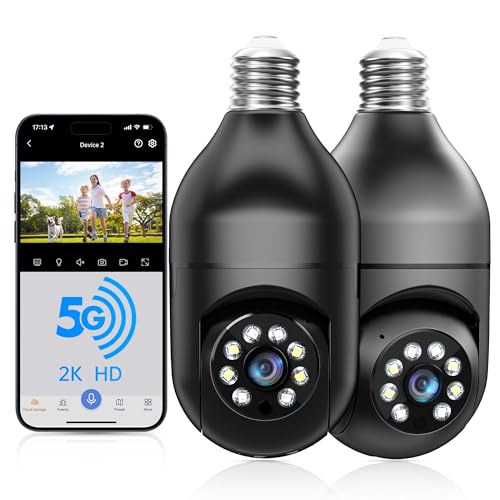
WESECUU Light Bulb Security Camera -5G& 2.4GHz WiFi 2K Security Cameras Wireless Outdoor Motion Detection and Alarm,Two-Way Talk,Color Night Vision,Human Detection, Bulb Camera Compatible with Alexa
Check price on Amazon
HD Wireless Light Bulb Security Camera,WiFi Bulb Camera for Home Security | 355° Pan/Tilt Surveillance Camera with Auto Motion Tracking, Two-Way Audio, Full-Color Night Vision, Easy Installation
Check price on Amazon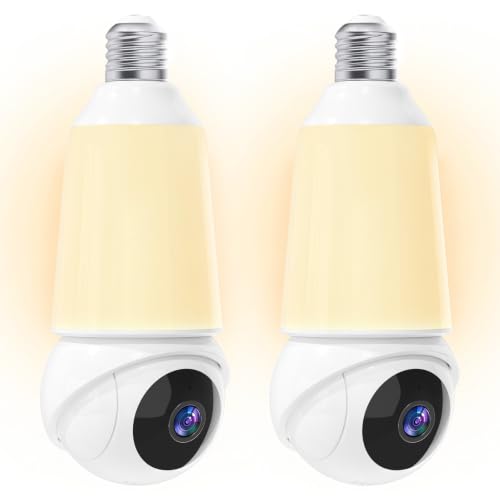
Light Bulb Security Camera -5G& 2.4GHz WiFi 2K Camera for Home Security, 1000-Lumen Dimmable Bulb Camera with Color Night Vision, Two-Way Talk, Motion Detection & Siren, 355°Pan Compatible with Alexa
Check price on Amazon
Light Bulb Security Camera -5G& 2.4GHz WiFi 2K Security Cameras Wireless Outdoor Motion Detection and Alarm,Two-Way Talk,Color Night Vision,Human Detection, Bulb Camera Compatible with Alexa 4Pack
Check price on Amazon
GNCC 2K Light Bulb Security Camera, 360° Outdoor Camera 2.4G WiFi (1-Pack) | Easy Screw-In Setup for Porches, Garages & Driveways; Full-Color Night Vision, Motion Alerts, Local SD or Optional Cloud
Check price on AmazonBuying Guide: How to Choose the Right Light Bulb Camera
With so many options available, it's important to know what to look for. Here are the key factors to consider:
1. Determine Your Surveillance Needs
Are you monitoring a small entryway or a large backyard? For small areas, a standard 1080p camera suffices. For larger spaces, consider a small security camera with night vision and a wider field of view.
2. Check Compatibility
Most light bulb cameras fit standard E26/E27 sockets. Verify that your fixture is compatible and that the camera's size won't obstruct the light output.
3. Decide on Storage
If you prefer no ongoing costs, choose a model with microSD card support. For remote access and backup, cloud storage is convenient but may require a monthly fee. A subscription-free wireless security camera is ideal for budget-conscious buyers.
4. Consider Internet Requirements
Some locations lack reliable Wi-Fi. In such cases, look for a light bulb camera without subscription that supports local recording, or consider a battery-operated security camera without WiFi as an alternative.
Light Bulb Cameras vs. Other Security Camera Types
How do light bulb cameras stack up against traditional options?
vs. Traditional CCTV
Traditional CCTV systems offer superior durability and often better video quality, but they require professional installation and significant upfront investment. Light bulb cameras win on convenience and cost. For a more robust solution, explore professional outdoor security cameras.
vs. Wireless Security Cameras
Wireless cameras like those in a wireless security camera system for small business offer more placement flexibility but require battery changes or charging. Light bulb cameras stay powered continuously.
vs. Hidden Cameras
While a hidden surveillance camera for outside home is designed to be completely concealed, light bulb cameras are discreet but visible. They serve as both a deterrent and a monitoring tool.
vs. Doorbell Cameras
Doorbell cameras are excellent for entryway monitoring, but they only cover one angle. A front porch light with security camera can provide a wider view of your entire porch area.
Best Use Cases for Light Bulb Security Cameras
🏠 Home Entrances
Replace your porch light with a camera bulb to monitor visitors, deliveries, and potential intruders. This is one of the most popular applications.
🚗 Garages & Driveways
Garage lights are ideal locations for these cameras. Monitor your vehicles, tools, and driveway activity around the clock.
🏢 Small Businesses
For a wireless security camera system for small business, light bulb cameras offer an affordable way to monitor entrances and storage areas.
🏢 Apartments & Rentals
Renters love light bulb cameras because they don't require permanent modifications. A small camera for outside apartment door provides peace of mind without violating lease agreements.
Ready to Upgrade Your Home Security?
Browse our top-rated light bulb security cameras and find the perfect fit for your needs.
SHOP RECOMMENDED MODELSFrequently Asked Questions
Do light bulb security cameras need Wi-Fi?
Most light bulb cameras require a 2.4GHz Wi-Fi connection for remote viewing and notifications. However, some models can record locally to a microSD card without Wi-Fi. If you need a camera that works entirely offline, consider a security camera that doesn't use internet or a indoor security camera that doesn't need WiFi.
Are light bulb cameras easy to install?
Yes! Installation typically takes less than five minutes. Simply screw the camera into an existing light socket, download the companion app, and follow the setup instructions. No drilling, wiring, or professional help is required.
Do light bulb cameras require a subscription?
Not necessarily. Many models offer local storage via microSD card, which means no monthly fees. If you want cloud storage for remote backup, a subscription may be required. Look for a light bulb camera without subscription if you prefer no ongoing costs.
Can light bulb cameras see in the dark?
Yes, most models feature infrared night vision that automatically activates in low-light conditions. Some premium models offer color night vision for even better clarity after dark.
What if my light fixture doesn't have a socket?
Light bulb cameras require a standard E26 or E27 socket. If your desired location lacks one, consider alternatives like a battery-operated security camera without WiFi or a solar panel for outdoor security camera setup.
Are light bulb cameras legal?
Yes, they are legal for monitoring your own property. However, laws regarding audio recording vary by jurisdiction. Always check local regulations before using two-way audio or recording in areas where privacy is expected.
Final Thoughts
Light bulbs with security cameras in them represent a perfect blend of convenience, affordability, and functionality. Whether you're a renter looking for a small security camera that connects to phone or a homeowner wanting to enhance your property's security, these devices offer an excellent solution.
For those who prefer a completely wireless setup, a wireless security camera without monthly fee might be a better fit. But if you have existing light fixtures and want a no-hassle installation, a light bulb camera is hard to beat.
Remember to consider your specific needs—resolution, night vision, storage, and connectivity—before making a purchase. With the right choice, you'll enjoy peace of mind knowing your property is monitored around the clock.