
Security Camera That Doesn't Use Internet
Discover how to protect your home with a security camera that works completely offline. No Wi-Fi, no monthly fees, no internet required — just reliable local recording and full privacy.
SEE RECOMMENDED MODELSWhen most people think about modern home security, they imagine cameras connected to Wi-Fi, streaming live footage to a smartphone app, and sending alerts to the cloud. But what happens when your internet goes down, when you live in a rural area with unreliable connectivity, or when you simply don't want your private footage stored on someone else's server? That's where a security camera that doesn't use internet becomes not just a convenience, but a necessity.
Offline security cameras have quietly become one of the fastest-growing segments in home surveillance. They appeal to privacy-conscious homeowners, people in remote locations, renters who can't modify their network setup, and anyone who is tired of paying monthly subscription fees. In this guide, we'll walk you through everything you need to know before buying one — from how they work, to the different types available, to the specific features that actually matter.
Why Choose a Security Camera Without Internet?
There are several compelling reasons why a homeowner might deliberately choose a camera that doesn't rely on an internet connection. Understanding these reasons will help you determine whether an offline camera is the right fit for your situation.
1. Complete Privacy and Data Control
When a camera streams to the cloud, your footage passes through servers owned by a third-party company. While most reputable brands use encryption, the reality is that your private moments — your family coming and going, your children playing in the yard — are stored on infrastructure you don't control. A camera that doesn't use internet keeps every byte of footage on your premises. If you're looking for a solution that respects your privacy above all else, this is the strongest argument for going offline. You may also want to explore hidden cameras that don't require Wi-Fi if discretion is your priority.
2. No Monthly Subscription Fees
Many popular Wi-Fi cameras are inexpensive upfront but require a monthly cloud storage plan to unlock features like video history. Over three years, those fees can easily exceed the cost of the camera itself. An offline camera typically uses a local SD card or a DVR with a hard drive, meaning you pay once and own your storage forever. If cost predictability matters to you, check out our guide to wireless security cameras without monthly fees.
3. Reliability When Internet Fails
Internet outages happen — during storms, construction, or provider downtime. A Wi-Fi camera becomes a paperweight the moment your router loses its connection. A camera that doesn't use internet keeps recording regardless. This makes offline cameras especially valuable for rural properties, cabins, and locations where broadband is unreliable.
4. Ideal for Remote or Off-Grid Locations
If you own a farm, a vacation home, or a construction site with no internet infrastructure, a traditional Wi-Fi camera simply won't work. Offline cameras — particularly battery-powered or solar models — are designed exactly for these scenarios. For perimeter protection in remote areas, a outdoor security camera without internet paired with a local DVR is a proven solution.
5. Simplicity and Fewer Points of Failure
Wi-Fi cameras require a stable network, a smartphone app, an account, and periodic firmware updates. An offline camera has fewer moving parts. You set it up, it records, and you retrieve the footage when you need it. For users who don't want to manage yet another app, this simplicity is a major advantage.
How Do Security Cameras Work Without Internet?
It's a common misconception that a security camera needs the internet to function at all. In reality, the internet is only needed for remote viewing and cloud storage. The core functions of a camera — capturing video, recording it, and storing it — can all happen locally. Here's how the main approaches work.
Local Storage via SD Card
The simplest offline camera records directly to a microSD card inserted into the camera itself. Once the card fills up, the camera either stops recording or loops over the oldest footage (a feature called "loop recording"). To view the footage, you either remove the card and plug it into a computer, or connect to the camera's own local Wi-Fi hotspot — which does not require an internet connection, only a direct device-to-camera link. This approach is common in indoor security cameras that don't need Wi-Fi.
Local Storage via DVR or NVR
A more robust setup uses a DVR (Digital Video Recorder) or NVR (Network Video Recorder) with a built-in hard drive. Multiple cameras connect to this central unit via cables or a closed local network, and all footage is stored on the hard drive. You can connect a monitor directly to the DVR to view live feeds and playback — no internet required at any point. If you're planning a multi-camera system, a DVR with hard drive for security cameras is the backbone of this setup.
Cellular Connectivity (No Wi-Fi, But Still Connected)
Some cameras skip Wi-Fi entirely but include a built-in 4G/LTE cellular module. These cameras don't need your home internet, but they do need a cellular data plan (similar to a phone SIM). They're ideal for locations without broadband but with cellular coverage. This is a middle-ground option: technically "connected," but not dependent on your home network. Learn more in our article on whether there's a security camera that doesn't need internet.
Battery-Powered, Fully Offline Cameras
The most independent category is battery-powered cameras that record to a local SD card and never connect to any network. These are truly set-and-forget devices. You mount them, they record motion events to the card, and you check the footage periodically by retrieving the card. For a deeper dive, see our guide to battery-operated security cameras without Wi-Fi.
Types of Security Cameras That Don't Use Internet
Not all offline cameras are built the same. The right choice depends on where you plan to install it, whether you have power nearby, and how you want to access footage. Below are the main categories.
| Type | Best For | Power Source | Typical Price |
|---|---|---|---|
| SD Card Camera | Single-room indoor monitoring | AC adapter or battery | $40–$120 |
| DVR-Based System | Whole-home multi-camera coverage | Wired AC power | $150–$400 |
| Cellular Camera | Remote sites without broadband | Battery or solar | $150–$400 |
| Battery-Powered Offline | Rentals, temporary setups | Rechargeable battery | $60–$200 |
| Trail / Wildlife Camera | Outdoor perimeter, wildlife | Battery | $50–$250 |
Indoor Offline Cameras
These are compact units designed to sit on a shelf or mount on a wall inside your home. They typically record to a microSD card and can be accessed via a direct local connection. If you want something that works without any network at all, look for models marketed as indoor cameras that don't require Wi-Fi. For continuous monitoring of a room, an indoor camera with continuous recording is a good fit.
Outdoor Offline Cameras
Outdoor cameras need to withstand weather, so they're built with IP65 or higher ratings. Many are battery-powered and record to a local card, while others connect to a DVR. If you need something that blends into your exterior, consider inconspicuous outdoor security cameras. For areas without power, a solar panel for outdoor security camera can keep the battery topped up indefinitely.
Battery-Powered and Solar Models
Battery-powered cameras are the most flexible because they don't require an outlet. A fully charged battery can last anywhere from one to six months, depending on motion activity. Pair one with a solar panel and you may never need to recharge manually. Our guide to battery-powered no Wi-Fi security cameras covers the best options in this category.
Cellular-Connected Cameras
If you need remote viewing but don't have home internet, a cellular camera is the answer. It uses a 4G LTE SIM card to send alerts and footage to your phone. You'll pay for a data plan, but you avoid the need for a router entirely. These are popular for construction sites and remote cabins. See our comparison of wireless security cameras with no Wi-Fi needed.
Storage Options for Offline Security Cameras
The storage method is arguably the most important decision when choosing an offline camera. It determines how long you can keep footage, how easily you can access it, and whether you'll ever need to pay a recurring fee.
MicroSD Cards
MicroSD cards are the simplest and most affordable storage option. A 128GB card can hold roughly one to two weeks of footage from a single camera, depending on resolution and motion settings. The main drawback is that if someone steals the camera, they take the footage with them. For this reason, SD card cameras are best used indoors or in combination with a visible deterrent like a decoy security camera with motion sensor.
DVR / NVR with Hard Drive
A DVR or NVR with a dedicated hard drive (typically 1TB to 4TB) can store weeks or even months of footage from multiple cameras. The recorder is usually kept in a locked location inside the home, so even if a camera is tampered with, the footage remains safe. This is the most secure offline storage method. If you're building a system from scratch, start with a DVR with hard drive for security cameras.
Local Network Attached Storage (NAS)
Some advanced cameras can record to a NAS device on your local network. This gives you the capacity of a hard drive with the flexibility of network access — all without touching the internet. It's a more technical setup, but ideal for users who already have a home server.
Key Features to Look For
When shopping for a security camera that doesn't use internet, not all features are equally important. Here are the ones that genuinely affect your experience.
Resolution and Night Vision
1080p is the baseline in 2026; 2K and 4K models are increasingly affordable. Higher resolution means you can zoom into footage and still identify faces or license plates. Night vision is equally critical — look for cameras with IR LEDs or color night vision. For outdoor use, a small security camera with night vision can cover a doorway or driveway effectively.
Motion Detection and Alerts
Since you won't have cloud alerts, on-device motion detection is essential. Better cameras use PIR (passive infrared) sensors to reduce false triggers from moving trees or shadows. Some also support customizable motion zones.
Local Access Methods
How will you view footage? Options include: removing the SD card, connecting via the camera's own Wi-Fi hotspot, or viewing on a monitor connected to a DVR. Choose a camera whose access method matches your comfort level. If you want phone access without internet, look for cameras that create their own local hotspot — these are sometimes described as cameras that can connect to your phone without a router.
Power Source and Battery Life
Battery-powered cameras offer the most flexible installation but require periodic charging. Look for models with at least 3–6 months of battery life under normal use. Solar-compatible models can extend this indefinitely. If you have an outlet nearby, a wired camera eliminates the charging chore entirely.
Weatherproofing
For outdoor installation, check the IP rating. IP65 protects against dust and water spray; IP67 can handle brief immersion. If you're mounting under an eave, IP65 is usually sufficient.
Storage Capacity and Loop Recording
Confirm the maximum SD card size the camera supports (many cap at 128GB or 256GB). Loop recording — automatically overwriting the oldest footage — is essential for uninterrupted coverage. Without it, the camera simply stops recording when the card is full.
Pros and Cons of Internet-Free Security Cameras
No product is perfect. Here's an honest look at the trade-offs.
Advantages
- No monthly fees — you own your storage and never pay a subscription
- Complete privacy — footage never leaves your property
- Works during outages — recording continues even when the internet is down
- Ideal for remote locations — no broadband infrastructure required
- Simple setup — no account creation, no app pairing, no router configuration
- Hacker-resistant — cameras not connected to the internet can't be remotely accessed
Disadvantages
- No remote viewing — you can't check live footage from your phone while away (unless you use a cellular model)
- Physical access required — retrieving footage often means accessing the camera or DVR directly
- Theft risk — if the camera or SD card is stolen, the footage is gone
- Limited storage — SD cards fill up faster than cloud plans
- Fewer smart features — no AI person detection, no cloud backups, no integration with smart home hubs
If remote viewing is non-negotiable but you still want to avoid monthly fees, consider a hybrid approach: a camera that records locally to an SD card and supports optional cellular connectivity for alerts only. This gives you the best of both worlds. You can read more about wireless security cameras without monthly fees for options that balance these trade-offs.
Setup and Installation Tips
Installing an offline camera is generally easier than installing a Wi-Fi camera because there's no network configuration involved. Here are practical tips to get it right the first time.
1. Choose the Right Location
Mount cameras at a height of 8–10 feet, angled slightly downward. This prevents tampering and captures faces rather than the tops of heads. For entryways, a small camera for outside apartment door can be mounted discreetly without drilling into the door itself.
2. Test Before Permanent Mounting
Before drilling holes, hold the camera in the intended position and check the field of view. Make sure it covers the area you care about — your door, driveway, or side gate — and that motion events trigger reliably.
3. Format the SD Card
Always format the SD card inside the camera, not on your computer. This ensures the correct file system and prevents recording errors. Use a card rated for surveillance use (high endurance) rather than a standard card, which can fail under continuous write cycles.
4. Secure the DVR
If you're using a DVR-based system, place the recorder in a locked cabinet or a hidden location. The DVR is the heart of your system — if it's stolen, you lose everything. Consider bolting it to a shelf or wall.
5. Optimize Motion Detection
Adjust sensitivity to avoid false alerts from passing cars or swaying branches. If your camera supports motion zones, mask out areas you don't care about, like a public sidewalk. This conserves battery and storage space.
6. Plan for Power
Battery cameras need periodic charging — decide now how you'll reach them. Solar panels are a worthwhile investment for outdoor cameras in sunny locations. For indoor cameras, a USB power adapter is usually the simplest solution. If you need a camera that screws into a light socket, see our guide to a camera that screws into a light socket.
7. Check Regularly
Once a month, verify that the camera is still recording and that the SD card isn't full or corrupted. Offline cameras don't send status alerts, so a quick manual check prevents unpleasant surprises.
Recommended Security Cameras Without Internet
⚠️ AFFILIATE DISCLOSURE: This website contains affiliate links. As an affiliate Associate, we earn from qualifying purchases. If you make a purchase through these links, we may receive a small commission at no additional cost to you. Read our full affiliate policy.

HOSAFE.COM 4G LTE Cellular Security Camera No Internet Needed, 2K Solar No WiFi Security Camera Outdoor Wireless with SIM Card Jobsite,360 Live View, Motion Detection,Free Cloud Storage(Need Apply)
Check price on Amazon
4G LTE Cellular Security Camera No Internet Needed, 2K Solar No wifi Security Camera Outdoor Wireless With SIM Card Jobsite,360 Live View, Motion Detection,Free Cloud Storage(Need Apply), 2 Packs
Check price on Amazon
4G LTE Cellular Solar Security Cameras Wireless Outdoor, Built in SIM Card | No Wi-Fi 2K Camera, 24/7 Recording, Color Night Vision, 360°Pan Tilt, 2-Way Audio, AI Motion Detection, Ultra Solar Panel
Check price on Amazon
4G LTE Security Camera No Internet Needed, Free Cloud Storage, 2K HD Video | 360° PTZ Outdoor Camera, Solar Camera Outdoor Wireless, PIR Motion Detection, 2-Way Talk, Wall/Ceiling Mount, Waterproof
Check price on Amazon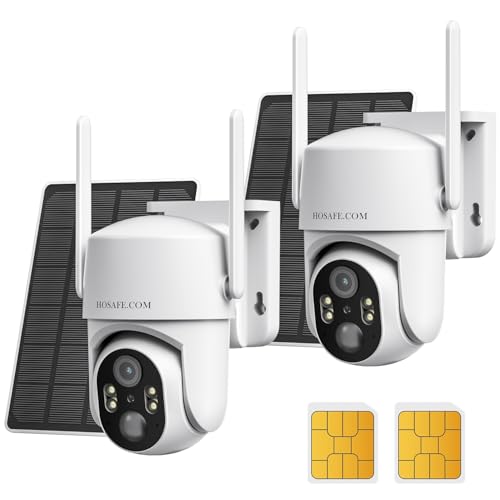
No WIFI Security Camera No Internet Needed, 2Packs, 2K Color Night Vision | 4G LTE Cellular Security Camera Outdoor Wireless Solar, PIR Motion Detection, Phone Alerts, Two Way Talk, IP66
Check price on Amazon
AOQEE 5G Cameras for Home Security Indoor, Pet Monitor w/Phone APP G5 2Pcs | Dual-Band Wi-Fi Indoor Camera with 24/7 TF Card Storage, 360 PTZ Auto-Tracking Pet/Dog/Cat/Puppy/Nanny, Motion Alert, Plug-in
Check price on Amazon
GNCC Cameras for Home Security 5Ghz WiFi Indoor Camera with 360°PTZ, 4 Pack | AI Motion Tracking,2K Night Vision, Detection for Pets /Baby/Nanny/Dogs, 2-Way Audio, 24/7 SD Card or Cloud, Works with Alexa
Check price on AmazonFrequently Asked Questions
Can a security camera work without internet?
Yes. A security camera can record video locally to an SD card or DVR without any internet connection. The internet is only required for remote viewing and cloud storage. If you don't need those features, a fully offline camera works perfectly.
How do I view footage from a camera that doesn't use internet?
You have three main options: remove the SD card and view it on a computer, connect directly to the camera's built-in Wi-Fi hotspot (which doesn't require internet), or connect a monitor to a DVR if your system uses one.
Are offline security cameras cheaper than Wi-Fi cameras?
Upfront, they're often similarly priced or slightly cheaper. The real savings come over time — offline cameras have no monthly subscription fees. A $100 Wi-Fi camera with a $5/month plan costs $280 over three years, while an offline camera at $120 costs just $120.
What happens if the power goes out?
Battery-powered offline cameras continue recording during a power outage. Wired cameras will stop unless connected to a UPS (uninterruptible power supply). If power reliability is a concern, choose a battery-powered model.
Can I still get motion alerts on my phone without internet?
Not on a fully offline camera. However, some cameras create a local Wi-Fi hotspot that lets you connect your phone directly when you're home. For remote alerts without home internet, you'll need a cellular camera with a data plan.
Is a camera without internet more secure?
From a cybersecurity standpoint, yes. A camera that never connects to the internet cannot be hacked remotely. The main physical risk is theft of the camera or storage card, which is why many users pair an offline camera with a hidden DVR.
How much storage do I need for an offline camera?
For motion-only recording at 1080p, a 64GB card holds roughly 1–2 weeks of footage. For continuous recording, plan on about 1GB per hour — a 128GB card holds about 5 days. A 2TB hard drive in a DVR can store months of multi-camera footage.
Can I use an offline camera for outdoor surveillance?
Absolutely. Many offline cameras are designed specifically for outdoor use with weatherproof housings and battery or solar power. Just make sure the model you choose has an appropriate IP rating (IP65 or higher) and night vision if you need 24-hour coverage.