
Cameras That Can Connect to Your Phone
Discover how to turn your smartphone into a powerful control center for security cameras, action cams, dash cams, and professional photography gear. Learn which connection types work best for your needs.
VIEW TOP PICKSWhy Phone Connectivity Matters: In today's connected world, a camera that links to your smartphone gives you instant access to live feeds, remote control, easy file transfers, and real-time alerts. Whether you need a small security camera that connects to phone or a beginner mirrorless camera for photography, choosing the right wireless protocol is the key to a seamless experience.
How Cameras Connect to Your Phone
Not all wireless cameras are created equal. The connection method determines range, reliability, power consumption, and whether you need an internet connection. Here are the main technologies to understand before you buy.
Wi-Fi Cameras
Wi-Fi is the most common way cameras link to phones. It offers high-bandwidth video streaming, remote access from anywhere, and support for cloud storage. Most wireless security cameras use Wi-Fi for live viewing and playback.
- Works over your home network
- Remote access via apps like Tuya or manufacturer apps
- Requires stable internet for cloud features
- Best for: home security, baby monitors, pet cams
Bluetooth Cameras
Bluetooth is ideal for short-range, low-power connections. It's commonly found in action cameras, dash cams, and some small battery-operated surveillance cameras. You can pair directly without a router.
- Direct phone-to-camera pairing
- Low power consumption
- Limited range (30–50 feet)
- Best for: action cams, dash cams, setup & control
Cellular & 4G LTE
For locations without Wi-Fi, cellular cameras use a SIM card to connect to your phone from anywhere. These are perfect for remote properties, construction sites, and home security cameras that don't need internet at the camera location.
- Works anywhere with cell signal
- Requires data plan or SIM card
- Higher monthly cost
- Best for: remote monitoring, off-grid security
Direct Wi-Fi (No Router)
Some cameras create their own Wi-Fi hotspot, letting you connect directly without a home network. This is common in indoor security cameras that don't need Wi-Fi and budget action cams.
- No router or internet required
- Direct phone-to-camera link
- Limited to local viewing
- Best for: quick setup, temporary monitoring
Recommended Cameras That Connect to Your Phone
⚠️ AFFILIATE DISCLOSURE: This website contains affiliate links. As an affiliate Associate, we earn from qualifying purchases. If you make a purchase through these links, we may receive a small commission at no additional cost to you. Read our full affiliate policy.

Klik Screen-Free Digital Camera | Stay Present & Capture Retro Photos | 3 Vintage Film-Style Filters, 500 Shots Per Charge, Built-in Flash, USB-C Photo Transfer, Rechargeable (Black)
Check price on Amazon
Klik Screen-Free Digital Camera | Stay Present & Capture Retro Photos | 3 Vintage Film-Style Filters, 500 Shots Per Charge, Built-in Flash, USB-C Photo Transfer, Rechargeable (Green)
Check price on Amazon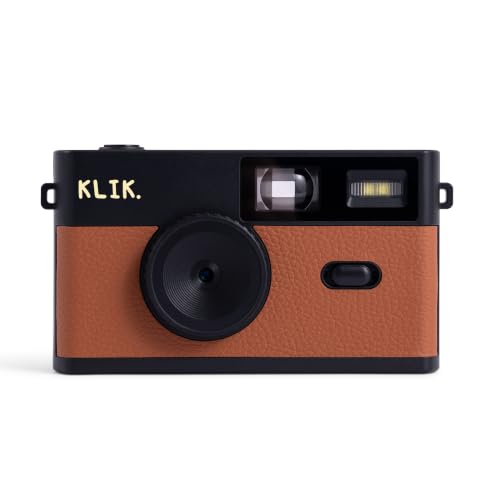
Klik Screen-Free Digital Camera | Stay Present & Capture Retro Photos | 3 Vintage Film-Style Filters, 500 Shots Per Charge, Built-in Flash, USB-C Photo Transfer, Rechargeable (Brown)
Check price on Amazon
Klik Screen-Free Digital Camera | Stay Present & Capture Retro Photos | 3 Vintage Film-Style Filters, 500 Shots Per Charge, Built-in Flash, USB-C Photo Transfer, Rechargeable (Blue)
Check price on Amazon
youkey 2.5K Indoor Pet Security Camera, Two-Way Audio Chat to Your Pets, AI Pet/Human Detection, 360° AI Human Tracking, Privacy Mode, No Monthly Fees, Night Vision, WiFi 6(2.4GHz & 5GHz)
Check price on Amazon
Klik Screen-Free Digital Camera | Stay Present & Capture Retro Photos | 3 Vintage Film-Style Filters, 500 Shots Per Charge, Built-in Flash, USB-C Photo Transfer, Rechargeable (Pink)
Check price on AmazonSecurity Cameras with Phone Access
Security cameras are the most popular category for phone connectivity. You can check live feeds, receive motion alerts, and review recordings from anywhere. Here's what to look for:
| Camera Type | Connection | Best Use | Price Range |
|---|---|---|---|
| Small Security Camera | Wi-Fi / Direct | Indoor discreet monitoring | $30–$80 |
| Indoor Camera (No Subscription) | Wi-Fi | Home monitoring without fees | $25–$60 |
| Outdoor Camera Without Internet | Direct Wi-Fi / 4G | Remote or offline locations | $80–$200 |
| Wireless Camera (No Monthly Fee) | Wi-Fi + Local Storage | Budget-conscious buyers | $40–$120 |
| Battery-Operated Outdoor Camera | Wi-Fi (battery) | Rental homes, easy install | $100–$250 |
| Solar-Powered Camera | Wi-Fi / 4G | Eco-friendly continuous power | $120–$300 |
For a deeper dive into specific needs, explore our guides on home security cameras that don't need internet and live feed security cameras without Wi-Fi.
Action Cameras & Dash Cams with Phone Control
Action cameras and dash cams have embraced phone connectivity for easy framing, settings adjustment, and instant sharing. Bluetooth and Wi-Fi are standard in most modern models.
Action Cameras
Mount them on helmets, bikes, or drones and control everything from your phone. You can preview shots, start/stop recording, and transfer files wirelessly.
- Wi-Fi + Bluetooth combo
- Live preview on phone screen
- Instant social media sharing
- Popular brands: GoPro, DJI, Insta360
Dash Cams
Review footage, adjust parking mode, and download clips directly to your phone. Many battery-powered dash cams front and rear include Wi-Fi for seamless phone integration.
- Wi-Fi for video transfer
- Parking mode alerts on phone
- Easy evidence sharing after incidents
- Some support cloud backup
Trail Cameras
Modern trail cams let you check wildlife activity from your phone. Models like trail cameras you can watch on your phone use cellular or Wi-Fi to send photos and videos.
- Cellular or Wi-Fi models
- Instant photo alerts
- Remote settings adjustment
- Ideal for hunting and wildlife monitoring
Photography Cameras with Phone Tethering
Mirrorless and DSLR cameras now offer robust phone connectivity for remote shooting, file transfer, and live view. This is a game-changer for portrait, landscape, and professional photography and videography.
Mirrorless Cameras
Most modern mirrorless cameras have built-in Wi-Fi and Bluetooth. Use your phone as a remote shutter, monitor, and file transfer hub. Great for beginner mirrorless cameras and up.
- Remote live view shooting
- Wireless image transfer
- Geotagging via phone GPS
- Firmware updates via app
Point & Shoot Cameras
Compact cameras with Wi-Fi let you share photos instantly. Models like point and shoot digital cameras with viewfinder often include phone apps for easy transfer.
- One-touch transfer to phone
- Remote shooting for selfies
- Easy social media upload
- Lightweight and travel-friendly
Ready to Choose Your Connected Camera?
Whether you need a security camera, action cam, or photography companion, phone connectivity makes everything easier. Explore our top recommendations above and find the perfect match for your needs.
BACK TO TOP PICKSFrequently Asked Questions
Do all security cameras need Wi-Fi to connect to a phone?
No. Some cameras use Bluetooth, direct Wi-Fi (no router), or cellular connections. For example, indoor cameras that don't require Wi-Fi can connect directly to your phone for local viewing.
Can I view my camera on my phone without the internet?
Yes, if the camera creates its own Wi-Fi hotspot or uses Bluetooth. However, remote viewing from outside your home network typically requires internet. Learn more in our guide on security cameras that don't need internet.
What is the best camera for phone connectivity?
It depends on your needs. For security, look for Wi-Fi or 4G cameras with no subscription fees. For photography, choose a mirrorless camera with robust app support. For action, pick a GoPro or DJI with Wi-Fi and Bluetooth.
Are there cameras that connect to phone without monthly fees?
Absolutely. Many cameras offer local storage via SD card and free apps for live viewing. Check out our list of wireless security cameras without monthly fees.
How far can a camera be from my phone?
Bluetooth works up to about 50 feet. Wi-Fi range depends on your router—typically 100–300 feet indoors. Cellular cameras work anywhere with a cell signal.
Final Thoughts
Phone connectivity has transformed how we use cameras. From checking on your home while on vacation to transferring photos instantly to social media, the right camera makes your smartphone even smarter. When choosing, consider:
- Connection type: Wi-Fi for remote access, Bluetooth for short-range control, cellular for off-grid locations.
- App quality: A good app makes all the difference in usability.
- Subscription fees: Some cameras require monthly plans for cloud storage—decide if that's worth it.
- Your primary use: Security, action, dash cam, or photography—each has different priorities.
Ready to buy? Browse our recommended cameras above, and don't forget to check our related guides on cameras that can connect to your phone and cameras you can watch on your phone for more insights.