
Home Security Cameras That Don't Need Internet
Protect your home without relying on WiFi, cloud subscriptions, or an active internet connection. Discover how offline security cameras work and which options fit your needs.
Why Go Internet-Free? Many homeowners are discovering that internet-dependent cameras come with hidden costs: monthly cloud fees, privacy concerns, and vulnerability during outages. Home security cameras that don't need internet solve these problems by storing footage locally and operating independently.
How Do Security Cameras Work Without Internet?
When people search for a security camera that doesn't use internet, they're often surprised to learn that these devices rely on a completely different architecture than their WiFi counterparts. Instead of streaming video to the cloud, offline cameras record directly to a local storage medium — typically an SD card, a built-in hard drive, or a DVR/NVR system.
The camera still captures footage, detects motion, and can even trigger alerts. The difference is where that data goes and how you access it. Many models let you view live or recorded footage through a direct local connection, such as a monitor plugged into the DVR or a dedicated app that works over your home network without needing an internet uplink.
For a deeper explanation of how these systems operate, see our guide on is there a security camera that doesn't need internet.
Types of Internet-Free Security Cameras
There's no single "offline camera" — the category includes several distinct approaches. Understanding the differences helps you choose the right one for your property.
Battery-Powered Cameras Without WiFi
These cameras run on rechargeable batteries and store footage on a local SD card. They often include cellular connectivity as an optional backup, but they can function entirely offline. A popular choice is a battery operated security camera without WiFi, which is ideal for rentals, remote cabins, or areas where running power cables is impractical.
If you need something even more compact, consider a battery powered no WiFi security camera that can be mounted almost anywhere.
Cameras With Local DVR or NVR Storage
Traditional CCTV systems use a DVR (Digital Video Recorder) or NVR (Network Video Recorder) to store footage from multiple cameras. These systems don't require internet — they only need power and a wired connection between cameras and the recorder. You can view footage on a connected monitor or via a local network.
For a complete setup, look for a DVR with hard drive for security cameras that includes ample storage for weeks or months of recordings.
Cellular-Connected Cameras (Offline-Capable)
Some cameras use a cellular SIM card instead of WiFi, which means they don't need your home internet. While they do transmit data over a mobile network, they operate independently of your WiFi and can function in areas with no broadband. These are often used as home security cameras that don't need internet in the traditional sense.
Light Socket and Bulb Cameras
These clever devices screw into a standard light socket and often include local storage. They're easy to install and don't require WiFi to record. A camera that screws into a light socket is a great option for porches, garages, and entryways.
You can also explore light bulbs with security cameras in them for a discreet, dual-purpose solution.
Key Features to Look For in an Offline Security Camera
Not all internet-free cameras are created equal. Here's what matters when you're comparing models.
Local Storage Capacity
Most offline cameras rely on microSD cards. Look for support for at least 128GB, and ideally 256GB, so you can store weeks of footage before overwriting. Some systems support external hard drives for even more capacity.
Night Vision and Low-Light Performance
Security doesn't stop at sunset. A home security system with night vision ensures you capture clear footage even in complete darkness. Infrared LEDs are standard, but some cameras offer color night vision for better identification.
For smaller spaces, a small security camera with night vision can be just as effective.
Motion Detection and Alerts
Offline cameras can still send alerts — they just do it locally or via a direct connection. Look for customizable motion zones to reduce false alarms from passing cars or swaying trees.
Power Source
Battery-powered models offer flexibility but require recharging. Wired models provide continuous power but need a cable run. Solar-powered options are excellent for outdoor use where sunlight is available. A solar panel for outdoor security camera can keep your device charged indefinitely.
Weather Resistance
For outdoor installation, look for an IP65 or higher rating. A outdoor security camera without internet needs to withstand rain, dust, and temperature extremes.
Benefits of Choosing a No-Internet Security Camera
Why are so many homeowners switching to offline systems? The advantages go beyond just saving on subscription fees.
No Monthly Fees
Cloud storage plans can cost $5–$15 per month per camera, adding up quickly. A non-subscription outdoor security camera eliminates that recurring expense entirely. You buy the hardware once and own your footage.
Similarly, a wireless security camera without monthly fee gives you peace of mind without the ongoing cost.
Privacy and Data Security
When footage stays local, it can't be accessed by third parties, hacked from the cloud, or used for targeted advertising. For many people, this is the single biggest reason to choose an offline camera.
Reliability During Outages
If your internet goes down, WiFi cameras stop working. An offline camera keeps recording, which is exactly when you need it most.
Works in Remote Locations
Cabins, barns, construction sites, and rural properties often lack reliable internet. A security camera that doesn't use internet is the only viable option in these environments.
Installation and Setup Tips
Setting up an internet-free camera is often simpler than configuring a WiFi model, but there are still best practices to follow.
Positioning for Coverage
Place cameras at entry points — front door, back door, garage, and any ground-floor windows. For a comprehensive view, consider an indoor and outdoor security cameras wireless bundle that covers multiple angles.
Storage Management
Regularly check your SD card or DVR storage. Set the camera to overwrite the oldest footage when the card is full, or schedule periodic backups to an external drive.
Power Considerations
If you're using battery-powered cameras, plan a recharging schedule. For wired cameras, ensure you have access to a power outlet or PoE (Power over Ethernet) injector.
Common Use Cases for Offline Security Cameras
Rentals and Apartments
Renters often can't run cables or modify wiring. A small camera for outside apartment door that uses battery power and local storage is a perfect solution. For a discreet option, consider an inconspicuous outdoor security camera.
Small Businesses
A wireless security camera system for small business can operate without internet, storing footage locally while still providing the coverage you need.
Remote Properties
For cabins, farms, and vacation homes, a wireless outdoor security camera with no monthly fee is ideal. Pair it with a solar panel with battery for security camera for a completely self-sufficient setup.
Indoor Monitoring
For inside the home, an indoor security camera that doesn't need WiFi can monitor pets, elderly family members, or general activity without exposing your data to the cloud.
Limitations of Internet-Free Cameras
While offline cameras offer many benefits, they're not perfect for every situation. Here's what to keep in mind.
Remote Access Challenges
Without internet, you can't check your cameras from your phone while you're away from home — unless you use a cellular model or a local network with VPN access. If remote viewing is essential, a camera that you can watch on your phone via cellular may be a better fit.
Storage Limits
Local storage is finite. If you need months of footage, you'll either need a large hard drive or a system that supports multiple storage devices.
No Cloud Backup
If a camera is stolen or destroyed, the footage goes with it. Cloud backup provides an extra layer of security, but it requires internet. Some users compromise by using a cellular camera that backs up only critical events.
Top Picks for Internet-Free Home Security
Based on our research and user feedback, here are some of the best options for different needs.
Best Overall: Battery-Powered No-WiFi Camera
A battery powered no WiFi security camera offers the best balance of flexibility, ease of installation, and offline operation. Look for models with 1080p or 2K resolution, night vision, and SD card support up to 256GB. Expect to pay $80–$200 per camera.
Best for Outdoor: Solar-Powered Camera
For continuous outdoor coverage, a camera paired with a solar panel for outdoor security camera eliminates battery swaps. These systems typically cost $120–$300 and are ideal for driveways, gates, and backyards.
Best for Multi-Camera Setup: DVR System
If you need four or more cameras, a DVR with hard drive for security cameras is the most cost-effective approach. A complete 4-camera system with 1TB storage runs about $200–$500.
Best Discreet Option: Light Bulb Camera
A light bulb camera without subscription blends into your existing fixtures and provides 360-degree coverage. These are surprisingly affordable at $40–$100.
Best for Renters: Small Battery Camera
A small battery operated surveillance camera can be mounted with adhesive or a simple screw, no wiring required. Perfect for apartments and rentals. Prices range from $50–$120.
Frequently Asked Questions
Can a security camera work without WiFi or internet?
Yes. Many cameras record to local SD cards or DVRs and don't require any internet connection. They can operate entirely offline, though you'll need to access footage physically or via a local network.
Do offline cameras still send alerts?
Some do, via local network notifications or cellular signals. Others simply record and rely on you reviewing footage later.
How long can an offline camera record?
It depends on storage capacity and resolution. A 128GB card can hold roughly 2–4 weeks of continuous 1080p footage, or longer if motion-activated recording is used.
Are offline cameras more secure?
Generally, yes — because footage isn't transmitted over the internet, it's less vulnerable to hacking. However, physical security of the device and storage is still important.
Can I use an offline camera with a phone?
Some models offer direct WiFi or Bluetooth connection for setup and live view without an internet connection. Others require a DVR with a local network. Check the specifications before buying.
Recommended Internet-Free Security Cameras
⚠️ AFFILIATE DISCLOSURE: This website contains affiliate links. As an affiliate Associate, we earn from qualifying purchases. If you make a purchase through these links, we may receive a small commission at no additional cost to you. Read our full affiliate policy.

ELYSOO No WiFi Security Camera Outdoor, Always-on Video, 4MP 360° Full View | 4G LTE Cellular Security Camera Solar, Built-in SIM Card, 24/7 Recording, Color Night Vision, Instant Alerts for Remote Areas
Check price on Amazon
Oculview 4G LTE Cellular Security Camera 2 Pack, Easy to Install, Off Grid Solar Powered, No WiFi Needed for Farm, Ranch, Jobsite, 2K Color Night Vision, 360° View, Built-in SIM Card - Black
Check price on Amazon
Tefrio No WiFi Security Camera, 4G LTE Cellular, 4MP 360° Full Live View | Solar Cellular Security Camera Outdoor, Built-in SIM Card/Color Night Vision/Instant Alerts/Remote Control for Off-grid Areas
Check price on Amazon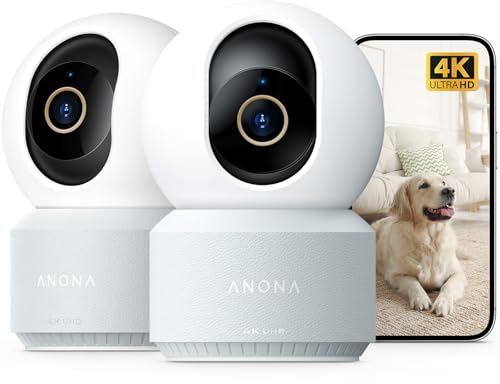
Anona 4K UHD Indoor Camera, Pet/Dog/Baby Security Camera with Phone App, 360°Pan-Tilt, 5G/2.4G Dual-Band Wi-Fi 6, Auto-Tracking, Person/Pet/Baby Crying Detection, Privacy Mode, Two-Way Audio, 2 Pack
Check price on Amazon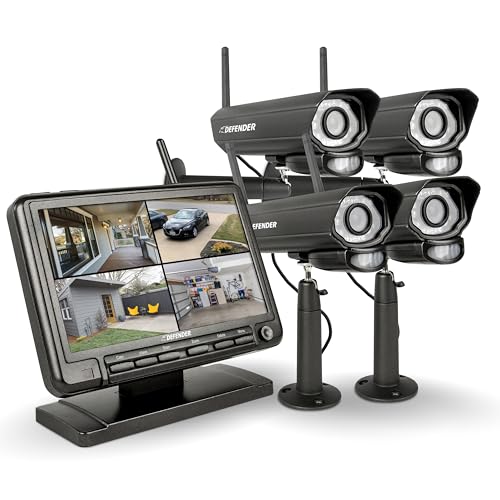
Defender PHOENIXM2 Non WiFi Plug-in Power Security Cameras- for Home & Business Surveillance Indoor & Outdoor Bullet Cameras with 7 Inch LCD Display Monitor (4 Cameras)
Check price on Amazon
4G LTE Security Camera No Internet Needed, Free Cloud Storage, 2K HD Video | 360° PTZ Outdoor Camera, Solar Camera Outdoor Wireless, PIR Motion Detection, 2-Way Talk, Wall/Ceiling Mount, Waterproof
Check price on AmazonFinal Thoughts
Home security cameras that don't need internet offer a compelling alternative to cloud-dependent systems. They save you money on subscriptions, protect your privacy, and keep working when your internet goes down. Whether you choose a battery-powered camera for a rental, a DVR system for a small business, or a solar-powered setup for a remote property, there's an offline solution that fits your needs.
If you're still exploring options, our guide on is there a security camera that works without internet can help you narrow down your choices. And for those who need remote access without WiFi, a live feed security camera without WiFi using cellular technology might be the perfect middle ground.
Whichever route you take, the key is to match the camera's capabilities to your specific environment and monitoring habits. With the right setup, you can enjoy reliable, private, and cost-effective security — no internet required.