
Magic Arm Guide: Articulating Camera Arms for Rigging & Mounting
Discover how magic arms transform your camera rig. Learn about articulation, payload limits, mounting options, and how to choose the right arm for monitors, lights, and accessories.
VIEW RECOMMENDED ARMSA magic arm is one of the most versatile tools in a filmmaker's or photographer's kit. It is an articulating arm with a ball joint at each end, connected by a locking mechanism that lets you position a monitor, light, microphone, or even a small camera at virtually any angle. Unlike fixed mounts, a magic arm gives you the freedom to fine-tune your rig quickly and securely.
Whether you are building a professional cinema rig or simply need to attach a field monitor to your camera cage, understanding how magic arms work, what they can hold, and how to mount them safely will save you time and prevent costly equipment damage. This guide covers everything you need to know before buying your first arm or upgrading an existing one.
What Is a Magic Arm and How Does It Work?
A magic arm consists of two arm segments joined by a central pivot. At each end is a ball joint, typically with a 1/4"-20 or 3/8"-16 threaded stud. When you rotate the central locking knob, all three joints tighten simultaneously, locking the entire arm into position. This single-knob design is what makes magic arms so fast and intuitive to use.
The articulation range is usually around 180 degrees at each joint, giving you enormous flexibility. Most arms are made from aluminum or stainless steel for durability, with rubber or plastic pads on the ball joints to prevent slipping. Some models feature a ratcheting knob for extra torque, while others use a lever-release system for even faster adjustments.
Types of Magic Arms
Magic arms come in several configurations, each suited to different rigging needs. Understanding the differences will help you choose the right one for your setup.
Standard Magic Arm (11-inch)
The most common size, typically around 11 inches (28 cm) when fully extended. It is ideal for mounting monitors, small LED lights, and microphones to a camera cage or bracket. This size balances reach and stability for most mirrorless and DSLR rigs.
Super Clamp Magic Arm
This variant includes a super clamp on one end, allowing you to attach the arm to pipes, tables, shelves, or any round or flat surface. It is perfect for tabletop setups, interview rigs, or when you need to mount a light or monitor away from the camera.
Double Ball Head Magic Arm
A shorter arm with ball heads on both ends and no central pivot. It offers less articulation but is more compact and often stronger. These are great for tight spaces or when you need a low-profile mount.
Articulating Arm with Quick Release
Some premium magic arms feature quick-release plates on one or both ends, allowing you to snap accessories on and off without threading. This is a huge time-saver on set, especially when swapping monitors or lights frequently.
| Type | Typical Length | Best For | Payload Range |
|---|---|---|---|
| Standard Magic Arm | 11 in / 28 cm | Monitors, small lights, mics | 2–5 lbs |
| Super Clamp Arm | 11 in / 28 cm | Tabletop, pipe mounting | 3–6 lbs |
| Double Ball Head | 5–7 in / 13–18 cm | Compact rigs, tight spaces | 2–4 lbs |
| Quick Release Arm | 11 in / 28 cm | Fast swaps on set | 3–6 lbs |
What to Look For When Buying a Magic Arm
Not all magic arms are created equal. The cheapest options often use weak joints and soft metals that strip easily. Here are the key factors to evaluate before you buy.
Payload Capacity
This is the single most important spec. It tells you how much weight the arm can hold securely. For a small field monitor (under 1 lb), almost any arm works. For a heavier monitor or LED panel (3–5 lbs), you need an arm rated for at least 5–6 lbs to have a safety margin. Never exceed the rated payload, and always test the lock before trusting it with expensive gear.
Material and Build Quality
Aluminum alloy is the standard for good reason: it is light, strong, and resistant to corrosion. Stainless steel joints are more durable but heavier. Avoid arms made from unknown alloys or plastic—they will fail under load. Look for arms with brass or steel threaded inserts rather than bare aluminum threads, which strip easily.
Mounting Threads
Most magic arms use 1/4"-20 threads on the ball heads, which is the standard for cameras and accessories. Some use 3/8"-16 for heavier gear. Check that the arm includes the adapters or studs you need. Many arms come with both 1/4" and 3/8" studs, which adds versatility.
Locking Mechanism
The locking knob should feel solid and provide enough torque to hold the arm in place without over-tightening. Ratcheting knobs are helpful when space is tight. Some arms use a lever-release system, which is faster but can be less secure if not adjusted properly.
Rubber Pads and Grip
Rubber or silicone pads on the ball joints prevent slipping and protect your gear from scratches. Replaceable pads are a plus, as they wear out over time. If the pads are missing or worn, the arm will not hold position reliably.
How to Use a Magic Arm Safely
Using a magic arm is straightforward, but a few best practices will keep your gear safe and your shots stable.
- Attach the arm to your rig first. Mount the arm to your camera cage or bracket before adding the accessory. This gives you a stable base to work from.
- Position the arm loosely. Leave the locking knob loose so you can adjust the joints freely. Find the angle you want.
- Tighten the knob firmly. Once positioned, tighten the central knob until the arm is locked. Do not over-tighten—you can damage the threads or the ball joints.
- Attach your accessory. Thread your monitor, light, or mic onto the ball head stud. Make sure it is secure before letting go.
- Test the hold. Gently press down on the accessory to confirm the arm holds. If it slips, reposition and tighten again.
- Check periodically. Vibration and movement can loosen the arm over time. Check the tightness during breaks or between takes.
For a complete rigging setup, consider pairing your magic arm with a camera monitor and a sturdy hot shoe mount or camera cage. If you are building a professional rig, a professional DSLR camera or a full-frame body will benefit most from a well-organized arm setup.
Common Uses for Magic Arms
Magic arms are used across many photography and videography disciplines. Here are some of the most common applications.
Mounting Field Monitors
This is the most popular use. A magic arm lets you position a monitor at the perfect viewing angle, whether you are shooting handheld, on a gimbal, or on a tripod. For gimbal work, a lightweight arm is essential to avoid throwing off balance. Pair it with a camera monitor for a professional monitoring setup.
Attaching LED Lights
Small LED panels and on-camera lights are often mounted with magic arms. The articulation lets you bounce light off walls or create specific angles without moving the camera. This is especially useful for interview setups and run-and-gun documentary work.
Microphone Placement
Shotgun microphones and small wireless receivers can be mounted on magic arms to get them closer to the subject or out of the camera's way. This improves audio quality and reduces handling noise.
Tabletop and Product Photography
A super clamp magic arm is invaluable for tabletop work. You can clamp it to a table edge and position a light or reflector exactly where you need it. This is a staple in product photography and food styling. If you are into product work, you might also be interested in photoshoot boxes and reflectors for cameras.
Action Camera and Smartphone Mounting
With the right adapters, magic arms can hold action cameras, smartphones, or small compact cameras in unconventional positions. This is great for BTS (behind-the-scenes) shots or mounting a second camera for a different angle.
For more advanced rigging, you might combine a magic arm with a monopod for camera or a telescope tripod for added stability. If you are working with a camcorder camera or a video recorder camera, a magic arm can help you mount accessories without adding bulk.
Magic Arm vs. Other Camera Mounts
Magic arms are not the only mounting solution. Here is how they compare to other common options.
| Mount Type | Articulation | Payload | Best For |
|---|---|---|---|
| Magic Arm | High (180° per joint) | 2–6 lbs | Monitors, lights, mics |
| Ball Head | Medium (360° pan, 90° tilt) | 5–20 lbs | Cameras, heavy lenses |
| Cold Shoe Mount | None | 1–3 lbs | Small mics, lights |
| Super Clamp | Low (depends on arm) | 10–30 lbs | Pipes, tables, rigging |
If you need maximum articulation in a compact package, a magic arm is the best choice. If you need to hold a heavy camera or lens, a ball head or tripod head is more appropriate. For clamping to surfaces, a super clamp is unmatched. Many rigs use a combination of these mounts.
Maintenance and Care for Magic Arms
Magic arms are simple devices, but a little care goes a long way. Here is how to keep yours working smoothly for years.
- Keep threads clean. Dust and grit in the threads can cause binding. Use a soft brush or compressed air to clean them periodically.
- Lubricate sparingly. A tiny drop of light machine oil on the ball joints can keep them moving smoothly. Do not over-lubricate, as it attracts dust.
- Check rubber pads. Replace worn or missing pads to maintain grip. Many manufacturers sell replacement pad kits.
- Store properly. Keep your arm in a padded case or pouch when not in use. Avoid tossing it loose in a bag where it can get damaged.
- Do not over-tighten. Over-tightening the locking knob can strip threads or crack the ball joints. Tighten until snug, not until it stops.
For more camera care tips, explore our camera care and maintenance hub. If you are building a full rig, you might also want to check out camera setup and accessories for other essential gear.
Buying Guide: How to Choose the Right Magic Arm
With so many options available, choosing the right magic arm can be overwhelming. Here is a simple framework to help you decide.
Step 1: Determine Your Payload
Weigh the accessory you plan to mount. Add a 50% safety margin. For example, if your monitor weighs 1.5 lbs, choose an arm rated for at least 3 lbs. This ensures the arm holds securely even under vibration or movement.
Step 2: Choose Your Length
An 11-inch arm is the most versatile for general use. If you need to reach around a large rig, a longer arm (15–20 inches) may be necessary. For compact setups, a 5–7 inch arm is better. Remember that longer arms have less payload capacity.
Step 3: Select Your Mounting Type
If you are mounting to a camera cage or bracket, a standard magic arm with 1/4"-20 threads is perfect. If you need to clamp to a table or pipe, choose a super clamp arm. If you want fast swaps, look for a quick-release model.
Step 4: Check the Build Quality
Look for aluminum or stainless steel construction, brass or steel threaded inserts, and rubber pads on the ball joints. Read reviews to see how the arm holds up over time. Avoid no-name brands with suspiciously low prices.
Step 5: Consider Accessories
Some arms come with extra studs, adapters, or a pouch. These add value and convenience. If you need to mount to a hot shoe, make sure the arm includes a hot shoe adapter or you purchase one separately.
Frequently Asked Questions About Magic Arms
Can a magic arm hold a camera?
Yes, but only small, lightweight cameras. A magic arm is not designed to hold a full-size DSLR or mirrorless camera with a lens. For cameras, use a ball head or tripod head. Magic arms are best for monitors, lights, microphones, and small action cameras.
What is the difference between a magic arm and a friction arm?
They are essentially the same thing. "Magic arm" is a generic term popularized by Manfrotto, while "friction arm" is a more descriptive term. Both refer to articulating arms with ball joints and a central locking mechanism.
How much weight can a magic arm hold?
Most standard magic arms hold 2–6 lbs. Heavy-duty models can hold up to 10 lbs. Always check the manufacturer's payload rating and stay within it. Never exceed the rating, as the arm may slip and damage your gear.
Can I use a magic arm with a gimbal?
Yes, but you must use a lightweight arm and keep the payload balanced. A heavy arm or accessory can throw off the gimbal's balance and cause motor strain. Use a compact arm and a lightweight monitor for best results.
How do I prevent my magic arm from slipping?
First, make sure you are not exceeding the payload rating. Second, tighten the locking knob firmly. Third, check the rubber pads on the ball joints—replace them if they are worn. Finally, position the weight centered over the base to reduce stress on the joints.
Are expensive magic arms worth it?
Generally, yes. Cheap arms often use soft metals that strip easily, weak joints that slip under load, and poor-quality rubber pads. A quality arm from a reputable brand will last for years and hold your gear securely. For professional use, the extra cost is well worth the reliability.
Final Thoughts on Magic Arms
A magic arm is a small but mighty tool that can transform your camera rig. It gives you the flexibility to position monitors, lights, and microphones exactly where you need them, without the bulk of traditional mounts. Whether you are a solo filmmaker, a wedding photographer, or a content creator, a good magic arm is a worthwhile investment.
When choosing an arm, prioritize payload capacity, build quality, and mounting compatibility. Do not skimp on quality—your expensive monitor or light deserves a secure mount. With the right arm, you can build a rig that is both functional and efficient, letting you focus on capturing the shot.
Ready to upgrade your rig? Browse our recommended magic arms below and find the perfect one for your setup. For more camera accessories and rigging tips, explore our camera setup and accessories hub.
Recommended Magic Arms for Camera Rigging
⚠️ AFFILIATE DISCLOSURE: This website contains affiliate links. As an affiliate Associate, we earn from qualifying purchases. If you make a purchase through these links, we may receive a small commission at no additional cost to you. Read our full affiliate policy.

SMALLRIG 9.8 Inches Magic Arm Clamp Kit with 1/4" and 3/8" Threaded Holes | Adjustable Friction Power Articulating Magic Arm with 1/4" Thread Screw, Camera Mount for LCD Monitor/LED Lights - KBUM2732B
Check price on Amazon
SMALLRIG 22" Magic Arm Clamp, Overhead Phone Mount Holder Stand, Camera Arm | Flexible Desk Camera Mount, Articulating Friction Boom Arm, for POV Shot, Filming, Light, Webcam, Action Camera
Check price on Amazon
K&F CONCEPT 9.8" Magic Arm Clamp Kit with 1/4" & 3/8" Thread Screw | 360° Ball Heads Camera Mount for Monitor, Flash, LED Light, Microphone, Camera Cage, Action Camera, MS32
Check price on Amazon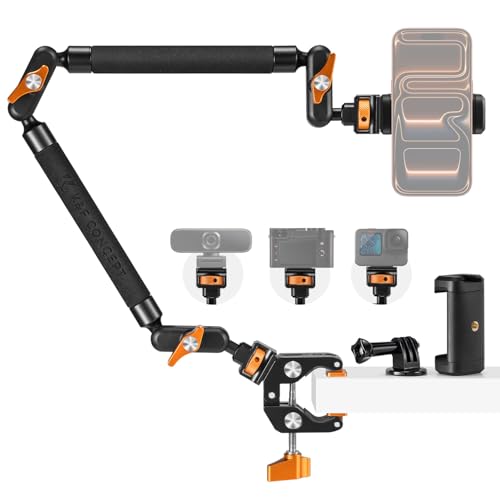
K&F CONCEPT 22" Magic Arm Clamp Kit, Overhead Desk Camera Mount | Long Articulating Friction Boom Arm for Phone, Action Camera, LED Light, Microphone, MS63
Check price on Amazon
K&F CONCEPT 2-Pack 9.8" Magic Arm, 1/4" Screw Camera Mount Arm | 360° Ball Heads for DSLRs, Monitor, Flash, LED Light, Microphone, Camera Cage, Action Camera, MS32
Check price on Amazon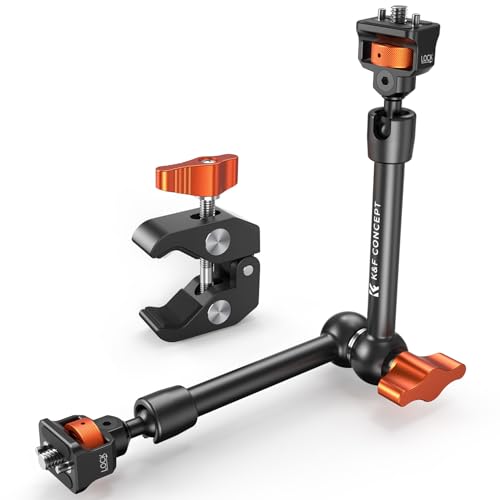
K&F CONCEPT 11" Magic Arm Clamp with Clamp ARRI 1/4" & 3/8" Thread Screw | 360° Ball Heads Arm with Clamp Mount for Monitor, LED Light, Webcam, Action Camera, MS33
Check price on Amazon
SMALLRIG Friction Magic Arm Camera Mount with Super Clamp and Platform | Overhead Camera Desk Mount Srand, Studio Space Saver, Heavy Duty Mount/Bracket for Lights, Cameras
Check price on Amazon