
Outdoor Laser Beam Security System for Perimeter Alarm
Protect your property boundaries with invisible infrared laser beams that detect intruders the moment they cross the line. This comprehensive guide explains how outdoor laser beam security systems work, what features matter most, and how to choose the right perimeter alarm for homes, businesses, and remote sites.
EXPLORE RECOMMENDED SYSTEMSWhy Perimeter Security Matters: Most intruders are detected at the property line, not at the front door. An outdoor laser beam security system creates an invisible early-warning barrier that triggers an alarm before anyone reaches your building. Unlike cameras that only record after the fact, a beam system actively alerts you in real time — giving you precious seconds to respond.
How an Outdoor Laser Beam Security System Works
An outdoor laser beam security system uses a transmitter and a receiver (or a reflector) to create an invisible infrared beam across a perimeter. When an intruder breaks the beam, the receiver detects the interruption and triggers an alarm, siren, or notification. Unlike a standard motion sensor camera outdoor solar powered setup that relies on heat signatures, laser beams create a precise tripwire that cannot be fooled by body heat or ambient temperature changes.
Most modern systems use multiple beams stacked vertically to detect intruders of different heights, including crawling or climbing. The beams are invisible to the naked eye, which means intruders have no idea they've triggered the alarm until it's too late. For properties that need reliable detection without WiFi dependence, pairing a laser system with an alarm system that doesn't require WiFi ensures continuous protection even during internet outages.
Key Features to Look For
Not all laser beam systems are built for outdoor perimeter use. Here are the features that separate a reliable system from a toy:
Weatherproof Rating
Look for IP65 or higher. Outdoor units must withstand rain, dust, and temperature swings from -20°F to 140°F. Cheap indoor units will fail within months.
Beam Range
Entry-level systems cover 30–100 feet. Professional perimeter systems reach 300–1,000 feet per zone. Match range to your property size.
Number of Beams
2–4 beams detect crawling, walking, and climbing intruders. 6–12 beams create a wall of detection for high-security sites.
Alarm Output
Look for relay outputs that trigger sirens, lights, or dialers. Some systems integrate directly with existing security camera system wired and wireless setups.
Power Options
Battery, solar, or hardwired. Remote sites benefit from solar-powered units that don't need trenching or constant battery changes.
Anti-Tamper Protection
Prevents intruders from covering or moving the transmitter/receiver. Critical for exposed perimeter locations.
Alignment Indicators
Built-in laser sights or LED indicators make setup faster and more accurate, especially over long distances.
Zone Control
Multiple zones let you identify which side of the property was breached, rather than a single vague alarm.
Advantages and Limitations
Before investing, understand where laser beam systems excel and where they fall short compared to other perimeter security options.
Advantages
- Invisible detection — intruders cannot see the beam
- Instant alarm — no recording delay or motion processing lag
- Works in total darkness — unlike cameras that need IR or light
- Low false alarm rate — precise tripwire, not heat-based
- Long battery life — some units last 1–2 years on a set of batteries
- Cost-effective — covers a long perimeter for less than multiple cameras
Limitations
- Requires line-of-sight — trees, bushes, and fences can block the beam
- Alignment can drift — ground movement or storms may require re-aiming
- No visual evidence — you still need cameras for identification
- Weather interference — heavy fog or rain can weaken the signal
- Not a standalone solution — best paired with cameras and lighting
How Much Does an Outdoor Laser Beam Security System Cost?
Prices vary widely based on range, beam count, and whether the system is designed for residential or commercial use. Here is a realistic breakdown of what you can expect to pay in the current market:
| System Type | Typical Range | Price Range | Best For |
|---|---|---|---|
| Single-Beam DIY Kit | 30–100 ft | $40–$120 | Driveways, gates, small yards |
| Multi-Beam Residential System | 100–300 ft | $150–$400 | Home perimeters, backyards |
| Professional Perimeter System | 300–1,000 ft | $500–$1,500 | Businesses, warehouses, farms |
| Solar-Powered Remote System | 100–500 ft | $200–$800 | Remote sites, construction lots |
| Integrated Multi-Zone System | Up to 2,000 ft | $1,200–$3,500 | Large commercial perimeters |
For most homeowners, a multi-beam residential system in the $150–$400 range provides the best balance of coverage and affordability. If you're protecting a business or remote property, a professional-grade system is worth the investment. Keep in mind that installation costs may apply if you hire a professional — for a broader view of installation pricing, see our guide on cost to have security cameras installed.
Installation Tips for Reliable Performance
Proper installation is the difference between a system that works for years and one that frustrates you with false alarms. Here are the essentials:
1. Choose the Right Location
Mount transmitters and receivers on stable surfaces — concrete walls, metal posts, or sturdy wooden beams. Avoid trees and fences that sway in the wind. The beam should run parallel to the ground at a height that catches intruders without being blocked by small animals or debris.
2. Clear the Beam Path
Trim bushes, branches, and tall grass along the beam line. Even a single leaf blowing through the beam can trigger a false alarm. If you're installing in an area with frequent vegetation growth, consider a system with adjustable sensitivity or a outdoor security camera with motion light as a secondary layer that activates only when the beam is broken.
3. Align Carefully
Use the built-in alignment scope or LED indicator to fine-tune the beam. Take your time — a misaligned beam is the number one cause of false alarms. For long-distance runs, use a laser alignment tool or ask a helper to watch the receiver indicator while you adjust the transmitter.
4. Test Before Finalizing
Walk, crawl, and climb through the beam path to confirm detection at every height. Test in different weather conditions if possible. Once satisfied, tighten all mounts and apply silicone sealant to cable entries to prevent water ingress.
5. Integrate with Your Existing Security
A laser beam system works best as part of a layered defense. Connect the alarm output to a siren, smart home hub, or dialer. Pair it with cameras that record when the beam is broken — for example, an outdoor security camera with local storage ensures you capture footage even without cloud connectivity. If you already have a security camera system with hard drive, check whether it accepts external alarm inputs.
Recommended Outdoor Laser Beam Security Systems
⚠️ AFFILIATE DISCLOSURE: This website contains affiliate links. As an affiliate Associate, we earn from qualifying purchases. If you make a purchase through these links, we may receive a small commission at no additional cost to you. Read our full affiliate policy.

SECO-LARM E-960-D190Q Enforcer Twin Photobeam Detectors with Laser Beam Alignment, 190' Outdoor/390' Indoor Sensing Range, Non-polarized Power Onputs, Pack of 1 Including 2 Detectors
Check price on Amazon
HTZSAFE Solar Wireless Driveway Alarm System-4 Channels & 4 Relay Outputs | 1/2 Mile Long Transmission Range-300 Feet Wide Sensor Range-Outdoor Weatherproof Security Perimeter Alert System KIT
Check price on Amazon
Triple Beam Photoelectric Infrared Detector – -250 Security System, 250m Outdoor Range, 3 Beam Technology, Water- & Easy to Install
Check price on Amazon
Triple Beam Alarm Photoelectric Beam Sensor Infrared Detector Security System Outdoor Weatherproof Motion Sensing Security Perimeter Alert System(-200)
Check price on Amazon
Seco-Larm E-964-Q660Q Multi-Frequency Quad Photobeam Detector with Laser Beam Alignment, Indoor or Outdoor Use, Up to 660ft (200m) Outdoor and 1,320ft (400m) Indoors Range, 12~24 VAC/VDC
Check price on Amazon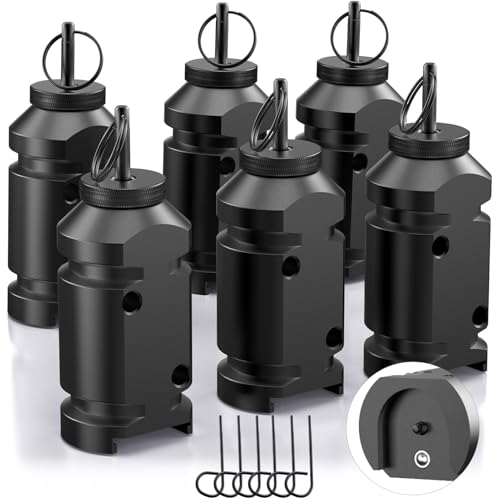
6 Pack Trip Alarm, 12 Gauge Perimeter Trip Alarm, Early Warning Security System for Camping and Property Safety/Bear Deterrent
Check price on Amazon
HTZSAFE Solar Wireless Driveway Alarm System- 190 Feet Wide Sensor Range | 1/4 Mile Long Transmission Range- No Wiring No Need Replace Battery- Outdoor Weatherproof DIY Security Perimeter Alert System
Check price on AmazonMaintenance and Troubleshooting
A well-installed laser beam system requires minimal maintenance, but a few routine checks will keep it reliable for years:
Monthly Checks
Walk the perimeter and visually inspect transmitters and receivers for spider webs, dirt, or insect nests. Clean the lenses with a soft, dry cloth. Test the alarm by breaking the beam manually.
Seasonal Maintenance
Before winter, check battery levels and replace if needed. After storms, re-check alignment — strong winds or ground shifts can knock units out of position. Trim any new vegetation that has grown into the beam path.
Common Issues
False alarms: Usually caused by misalignment, insects, or moving vegetation. Re-align and clear the path. No detection: Check power, battery, and receiver indicator. Reduced range: Clean lenses and check for fog or condensation inside the housing. If your system uses a wireless security camera with battery backup as part of the setup, ensure the backup battery is also healthy.
Frequently Asked Questions
Can an outdoor laser beam security system work without WiFi?
Yes. Many laser beam systems use standalone alarms, sirens, or cellular dialers that don't require internet. If you need remote notifications without WiFi, look for a system with a SIM card or a home security system that does not require internet.
How far can a laser beam perimeter alarm reach?
Residential systems typically cover 30–300 feet per zone. Commercial systems can reach 1,000 feet or more with proper alignment and weatherproofing. Range depends on beam power, lens quality, and environmental conditions.
Will rain or fog trigger false alarms?
Light rain and fog generally do not trigger false alarms in quality systems. However, heavy downpours or dense fog can weaken the beam and cause intermittent triggers. Choose a system with adjustable sensitivity and weather compensation if you live in a wet climate.
Can I use a laser beam system with my existing cameras?
Yes. Most systems provide a relay output that can trigger cameras, recorders, or alarm panels. If your cameras support external alarm inputs — such as a security camera with recording capability — you can set them to start recording the moment the beam is broken.
Is a laser beam system better than motion sensors?
They serve different purposes. Laser beams create a precise tripwire that detects any crossing, while motion sensors detect heat and movement over a broader area. For perimeter security, laser beams are more reliable because they don't depend on temperature differences. Many properties use both for layered protection.
How many beams do I need for full perimeter coverage?
For a typical residential yard, 2–4 beams per side provide good coverage. For commercial or high-security sites, 6–12 beams per zone create a detection wall that catches crawling, walking, and climbing intruders. The goal is to cover all approach paths without gaps.
Secure Your Perimeter Today
An outdoor laser beam security system is one of the most cost-effective ways to detect intruders before they reach your property. Combine it with cameras, lighting, and a reliable alarm for complete peace of mind.
VIEW RECOMMENDED SYSTEMS