
Outdoor Security Cameras That Work With 5GHz WiFi
Discover how 5GHz WiFi transforms outdoor security camera performance with faster streaming, higher resolution, and reduced interference. Your complete guide to choosing and setting up the right camera.
VIEW RECOMMENDED MODELSWhy 5GHz Matters for Outdoor Security: If you have ever experienced laggy live feeds, dropped connections, or grainy video from your outdoor security camera, your WiFi band could be the culprit. Most older cameras rely on 2.4GHz, which is slower and overcrowded. Upgrading to a camera that supports 5GHz WiFi can dramatically improve your security system's reliability and video quality.
Understanding 2.4GHz vs 5GHz for Security Cameras
Before choosing an outdoor security camera, it is essential to understand how WiFi frequencies affect performance. Both 2.4GHz and 5GHz have distinct advantages and trade-offs that directly impact your camera's reliability, video quality, and coverage.
| Feature | 2.4GHz | 5GHz |
|---|---|---|
| Range | Longer — up to 150 feet indoors | Shorter — up to 50 feet indoors |
| Wall Penetration | Better through walls and obstacles | Weaker through walls |
| Speed / Bandwidth | Slower — up to 450 Mbps | Faster — up to 1300 Mbps |
| Interference | High — crowded with other devices | Low — fewer devices use this band |
| Best For | Long-distance, through-wall coverage | High-resolution streaming, short-range |
For outdoor security cameras, 5GHz is ideal when your camera is relatively close to the router (within 50 feet) and you need smooth 2K or 4K video streaming. However, if your camera is far from the router or must penetrate multiple walls, 2.4GHz may still be necessary. This is why dual-band cameras — which support both frequencies — offer the best of both worlds.
If you are still exploring your options, our guide on what is a good outdoor security camera breaks down the essential features to consider before buying.
Do You Actually Need a 5GHz Outdoor Security Camera?
Not every home setup requires 5GHz. Here are the scenarios where a 5GHz-capable outdoor camera makes the most sense:
- You have a high-speed internet plan (100 Mbps or faster): 5GHz maximizes your bandwidth for smooth 4K streaming.
- Your router is close to the camera location: If the distance is under 50 feet with minimal obstructions, 5GHz will deliver superior performance.
- You live in a densely populated area: 5GHz suffers far less interference from neighbors' WiFi networks.
- You want to stream multiple cameras simultaneously: 5GHz handles multiple high-bandwidth streams better than 2.4GHz.
- You need low-latency live view: 5GHz reduces lag for real-time monitoring and two-way audio.
⚠️ Important: If your outdoor camera is mounted far from your router (over 50 feet) or behind thick concrete walls, 5GHz may struggle to maintain a stable connection. In these cases, consider a dual-band camera that can fall back to 2.4GHz, or explore options for security cameras that don't use internet at all.
Types of Outdoor Security Cameras With 5GHz Support
When shopping for an outdoor camera that works with 5GHz WiFi, you will encounter three main categories. Each has distinct advantages depending on your needs and budget.
1. Dual-Band Cameras (2.4GHz + 5GHz)
These are the most versatile and common options. Dual-band cameras automatically or manually switch between 2.4GHz and 5GHz, giving you flexibility. If the 5GHz signal weakens, the camera can fall back to 2.4GHz to maintain connectivity. Most premium outdoor cameras from brands like Ring, Arlo, and Eufy fall into this category.
2. Dedicated 5GHz Cameras
Some cameras operate exclusively on 5GHz. These are less common but offer focused performance for setups where the router is nearby. They tend to be slightly cheaper than dual-band models but offer no fallback option.
3. Standalone 5GHz Cameras (No WiFi Required)
If your goal is to avoid WiFi entirely, there are cameras that record locally to an SD card or NVR without any network connection. While these do not use 5GHz WiFi, they are worth mentioning for users who want complete independence from wireless networks. You can explore outdoor security cameras with SD card recorder for this approach.
💡 Pro Tip: If you want the reliability of 5GHz but also need a backup for when WiFi goes down, look for cameras with local storage (microSD or NVR) alongside 5GHz WiFi support. This ensures continuous recording even during network outages.
Key Features to Look For in a 5GHz Outdoor Security Camera
Beyond WiFi band support, several other features determine whether an outdoor security camera will meet your needs. Here is what to prioritize:
- Resolution: Look for at least 1080p; 2K or 4K is ideal for identifying faces and license plates. Higher resolution benefits most from 5GHz bandwidth.
- Night Vision: Color night vision or infrared LEDs are essential for 24/7 monitoring. Check our guide on battery-powered security camera with night vision for more details.
- Weather Resistance: IP65 or higher rating ensures the camera survives rain, dust, and extreme temperatures.
- Power Source: Battery, solar, or wired. Solar-powered options are excellent for locations without outlets — see outdoor security camera wireless solar powered.
- Local Storage: microSD card slot or NVR compatibility means you can record without ongoing cloud fees. Learn more about outdoor security camera with free cloud storage.
- Subscription-Free Operation: Many cameras work fully without a monthly plan. Check our list of security cameras that do not require subscription.
- Motion Detection: AI-powered person/vehicle detection reduces false alerts. See wireless security cameras with motion detection.
- Two-Way Audio: Useful for communicating with visitors or deterring intruders.
For a broader overview of wireless options, explore our guide to top 10 outdoor wireless security cameras.
How to Set Up Your 5GHz Outdoor Security Camera for Best Performance
Getting the most out of a 5GHz camera requires thoughtful placement and network configuration. Follow these steps to ensure a stable, high-quality connection:
- Check Your Router's 5GHz Band: Log into your router settings and confirm that the 5GHz band is enabled and broadcasting. Some routers have separate SSIDs for 2.4GHz and 5GHz — connect your camera to the 5GHz SSID.
- Position the Camera Within Range: Keep the camera within 50 feet of the router with minimal walls between them. For outdoor cameras, place the router near a window facing the camera location if possible.
- Use a WiFi Extender or Mesh System: If the distance is unavoidable, a mesh WiFi system can blanket your outdoor area with a strong 5GHz signal. This is especially useful for large properties.
- Update Firmware: Always update your camera's firmware to the latest version for optimal 5GHz compatibility and security patches.
- Test the Connection: Before permanent mounting, test the live feed at the intended location. Check for lag, dropouts, or reduced resolution.
- Secure Your Network: Use WPA3 or WPA2 encryption on your WiFi network to prevent unauthorized access to your camera feed.
💡 Pro Tip: If your camera supports both bands but keeps connecting to 2.4GHz, you can often force it to use 5GHz by temporarily disabling the 2.4GHz band during setup, or by assigning separate SSIDs for each band.
Common 5GHz WiFi Issues and How to Solve Them
Even with the right camera, 5GHz connectivity can present challenges. Here are the most common problems and their solutions:
- Camera won't connect to 5GHz: Ensure the camera actually supports 5GHz — many budget cameras are 2.4GHz only. Check the specifications carefully.
- Frequent disconnections: The camera may be too far from the router. Move it closer, add a mesh node, or switch to 2.4GHz if available.
- Slow live view: 5GHz should be fast, but if your internet upload speed is low, streaming will still lag. Check your upload speed — most cameras need at least 2-4 Mbps per stream.
- Interference from other devices: Although 5GHz is less crowded, cordless phones and some smart home devices can still interfere. Change your router's 5GHz channel to avoid overlap.
- Camera drops offline during rain: This is often a power issue, not WiFi. Battery or solar cameras may struggle in prolonged bad weather. Consider a wired power source or a camera with a larger battery.
For situations where WiFi is simply not viable, you might consider security cameras that don't use internet or security systems that don't need WiFi.
Top Outdoor Security Cameras With 5GHz WiFi Support
Based on current market offerings and user feedback, here are the leading categories of outdoor security cameras that work with 5GHz WiFi:
- Ring Spotlight Cam Pro: Dual-band WiFi, 1080p HDR, color night vision, and customizable motion zones. Requires a subscription for cloud recording but offers robust 5GHz performance.
- Arlo Pro 5S 2K: Dual-band WiFi, 2K resolution, color night vision, and local storage via base station. Works with 5GHz for smooth streaming.
- Eufy Security SoloCam S40: Solar-powered, 2K resolution, dual-band WiFi, and no monthly fee. Local storage via built-in 8GB memory.
- Reolink Argus 4 Pro: 4K resolution, dual-band WiFi, solar-powered, and supports microSD card up to 128GB. No subscription required.
- TP-Link Tapo C420S2: 2K QHD, dual-band WiFi, battery-powered, and includes a hub for local storage. Works with 5GHz for fast live view.
- Wyze Cam Floodlight v2: 2K resolution, dual-band WiFi, built-in floodlight, and free cloud storage for 14 days. Very budget-friendly.
For a more detailed comparison, see our guide to wireless outdoor security cameras for sale and outdoor security cameras without monthly fee.
Recommended Outdoor Security Cameras with 5GHz WiFi
⚠️ AFFILIATE DISCLOSURE: This website contains affiliate links. As an affiliate Associate, we earn from qualifying purchases. If you make a purchase through these links, we may receive a small commission at no additional cost to you. Read our full affiliate policy.
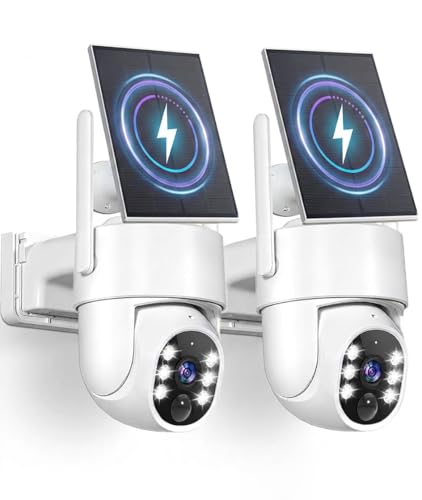
Gianteye 5G Solar Security Cameras Wireless Outdoor, 2K Cameras for Home Security Outdoor, Security Cameras Wireless Outdoor with Color Night Vision, 2-Way Talk, PTZ Human Detection, 2 Packs
Check price on Amazon
2K Security Cameras Wireless Outdoor, 5GHz WiFi Solar Camera Outdoor Wireless, Wire-free Installation, AI Detection, Two-way Audio, Mobile alerts, SD/Cloud Storage, Color Night Vision, 2 Packs
Check price on Amazon
CiKiKWXO 2.5K Outdoor WiFi Security Camera, Plug-in, 360° PTZ Auto Tracking | 5GHz WiFi,Works with Alexa,Spotlight&Siren,24/7 Recording,Color Night Vision,Motion Detection,2-Way Audio,Local/Cloud Storage
Check price on Amazon
4MP Security Cameras Wireless Outdoor, No Subscription 128GB Local Storage, Solar Powered Cameras For Home Security, PTZ Auto Tracking, 4Cam-Kit, Color Night Vision Home Security Camera System,5G&2.4G
Check price on Amazon
2026 Enhanced 2K UHD Security Cameras Wireless Outdoor – Free Cloud & SD Storage, Dual-Band WiFi 2.4G/5G, Full-Color Night Vision, 6-Month Battery, Motion Alerts, IP66 Weatherproof, 2-Way Talk
Check price on Amazon
LongPlus 4K Wireless Outdoor Security Camera, WiFi6 Battery Security Camera | 2.4GHz & 5GHz WiFi, 24/7 Recording, Color Night Vision, AI Person/Vehicle Detection, Spotlight, SD/Cloud, Waterproof
Check price on Amazon
blurams 2K Outdoor Camera Wired, 5GHz/2.4GHz Wi-Fi Cameras for Home Security Outside with 360° PTZ, Color Night Vision, Motion Detection Tracking, Two-Way Audio, IP66 Weatherproof, Works with Alexa
Check price on Amazon
Dual Lens Security Camera Outdoor, 6MP 5GHz WiFi Cameras for Home Security | Outside Camera,5G/2.4G Wifi, 135° Wide-Angle + 355° Pan 90° Tilt, Human Track, Color Night Vision, 2-Way Audio, Plug in Wired
Check price on AmazonHow Much Do 5GHz Outdoor Security Cameras Cost?
Pricing for outdoor security cameras with 5GHz WiFi varies based on resolution, power source, and storage options. Here is a general breakdown of what you can expect to pay:
- Budget (1080p, basic features): $40–$80 per camera. Brands like Wyze and TP-Link offer affordable dual-band options.
- Mid-range (2K, better night vision, local storage): $80–$150 per camera. Eufy, Reolink, and Arlo offer strong mid-range choices.
- Premium (4K, advanced AI, solar or wired): $150–$300 per camera. Ring, Arlo Pro, and Reolink flagship models fall here.
- Professional installation (optional): If you hire a professional, expect to pay $100–$300 per camera for installation. See average cost of security camera installation for details.
Remember that subscription costs can add up: most brands charge $3–$15 per month per camera for cloud recording. If you want to avoid ongoing fees, prioritize cameras with local storage. Our guide to outdoor security cameras with no monthly fee covers this in depth.
Alternative Solutions When 5GHz WiFi Isn't Enough
In some situations, 5GHz WiFi simply won't work — whether due to distance, interference, or a lack of reliable internet. Fortunately, there are excellent alternatives:
- 4G/LTE Cellular Cameras: These cameras use a cellular network instead of WiFi, making them ideal for remote locations. See security camera with built-in cellular service.
- Cameras With Mobile Hotspot Support: If you have a mobile hotspot, you can connect a camera to it. Learn about security cameras that work with mobile hotspot.
- Offline Cameras: Cameras that record to SD cards without any network connection. Explore security cameras that do not use internet.
- Wired Systems: PoE (Power over Ethernet) cameras offer the most reliable connection but require cabling. Check wired home security camera system reviews.
- Solar-Powered Cameras: For locations without power outlets, solar cameras are a great option. See solar-powered outdoor security camera with night vision.
Frequently Asked Questions
Do all outdoor security cameras work with 5GHz WiFi?
No. Many budget cameras are 2.4GHz only. Always check the specifications before purchasing. Dual-band cameras support both 2.4GHz and 5GHz, while some premium models are 5GHz-only.
Is 5GHz better than 2.4GHz for security cameras?
It depends on your setup. 5GHz is faster and less prone to interference, making it better for high-resolution streaming and short-range connections. 2.4GHz has a longer range and better wall penetration, making it better for distant cameras. Dual-band cameras offer the best flexibility.
Can I use a 5GHz security camera without internet?
Yes, if the camera supports local storage (microSD card or NVR). You can record footage locally without any internet connection. However, you will not be able to view the camera remotely without a network connection.
How far can a 5GHz security camera be from the router?
Generally, 5GHz signals are reliable up to about 50 feet indoors, less through walls. Outdoors with clear line of sight, you may get up to 100 feet. For longer distances, consider a mesh WiFi system or a 2.4GHz camera.
Do 5GHz security cameras require a subscription?
Not necessarily. Many cameras with 5GHz support also offer local storage via microSD card, allowing you to avoid monthly fees. Some brands offer free cloud storage tiers with limited features. Check our guide to security cameras that do not require subscription.
Ready to Upgrade Your Outdoor Security?
Choose from our recommended 5GHz WiFi outdoor security cameras and enjoy faster streaming, clearer video, and fewer connection issues.
VIEW TOP PICKSFinal Thoughts
Outdoor security cameras that work with 5GHz WiFi offer significant advantages for homeowners who prioritize video quality and reliability. With faster data transfer, reduced interference, and support for higher resolutions, 5GHz cameras are an excellent choice for modern security setups — provided your router is within range.
When shopping, prioritize dual-band cameras for maximum flexibility, and always consider local storage options to avoid ongoing subscription fees. Whether you choose a solar-powered model, a battery-operated camera, or a wired system, the key is matching the camera's capabilities to your specific environment.
For more help choosing the right security camera, explore our related guides on outdoor security cameras that work with 5GHz WiFi and indoor cameras that work with 5GHz WiFi.