
What Is a Good Home Security Camera System?
Your complete guide to understanding the essential features, types, and smart choices for protecting your home with the right security camera system.
In This Guide
Investing in a home security camera system is one of the most effective ways to protect your property and loved ones. But with so many options on the market—from simple indoor wireless cameras to comprehensive hard-wired surveillance systems—it's easy to feel overwhelmed. This guide will walk you through exactly what makes a security camera system "good" for your specific needs, so you can make a confident, informed purchase.
A truly good system balances video quality, reliability, ease of use, and cost. It should fit your lifestyle, whether you're a renter looking for a wireless solution for an apartment or a homeowner wanting a permanent closed-circuit camera system. Let's break down everything you need to know.
What Makes a Good Home Security Camera System?
A good home security camera system isn't just about having a camera pointed at your front door. It's a combination of hardware, software, and thoughtful placement working together to give you peace of mind. Here are the core pillars:
- Reliability: The system must work 24/7, in all weather conditions, without constant maintenance. Look for cameras with durable builds and stable connections.
- Clear Video Quality: At minimum, 1080p HD is standard. For reading license plates or identifying faces, 2K or 4K resolution is better. A good HD security camera should perform well in both day and night conditions.
- Effective Night Vision: Most break-ins happen under cover of darkness. Infrared (IR) or color night vision is essential. Some models offer porch light cameras with night vision that integrate with your existing fixtures.
- Smart Detection: Modern systems use AI to distinguish between people, pets, and cars, reducing false alerts. This is a hallmark of a good night CCTV camera.
- Flexible Storage: Whether you prefer local storage (SD card, NVR) or cloud storage, a good system gives you options. For those wanting no ongoing fees, look for security cameras with free cloud storage or no-subscription outdoor cameras.
- Easy Installation & Use: A system that's difficult to install or use won't be effective. DIY-friendly options like wireless solar security cameras or battery-powered home security cameras are ideal for many users.
Bottom Line: A good system is one that you can rely on, understand, and afford—both upfront and long-term. It should seamlessly integrate into your daily life, not become a chore.
Key Features to Evaluate Before Buying
When comparing systems, focus on these critical specifications. They separate a mediocre camera from a genuinely good one.
1. Resolution and Field of View
Resolution determines image clarity. 1080p is good, 2K is better, and 4K is excellent for large areas or zooming in. Field of view (FOV) tells you how much area a single camera can cover. A 130° to 160° FOV is common; wider angles mean fewer cameras needed but can distort the image at the edges.
2. Night Vision Capability
Look for cameras with either infrared (black and white) or color night vision. Some advanced models, like a security camera that screws into a light socket, use floodlights for full-color night recording. The range of night vision (typically 20-100 feet) is also important.
3. Power Source and Connectivity
How is the camera powered? Options include wired (most reliable), battery, or solar. For internet connectivity, Wi-Fi is convenient but can be less reliable; Ethernet (PoE) is rock-solid. For areas without Wi-Fi, consider a security camera that doesn't need Wi-Fi or a 4G cellular security camera.
4. Storage and Recording Options
You'll choose between local storage (microSD, NVR/DVR) and cloud storage. Local storage often means no monthly fees. If you prefer cloud, check for free tiers or affordable plans. A 128GB micro SD card can store weeks of footage on a local camera.
5. Smart Home Integration
A good system plays well with others. Look for compatibility with Amazon Alexa, Google Assistant, or Apple HomeKit. Features like two-way audio, motion alerts, and integration with smart locks or lights add convenience and security.
Types of Home Security Camera Systems
There's no one-size-fits-all solution. Your choice depends on your home, budget, and technical comfort. Here are the main categories:
| System Type | Best For | Pros | Cons |
|---|---|---|---|
| Wireless Cameras | Renters, easy DIY install | No drilling, flexible placement, often battery/solar powered | Can be less reliable, need recharging |
| Wired (PoE) Systems | Homeowners, permanent setups | Reliable, no battery changes, high-quality video | Requires installation, drilling, cabling |
| Wire-Free (Battery) | Renters, hard-to-reach areas | No wires, easy to mount | Need periodic charging, may miss events if not optimized |
| Solar-Powered | Outdoor, sunny locations | Continuous power, no charging | Dependent on sunlight, higher upfront cost |
| Doorbell Cameras | Front door monitoring | Two-way talk, package detection | Limited field of view |
For a comprehensive solution, many homeowners combine a wireless video doorbell with a few solar-powered outdoor cameras for full coverage.
Wired vs. Wireless: Which Is Right for You?
This is the most common dilemma. The answer depends on your priorities:
- Choose Wired if: You own your home, want maximum reliability, don't want to worry about batteries, and can invest in professional installation or a DIY kit like a PoE security camera system. A home security camera installation service can handle the setup for you.
- Choose Wireless if: You rent, want a quick setup, or need flexibility to move cameras. Modern rechargeable wireless security cameras and wireless outdoor cameras without subscription offer excellent performance without the hassle of wires.
- Hybrid Approach: Many people use a wired system for critical areas and wireless cameras for supplementary coverage. This gives you the best of both worlds.
Pro Tip: If you're unsure, start with a battery-powered wireless outdoor security camera. It's a low-commitment way to test coverage and features before investing in a full wired system.
Storage Options Explained: Local vs. Cloud
Where your video footage is stored is a critical decision that affects both cost and privacy.
- Local Storage: Footage is saved on a microSD card (in the camera) or a network video recorder (NVR) in your home. This means no monthly fees and complete control over your data. A 128GB micro SD card for a security camera is a popular choice. However, if the camera is stolen, the footage goes with it.
- Cloud Storage: Footage is uploaded to a secure server. This protects your data even if the camera is destroyed or stolen. Many brands offer free basic plans, but for continuous recording, you'll likely need a subscription. Look for security cameras with free cloud storage if you want to avoid fees.
- Hybrid: Some systems record to both local storage and the cloud simultaneously, giving you the best of both worlds.
If you want a system with absolutely no ongoing costs, focus on cameras with local storage and no-subscription outdoor security cameras.
Smart Features That Matter
Modern security cameras are packed with features. Here are the ones that genuinely enhance security and usability:
- AI-Powered Detection: Distinguishes between people, animals, and vehicles, reducing annoying false alerts.
- Two-Way Audio: Speak to visitors or warn off intruders directly from your phone.
- Color Night Vision: Uses a spotlight or advanced sensor to record in full color, even at night, making identification easier.
- Activity Zones: Define specific areas for motion detection, so you're only alerted when something happens in a critical zone.
- Integration with Smart Home: Works with Alexa, Google Assistant, or IFTTT to trigger lights, sirens, or other actions.
- 24/7 Recording: Some systems offer continuous recording, while others only record on motion. For critical areas, 24/7 is ideal.
For a system that works even without an internet connection, consider a home security system without internet, which often uses local storage and cellular backup.
Budget Guide: What to Expect
Home security camera systems range from very affordable to premium. Here's a realistic breakdown of what you'll pay for a good system:
- Single Indoor Camera: $30–$80. Good for monitoring a single room or as a baby monitor. A small indoor wireless security camera is a great starter.
- Single Outdoor Camera: $80–$250. Look for weatherproofing, night vision, and good resolution. Solar-powered models are at the higher end but eliminate charging.
- Multi-Camera System (2-4 cameras): $200–$600. This is the sweet spot for most homes. You can get a closed-circuit camera system for home or a wireless multi-camera kit.
- Professional-Grade System (4+ cameras): $600–$2,500+. Includes NVR, high-resolution cameras, and professional installation. Ideal for large properties or small business video security systems.
- Installation Service: $200–$800+ depending on complexity. If you're not handy, a security systems installation service is worth the investment.
Ongoing Costs: Cloud storage plans typically range from $3 to $15 per month per camera. Local storage has no monthly fees. Always factor in these costs when comparing systems.
Frequently Asked Questions
Do I need a subscription for my home security camera?
Not necessarily. Many cameras offer local storage via microSD card, which requires no subscription. However, cloud storage usually requires a monthly fee, though some brands offer free basic plans. If you want to avoid subscriptions entirely, look for wireless outdoor security cameras without subscription or no-subscription outdoor security cameras.
Can I install a security camera system myself?
Yes, many modern systems are designed for DIY installation. Wireless cameras are particularly easy—just mount and connect to Wi-Fi. Wired systems require more effort, but kits with pre-configured NVRs make it manageable. If you're not comfortable with wiring, a home security camera installation service can help.
What if I don't have Wi-Fi or internet at home?
You have options. A security camera that doesn't need Wi-Fi can record to a local SD card or NVR. For remote viewing without internet, a 4G cellular security camera uses a cellular network. You can also build a home security system without internet using local storage and direct monitor connection.
How many cameras do I need?
It depends on your home's layout. Most homes need at least 2-4 cameras: one at the front door, one covering the driveway, one for the backyard, and perhaps one for a side entrance. A wireless video doorbell can serve as your front door camera. For larger properties, consider a small business video security system that supports more cameras.
Are wireless cameras as good as wired ones?
Modern wireless cameras are excellent and can match wired cameras in video quality. The main differences are reliability and power. Wired cameras are always on and never need charging. Wireless cameras depend on battery life and Wi-Fi signal strength. For critical areas, wired is often preferred; for flexibility, wireless wins. Many people use a hybrid approach.
Recommended Home Security Camera Systems
⚠️ AFFILIATE DISCLOSURE: This website contains affiliate links. As an affiliate Associate, we earn from qualifying purchases. If you make a purchase through these links, we may receive a small commission at no additional cost to you. Read our full affiliate policy.
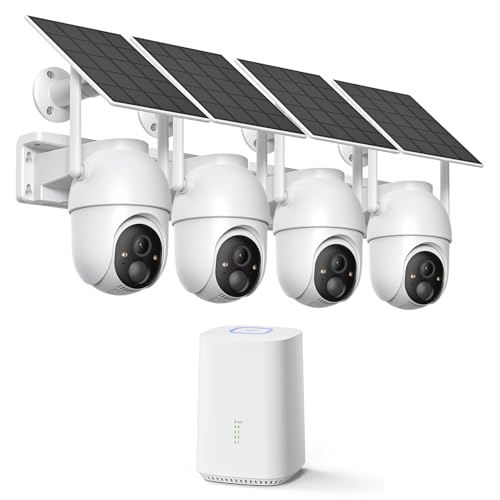
ELYSOO 2K/4MP Home Security Camera System, 2.4G & 5GHz Wi-Fi Connected | Local Storage Included, Solar Security Cameras Wireless Outdoor, IP65, Instant APP Alerts, Color Night Vision
Check price on Amazon
2K Security Camera System, Solar Cameras for Home Security, 3 Packs | Wire-free Installation, AI Detection, Two-way Audio, Mobile alerts, SD/Cloud Storage, Color Night Vision, 5GHz&2.4GHz WiFi
Check price on Amazon
Security Cameras Wireless Outdoor, 2K Indoor Cameras for Home Security Battery Powered, AI Motion Detection, Color Night Vision, 2-Way Talk, Spotlight Siren Alarm, Cloud & SD Storage-Jet Black Camera
Check price on Amazon
ZOSI 3K Lite Wired Security Camera System Outdoor, 8 X 2MP Cameras, 1TB HDD | AI Human/Vehicle Detection, 5MP Lite H.265+ 8 Channel Surveillance DVR, IP66 Weatherproof CCTV Camera, 80ft Night Vision
Check price on Amazon
AOQEE 5G Cameras for Home Security Indoor, Pet Monitor w/Phone APP G5 2Pcs | Dual-Band Wi-Fi Indoor Camera with 24/7 TF Card Storage, 360 PTZ Auto-Tracking Pet/Dog/Cat/Puppy/Nanny, Motion Alert, Plug-in
Check price on Amazon
VIMTAG 2.5K Cameras for Home Security Outdoor/Indoor, Color Night Vision Security Camera for Baby/Pet/Dog/Nanny, Light/Siren, Motion Detection, 2-Way Audio, Work with Alexa, Cloud/Card Storage, 2Pcs
Check price on Amazon
GMK 4 Pack Cameras System, Security Cameras Wireless Outdoor, 2K Video | VicoHome Cam, Motion Detect, Color Night Vision, 2-Way Talk, IP65 Waterproof, Indoor&Outdoor, 2.4GHz WiFi, SD/Cloud Storage
Check price on Amazon
Rraycom 5G/2.4G Security Cameras Wireless Outdoor,4Pack Cameras System | 2K Battery Powered AI Motion Detection Siren Alarm, Color Night Vision, 2-Way Talk, Waterproof, Works w/Alexa, Cloud/SD
Check price on AmazonFinal Thoughts: Making the Right Choice
A good home security camera system is one that fits your life. It should provide clear video, reliable performance, and peace of mind without breaking the bank or requiring constant attention. Start by identifying your must-have features—whether that's night CCTV capability, no-subscription storage, or smart home integration. Then, choose a system type that matches your home and technical comfort.
Remember, the best system is the one that's properly installed and consistently monitored. Whether you choose a simple indoor wireless camera or a full hard-wired video surveillance system, taking action today is the most important step toward protecting what matters most.