
Security Cameras with Free Cloud Storage
A complete buyer's guide to no-subscription security cameras that store footage in the cloud without monthly fees — what's genuinely free, what isn't, and how to choose the right model for your home.
Why this guide matters: Most security camera brands advertise "free cloud storage" — but the fine print often reveals a 7-day trial, limited clip length, or a single-camera cap. If you're researching cameras before buying, this guide breaks down exactly how free cloud tiers work, which features are truly no-cost, and how to match a camera to your home, WiFi, and recording habits.
How Free Cloud Storage Works on Security Cameras
When a camera records motion or a continuous stream, it can save that footage in three places: a local microSD card, a local NVR/base station, or the cloud. "Free cloud storage" means the manufacturer hosts your clips on their servers at no monthly cost. The camera uploads clips over WiFi to the vendor's cloud, and you access them through a mobile app or web portal.
There's a catch worth understanding before you buy: cloud bandwidth and server space cost money, so brands limit the free tier. Typical free plans give you a rolling window — for example, the last 24 hours or 7 days of motion clips — after which older footage is automatically deleted. Some brands, like Wyze and Eufy, have historically offered a limited free tier alongside paid plans. Others use a short trial that quietly converts to a subscription if you don't cancel.
It's also worth knowing that many cameras can record to a microSD card locally without any cloud at all. If your priority is simply avoiding monthly fees, a local-storage camera like a HD security camera with a card slot may be a better fit than chasing a free cloud tier. For situations without reliable WiFi, a security camera that does not need WiFi is often the more practical choice.
What to Expect from a "Free" Cloud Tier
Free tiers vary wildly between brands. Before committing, check these five things in the spec sheet or app store listing:
- Retention window: How many days of clips are stored? Common free limits are 24 hours, 3 days, or 7 days.
- Clip length: Some free plans cap each motion clip at 12 seconds, which may miss the full event.
- Number of cameras: Many free tiers cover only one camera; adding a second camera often triggers a paid plan.
- Resolution of stored clips: A few brands store free clips at reduced resolution (e.g., 720p even if the camera shoots 2K).
- What happens after the trial: Some cameras advertise "free cloud" but actually offer a 30-day trial. Verify the plan is permanent.
Types of Security Cameras That Offer Free Cloud Storage
Not every camera category supports free cloud. Here's where you'll actually find it:
Indoor WiFi Cameras
The most common category for free cloud tiers. Brands like Wyze, Eufy, and TP-Link Tapo typically include a limited free plan. If you want a compact option for an apartment, a small indoor wireless security camera is a good starting point — just confirm the free plan covers your retention needs. For renters who can't drill or run cables, a wireless security camera for apartments is often the easiest install.
Outdoor Battery & Solar Cameras
Outdoor models that rely on battery or solar power usually pair free cloud with a local base station. A wireless outdoor security camera solar powered unit can run indefinitely without wiring, and many include a free basic cloud plan. If you prefer no subscription at all, a wireless outdoor security camera without subscription paired with local storage is the cleanest option. For fully off-grid placement, look at wireless solar security cameras. If you need something that works without internet entirely, a no subscription outdoor security camera is the right search.
Doorbell Cameras
Video doorbells are a mixed bag — many require a subscription for cloud clips, but a few offer a basic free tier. A wired doorbell camera without subscription is worth checking if you want footage stored locally. For a fully wireless option, a video doorbell wireless model is common, and a standard video door bell with an SD card slot can avoid cloud fees entirely.
4G / Cellular Cameras
For locations without WiFi, a 4G cellular security camera uses a SIM card for connectivity. Free cloud storage on these is rare because the data itself costs money — expect a paid data plan even if the cloud tier is free. If you need a camera that works offline, a security camera that doesn't need WiFi is a better fit.
PoE & Wired Systems
Wired systems like PoE security cameras usually record to a local NVR rather than the cloud, so "free cloud" isn't the selling point — reliability is. For a complete property setup, a closed circuit camera system for home with local storage eliminates subscription concerns entirely. If you'd rather have a professional handle the wiring, a security systems installation service can set up a hardwired system with no recurring cloud fee. A home security camera installation service is the equivalent for residential-only setups.
Key Specs That Actually Matter
Marketing pages love to list features. Here's what genuinely affects your experience with a free-cloud camera:
- Resolution: 1080p is the practical minimum for identifying faces and license plates. 2K and 4K give more detail but consume more bandwidth and cloud space.
- Night vision: Look for color night vision or strong IR range (30 ft+). A night CCTV camera with good low-light performance is essential for driveways and backyards. For porch coverage, a porch light security camera with night vision doubles as a light fixture.
- Field of view: 110°–130° covers most doorways and driveways. Wider than 140° introduces distortion.
- Two-way audio: Useful for doorbells and indoor cams; less critical for perimeter cameras.
- Power source: Battery cameras need recharging every 1–6 months. A rechargeable wireless security camera saves on disposable batteries. If you want a permanent install, a battery powered wireless outdoor security camera still needs periodic charging, while a battery powered home security camera is best for temporary placement.
- Local backup: Even with free cloud, a microSD slot gives you a safety net. A 128GB micro SD card for security camera holds weeks of motion clips at 1080p.
- Smart detection: Person/vehicle/package detection reduces false alerts and saves cloud space compared to generic motion detection.
Comparison Snapshot: Free Cloud vs. Alternatives
Use this table to decide whether free cloud is the right storage strategy for your setup.
| Storage Type | Monthly Cost | Retention | Best For |
|---|---|---|---|
| Free Cloud Tier | $0 | 24 hours – 7 days (varies) | Renters, single-camera setups, casual monitoring |
| Paid Cloud Plan | $3–$15 | 30–90 days | Multi-camera homes, longer evidence retention |
| Local microSD | $0 (one-time card cost) | Until card fills | Budget setups, no-subscription users |
| Local NVR | $0 | Weeks to months (drive-dependent) | Full property coverage, PoE systems |
| Hybrid (Free Cloud + SD) | $0 | Cloud window + full local history | Best of both — our recommendation |
A typical free-cloud camera costs between $30 and $120. A mid-range outdoor model with color night vision and a free tier generally runs $60–$150. If you want a full multi-camera system with local recording, expect $200–$600 depending on the number of cameras and whether you need professional installation.
Pros and Cons of Free Cloud Storage
✓ Advantages
- No monthly fee — real long-term savings
- Footage survives theft or camera destruction
- Access from anywhere via mobile app
- Easy setup — no NVR or wiring required
- Ideal for renters and temporary installs
✗ Limitations
- Short retention window (often 3–7 days)
- Clip length and resolution may be capped
- Usually limited to one camera
- Requires stable WiFi and upload bandwidth
- Privacy depends on vendor's security practices
Installation and Setup Tips
Getting free cloud to work reliably comes down to a few practical steps:
- Check your upload speed. Cloud recording depends on upload bandwidth, not download. Aim for at least 2 Mbps upload per camera. Most home connections handle 1–2 cameras fine; four or more may need an upgrade.
- Place the camera within WiFi range. A wireless car dash camera front and rear is a different category, but for home cameras the same principle applies: weak signal causes dropped clips. If signal is a problem, a camera with local storage like a HD security camera that records to SD is more forgiving.
- Mount high, angle down. 8–10 feet is ideal for most outdoor cameras — high enough to deter tampering, low enough to capture faces.
- Enable person detection. This dramatically reduces false alerts and preserves your free cloud quota for real events.
- Add a microSD card. Even a 64GB card provides weeks of 1080p motion clips as a backup.
- Test the free plan before relying on it. Trigger a motion event, wait, then check the app to confirm the clip saved and how long it stays.
If you'd rather not DIY, a home security camera installation service can handle mounting, WiFi optimization, and app setup. For multi-camera or commercial properties, a security systems installation service is the more appropriate call — they can also advise on small business video security systems if you're covering a storefront or office.
For broader home coverage planning, see our guide to what is a good home security camera system. If you want a hardwired, subscription-free approach, a hard wired video surveillance system paired with local storage is the most robust long-term option.
Frequently Asked Questions
Is free cloud storage really free, or is it a trial?
It depends on the brand. Some manufacturers offer a permanent free tier with limited retention (often 3–7 days), while others advertise "free cloud" but actually provide a 30-day trial that converts to a paid plan. Always check the app's plan details before buying — look for the word "free plan" or "basic plan" rather than "trial."
Can I use a security camera with free cloud storage without WiFi?
No — cloud storage requires an internet connection to upload clips. If you don't have WiFi at the camera location, you'll need a camera that records locally to a microSD card or NVR. A security camera that doesn't need WiFi is the right category for those setups. For locations with power but no internet, a home security system without internet that records locally is the practical alternative.
How long do free cloud clips stay available?
Most free tiers retain clips for 24 hours to 7 days. After that window, older clips are automatically deleted. If you need longer retention — for insurance claims or legal evidence — either upgrade to a paid plan or add local storage via microSD or NVR.
How many cameras can I connect on a free cloud plan?
Most free plans cover a single camera. Adding a second camera typically requires a paid subscription. If you're planning a multi-camera setup, factor subscription costs into your budget — or choose cameras with local storage and skip cloud entirely.
Is free cloud storage secure?
Reputable brands encrypt footage in transit and at rest. However, you're trusting the vendor's servers with your video. Enable two-factor authentication on your account, use a strong unique password, and keep camera firmware updated. If privacy is a top concern, local storage on a microSD card or NVR keeps footage entirely within your home.
Do I need a subscription for motion alerts?
Basic motion alerts are usually free. Advanced detection — like person, vehicle, or package identification — is sometimes locked behind a subscription. Check the feature list carefully if smart alerts matter to you.
What's the best setup for a renter who wants free cloud storage?
A battery-powered indoor or outdoor camera with a free cloud tier and a microSD backup is ideal — no drilling, no wiring, and no monthly fee. A wireless security camera for apartments designed for renter-friendly mounting is a good starting point.
Ready to Choose Your Camera?
Compare our recommended security cameras with free cloud storage below. Each model is selected for reliable free-tier recording, solid night vision, and real-world value — no subscription required to get started.
Recommended Security Cameras with Free Cloud Storage
⚠️ AFFILIATE DISCLOSURE: This website contains affiliate links. As an affiliate Associate, we earn from qualifying purchases. If you make a purchase through these links, we may receive a small commission at no additional cost to you. Read our full affiliate policy.

2026 Upgraded 2K Security Cameras Wireless Outdoor, Free Cloud Storage, 1-6 Months Battery Life, Waterproof, 2-Way Talk, AI Motion Detection Spotlight Siren Alarm Cameras for Home Security
Check price on Amazon
2026 Enhanced 2K UHD Security Cameras Wireless Outdoor – Free Cloud & SD Storage, Dual-Band WiFi 2.4G/5G, Full-Color Night Vision, 6-Month Battery, Motion Alerts, IP66 Weatherproof, 2-Way Talk
Check price on Amazon
Braload Mini Camera Nanny Cam for Home - 2026 Update WiFi Security Camera with Free Cloud Storage, Baby Monitor Pet Camera with Motion Detection, Night Vision, App Control, with No WiFi Mode
Check price on Amazon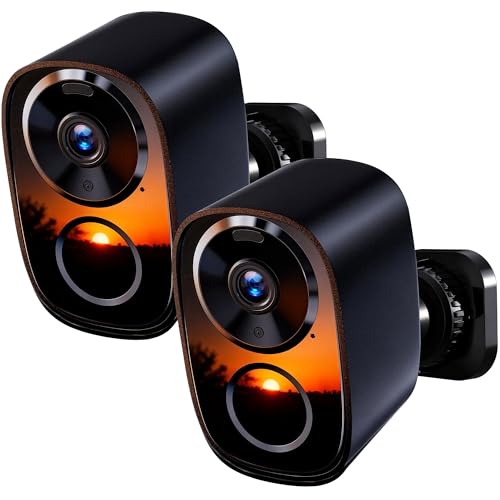
2026 Upgraded 2K Security Cameras Wireless Outdoor (2-Pack), Free Cloud & SD Storage, Long Battery Life, 2.4G/5G Wifi Support, Motion Detection, Color Night Vision, Spotlight, Waterproof, 2-Way Talk
Check price on Amazon
2026 Upgraded 2K Wireless Security Camera with 64G SD Card, Free Cloud Storage, 1-6 Month Battery Life, AI Motion Detection, Spotlight, Siren Alarm, 2-Way Audio, Waterproof WiFi Surveillance Camera
Check price on Amazon
5G&2.4GHz Indoor Security Camera, 2K, Free Cloud, 24/7 TF Recording, Wired | AI Motion Detection, Easy App Setup, 2-Way Audio, Cameras for Home Security, Dog, Cat, Elder, Nanny, Pet Camera
Check price on Amazon
Tapo 1080P Indoor Security Camera, Baby Monitor, Dog Camera, C101 | Motion Detection, 2-Way Audio, Siren, Night Vision, Cloud & SD Card Storage, Works w/Alexa & Google Home, Black
Check price on Amazon