
Wireless Dash Cam Front and Rear: The Ultimate Guide to Protecting Your Vehicle
Discover how a wireless dash cam front and rear setup can provide complete coverage, seamless installation, and peace of mind on every journey.
VIEW TOP PICKSWhy Go Wireless? A wireless dash cam front and rear eliminates the hassle of running long cables through your car's interior. With Wi-Fi connectivity, you can easily view, download, and share footage directly from your smartphone. This guide will help you understand the key features, installation considerations, and the best options available today.
What Is a Wireless Dash Cam Front and Rear?
A wireless dash cam front and rear is a two-channel recording system that captures both the road ahead and the traffic behind your vehicle. Unlike traditional wired systems that require a physical cable connecting the front and rear cameras, a wireless setup transmits video signals over a Wi-Fi connection. This makes installation significantly easier, especially for those who prefer not to dismantle interior panels or deal with complex wiring.
These systems typically consist of a main front-facing camera unit and a smaller rear camera that mounts on your rear window. The front unit usually houses the processor, storage, and Wi-Fi module, while the rear camera sends footage wirelessly. Some models also offer a rear view camera wireless function, which can double as a reversing aid. For those who want an even more comprehensive view, a car camera 360 system might be worth considering, but a dedicated front-and-rear setup remains the most popular choice for everyday drivers.
Key Features to Look For
When choosing a wireless dash cam front and rear, understanding the essential features will help you make an informed decision. Here’s what matters most:
1. Video Resolution and Quality
Most modern dash cams offer at least 1080p Full HD, but for clearer license plate capture and better detail in low light, consider a 4K dash cam for car. A 4K front camera paired with a 1080p rear camera is an excellent combination. Keep in mind that higher resolution means larger file sizes, so you’ll need a high-capacity memory card.
2. Wireless Connectivity and App Control
The core advantage of a wireless dashcam is its Wi-Fi connectivity. A dedicated smartphone app lets you preview live footage, download clips, and adjust settings without removing the memory card. Look for dual-band Wi-Fi (2.4GHz and 5GHz) for faster transfer speeds and a more stable connection.
3. Parking Mode and Motion Detection
Parking mode is a crucial feature for security. When your car is parked, the dash cam enters a low-power standby mode and starts recording if it detects motion or a collision. This requires a dash cam hardwire kit or a built-in battery. Some systems also integrate with a broader home security system motion sensor ecosystem if you want a unified security approach.
4. Night Vision and Low-Light Performance
Accidents don’t just happen during the day. A good dash cam should have excellent night vision, often achieved through a large aperture, Sony STARVIS sensor, or infrared LEDs. This ensures clear footage even in dimly lit streets or parking garages.
5. Storage and Loop Recording
Loop recording automatically overwrites the oldest footage when the memory card is full, ensuring continuous recording. A high-endurance microSD card of at least 64GB, preferably 128GB or 256GB, is recommended. Some premium models support up to 512GB.
6. Build Quality and Heat Resistance
Dash cams are exposed to extreme temperatures. Look for models with a supercapacitor instead of a lithium-ion battery, as they are more heat-resistant and safer in hot climates. A sturdy dash cam mount is also essential to keep the camera stable on rough roads.
Installation Tips for a Wireless Dash Cam Front and Rear
One of the biggest advantages of a wireless system is simplified installation. However, there are still a few steps to ensure optimal performance:
- Mounting the Front Camera: Position it near the rearview mirror, ensuring it doesn’t obstruct your view. Clean the windshield thoroughly before applying the adhesive mount.
- Mounting the Rear Camera: Attach it to the rear window, ideally at the top center. Make sure the lens is aligned with the road behind you. For vehicles with a mirror dash cam, the rear camera often integrates into the mirror itself.
- Power Connection: You can power the front camera via the cigarette lighter socket or use a hardwire kit for a cleaner installation and parking mode functionality. A rechargeable dash cam offers even more flexibility if you prefer not to use your car’s power at all.
- Wi-Fi Pairing: Follow the manufacturer’s instructions to pair the rear camera with the front unit. Usually, this involves pressing a button or scanning a QR code in the app.
- Testing: Before finalizing the installation, test the system to ensure both cameras are recording and the Wi-Fi connection is stable.
If you’re considering a more advanced setup, such as a 4-channel dash cam or a 360 dash cam, the installation process may be more involved, but the coverage is unparalleled.
Benefits of a Front and Rear Dash Cam
Investing in a wireless dash cam front and rear offers numerous advantages:
- Complete Coverage: Captures both front and rear incidents, which is invaluable in rear-end collisions or hit-and-run scenarios.
- Insurance Claims: Video evidence can expedite insurance claims and protect you from fraudulent claims.
- Peace of Mind: Knowing you have a record of your journeys, especially when parked, reduces stress.
- Easy Installation: No need to run cables through your car’s interior.
- Smart Features: App control, GPS logging, and voice control add convenience.
For budget-conscious buyers, there are excellent cheap dash cam options that still offer reliable front and rear coverage. If you’re looking for a simple front-only solution, a front camera for car might suffice, but the rear coverage is often worth the extra investment.
Recommended Wireless Dash Cam Front and Rear
⚠️ AFFILIATE DISCLOSURE: This website contains affiliate links. As an affiliate Associate, we earn from qualifying purchases. If you make a purchase through these links, we may receive a small commission at no additional cost to you. Read our full affiliate policy.

ROVE R2-4K Dual Dash Cam Front and Rear, STARVIS 2 Sensor, Free 128GB Card | 4K Upscaled Front + FHD Rear Recording, 5.8GHz WiFi, 20MB/s Download Speed, App, GPS, 3" IPS, 24Hr Parking Mode, Night Vision
Check price on Amazon
IIWEY N6 360° Dash Cam 4 Channel, Free 128GB Card, 8 IR Lights Night Vision | STARVIS 2K,5.8G WiFi-6 (up to 20MB/s), App, 24/7 Parking Mode, Front & Rear Inside DashCam for Car, 3.16” IPS, GPS, G-Sensor
Check price on Amazon
4K+4K+1080P 3 Channel Dash Cam, Free 128GB Card, AProX HD Night Vision | Dash Cam Front and Rear with Cabin, 5.8GHz WiFi6 - up to 20MB/s, App, GPS, G-Sensor, 24H Parking Mode, Support 512GB Max
Check price on Amazon
Icesky 4K Dash Cam Front and Rear Left Right with GPS, 20MB/s WiFi 6 | Include 128GB SD Card, G-Sensor, 5.8GHz WiFi6, Parking Mode, 8 IR Lights, 4K Front 1080P Rear/Left/Right, 360° 4 Channel
Check price on Amazon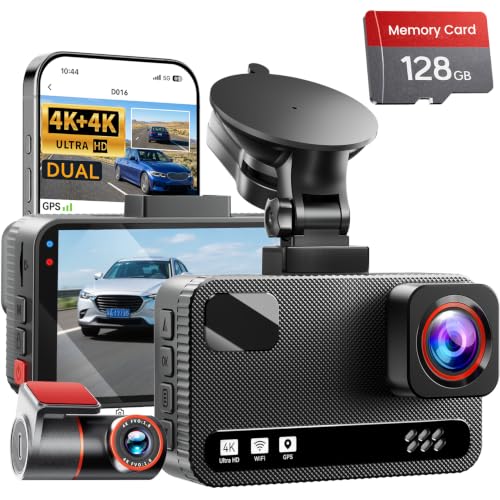
4K+4K Dual Dash Cam Front and Rear, Free 128GB Card, Starlight Night Vision | Dual-Channel Recording, 5.8GHz WiFi, 20MB/s Download Speed, GPS, 3" IPS Screen, Collision Sensor, 24H Parking Mode
Check price on Amazon
360 View 4 Channel Dash Cam Front and Rear Left Right Inside Camera for Cars, GPS and 5G Band WiFi, Night Vision, 160 Wide Angle, WDR, 24H Parking Mode, Supercapacitor, Included 128GB Card
Check price on Amazon
Affver 5 Channel 4K Dash Cam Front Rear Inside Left Right with GPS WiFi 6 | Free 128GB Card, 5.8GHz WiFi-20MB/s Download Speed, 4 IR Lights, 4K+1080P*4 360° Full View, 1.5" IPS Screen, 24H Parking Mode
Check price on Amazon
Dash Cam Front and Rear 4K+1080P, 5GHz WiFi, App Control, with 64GB Card | 24H Parking Mode, G-Sensor Locks Important Footage, Loop Recording, Easy Video Transfer and Playback
Check price on AmazonHow to Choose the Right Wireless Dash Cam
With so many options on the market, narrowing down your choice can be overwhelming. Here are some practical considerations:
Budget
Wireless dash cams range from around $50 for basic models to over $300 for premium 4K systems with advanced parking modes. A solid mid-range option typically costs between $100 and $200. Determine your budget first, then prioritize the features that matter most to you.
Video Quality
If you frequently drive at night or in challenging conditions, prioritize a model with excellent low-light performance. 2K resolution is a good balance between clarity and file size, while 4K offers the best detail but requires a faster memory card and more storage.
App Experience
Since you’ll be interacting with the dash cam through its app, check reviews about the app’s stability and user-friendliness. A clunky app can ruin the experience of an otherwise great camera.
Parking Mode
If you park on the street or in public lots, parking mode is a must. Ensure the dash cam supports it and consider a hardwire kit for continuous power.
Warranty and Support
Choose a reputable brand with good customer support and a solid warranty. This is especially important for electronic devices that are exposed to harsh conditions.
Frequently Asked Questions
Is a wireless dash cam reliable?
Yes, modern wireless dash cams are very reliable. The Wi-Fi connection between the front and rear cameras is stable, and the footage is stored locally on the front unit’s memory card. However, some interference can occur in areas with heavy Wi-Fi traffic, so choose a model with dual-band Wi-Fi for best results.
Do I need a hardwire kit for parking mode?
Most dash cams require a constant power source for parking mode. A dash cam hardwire kit connects the camera directly to your car’s fuse box, providing power even when the ignition is off. Some dash cams have built-in batteries, but they typically only last a few hours.
Can I use a wireless dash cam with my existing rearview mirror?
Some models are designed as mirror dash cams, replacing your existing rearview mirror with a smart mirror that includes a display for the rear camera. These are excellent for a clean, integrated look.
What is the best resolution for a dash cam?
For most drivers, 1080p is sufficient for basic evidence. However, if you want to read license plates clearly, especially at a distance, 2K or 4K is recommended. Just ensure you have a high-capacity, high-endurance memory card.
How do I transfer footage from a wireless dash cam?
You can transfer footage via the companion app over Wi-Fi, or by removing the microSD card and inserting it into a computer. The app method is more convenient for quick sharing, while the card method is faster for large files.
Final Thoughts
A wireless dash cam front and rear is a smart investment for any vehicle owner. It provides comprehensive coverage, simplifies installation, and offers peace of mind knowing you have a reliable witness on the road. By considering the features outlined in this guide—resolution, parking mode, app quality, and build—you can choose a system that fits your needs and budget.
Whether you’re a daily commuter, a rideshare driver, or a road trip enthusiast, the right dash cam will protect you from false claims and capture unexpected moments. Explore our recommended products above to find the best wireless dash cam for your car.