Why 35mm Slide Scanning Matters More Than Ever
If you have boxes of 35mm slides tucked away in your attic, you're sitting on a treasure trove of memories that are slowly deteriorating. Unlike digital files, physical slides are susceptible to environmental damage, color fading, and even fungal growth. Scanning them into a digital format is the only way to ensure they survive for future generations. But not all scanning methods are created equal. Whether you're a professional archivist or a family historian, understanding the nuances of camera quality and resolution is crucial. A high-quality scan can reveal details you never noticed on a projector screen, while a poor scan can introduce noise, color shifts, and distortion.
Moreover, digitizing your slides opens up a world of creative possibilities. You can easily retouch old photos, create digital photo books, or share them instantly with family and friends across the globe. For those who appreciate the tactile nature of film, combining digital scans with a compact 35mm film camera can offer the best of both worlds—analog shooting with digital preservation.
Choosing the Right Scanner for 35mm Slides
The market offers a bewildering array of scanners, from dedicated film scanners to flatbed models with transparency adapters. Your choice depends on your budget, volume of slides, and desired quality. Dedicated film scanners generally offer superior optical resolution and dynamic range, making them ideal for critical archival work. However, they can be pricey and often scan only one slide at a time. Flatbed scanners with transparency units are more versatile and can handle multiple slides in a batch, but they may not capture the same level of detail.
When evaluating scanners, pay close attention to optical resolution (measured in DPI). For 35mm slides, a minimum of 2400 DPI is recommended, though 3200 DPI or higher is better for larger prints or cropping. Also, consider the scanner's dynamic range, which affects how well it captures shadow and highlight details. A higher dynamic range means more accurate color and tonal reproduction. If you're on a tight budget, you might also consider using a high-quality camera with a macro lens and a slide duplicator attachment—a technique that can yield excellent results with the right setup.
Dedicated Film Scanners vs. Flatbed Scanners
- Dedicated Film Scanners: Best for maximum quality. They use specialized optics and sensors to extract every detail from your slides. Examples include the Plustek OpticFilm series and Pacific Image PrimeFilm. Expect to pay between $300 and $800.
- Flatbed Scanners with Transparency Adapter: Good for mixed media and batch scanning. Models like the Epson Perfection V600 or V850 are popular choices. Prices range from $200 to $1,000+. They can also scan documents and photos, adding versatility.
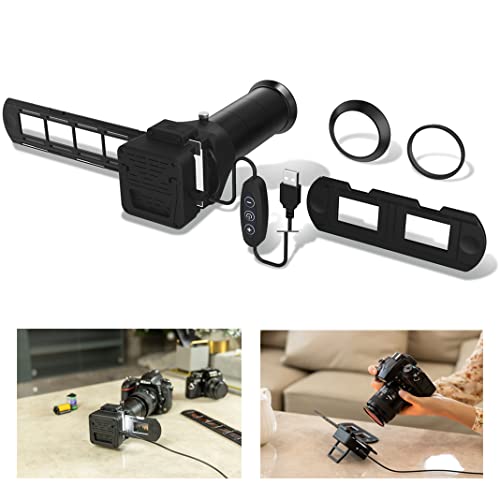
- Camera Scanning: A cost-effective alternative if you already own a mirrorless camera for video or DSLR. You'll need a macro lens, a light source, and a slide holder. This method can be very fast and produces high-quality results, but requires more skill and setup.
DIY vs. Professional Scanning Services
Should you scan your slides yourself or send them to a professional service? The answer depends on your time, budget, and the value you place on your memories. DIY scanning gives you complete control over the process and can be more economical if you have a large collection and are willing to invest in a good scanner. However, it can be time-consuming, especially if you're meticulous about cleaning and color correction. Professional services handle the entire process, often using high-end equipment and offering services like dust removal and color restoration. They charge per slide, typically between $0.25 and $1.00 per slide, which can add up quickly for large collections.
If you choose the DIY route, consider using a camera connect setup to tether your camera to a computer for immediate review and adjustment. This can streamline your workflow and ensure consistent results. For those who prefer a more automated approach, dedicated slide scanners often come with software that includes dust and scratch removal, though results can vary. Remember, the goal is to preserve the image without altering its original character. Over-processing can strip away the nostalgic charm of your slides.
Step-by-Step Guide to Scanning 35mm Slides
- Prepare Your Slides: Clean each slide gently with a soft brush or compressed air to remove dust and lint. Avoid touching the film surface with your fingers.
- Set Up Your Scanner: Follow the manufacturer's instructions to install the scanner and software. Calibrate your monitor for accurate color representation.
- Choose Your Settings: Select the highest optical resolution available (at least 2400 DPI). Set the color depth to 48-bit if possible, and save as TIFF for maximum quality.
- Scan: Load your slides into the holder or feeder. Preview each scan and adjust exposure and color balance as needed. Batch scanning can save time, but review each image for quality.
- Post-Process: Use editing software to remove dust spots, correct color casts, and adjust contrast. Be conservative to maintain the original look.
- Organize and Backup: Name your files systematically and store them in folders by date or event. Back up your scans to at least two different locations, such as an external hard drive and cloud storage.
Common Mistakes to Avoid in 35mm Slide Scanning
Even experienced users can fall into traps that compromise the quality of their scans. One of the most common mistakes is scanning at too low a resolution. While 1200 DPI might seem adequate for screen viewing, it won't capture enough detail for printing or future-proofing. Another mistake is neglecting to clean the scanner glass and slide holder; dust and smudges will show up as artifacts in your images. Additionally, over-sharpening or aggressive noise reduction can make your scans look unnatural and lose fine details.
Color management is another critical area. If your scanner and monitor aren't calibrated, the colors you see on screen may not match the original slide. Using a photography lighting setup with a consistent color temperature can help, but for scanning, rely on your scanner's calibration tools. Finally, don't forget to handle your slides with care. Oils from your fingers can permanently damage the emulsion. Use gloves or hold slides by the edges only.
Preserving Your Digital Files for the Long Haul
Once your slides are digitized, the job isn't over. Digital files can also be lost due to drive failures, file format obsolescence, and accidental deletion. Adopt a robust backup strategy: follow the 3-2-1 rule—three copies, on two different media types, with one copy off-site. Use archival formats like TIFF for master files and JPEG for sharing. Periodically migrate your files to new storage media as technology evolves. For those who also enjoy instant photography, a digital instant camera can complement your digital archive by providing physical prints, but always keep the digital negatives safe.
If you're scanning a large collection, consider creating a catalog with metadata. Include details like date, location, people, and events. This not only makes it easier to find specific images but also adds historical context. Many scanning software programs allow you to embed metadata directly into the file, ensuring it travels with the image. For those who also work with other types of cameras, such as a 4K video camera, maintaining a consistent naming and organization system across all media is a good habit.
Ready to get started? Check out our recommended 35mm slide scanners and accessories below. These affiliate links support our site at no extra cost to you.
Explore More Photography & Scanning Guides
Whether you're digitizing slides or expanding your camera gear, our detailed guides can help. Learn about megapixels to understand resolution, or explore camera deals for the best prices. If you're interested in film photography, don't miss our articles on 35mm point and shoot cameras and 35mm lenses. For those who shoot digitally, we also cover small digital cameras and top-rated digital cameras.