
CCTV Installation: The Complete Guide to Setting Up Your Security System
From planning camera placement to running cables and configuring your DVR/NVR, this guide walks you through every step of a professional CCTV installation.
Installing a CCTV system is one of the most effective ways to protect your home or business. Whether you are upgrading an old analog setup or building a modern IP-based surveillance camera system, proper installation is critical for reliable performance. A poorly installed camera can miss key evidence, suffer from poor image quality, or fail entirely when you need it most.
This guide covers the entire installation process: planning, wiring, mounting, and configuration. By the end, you will have the knowledge to either complete a professional-grade DIY installation or confidently oversee a contractor. If you are still deciding on equipment, our guide to CCTV cameras can help you choose the right models for your needs.
💡 Pro Tip: Before you buy any equipment, sketch a floor plan and mark every camera location. This simple step prevents costly mistakes like blind spots or cables that are too short. For outdoor cameras, consider models that are subscription-free to avoid ongoing costs.
1. Planning Your CCTV Installation
Every successful installation begins with a solid plan. Rushing this stage leads to coverage gaps, ugly cable runs, and frustration. Start by identifying your goals: do you need to monitor entrances, a driveway, a backyard, or a retail floor? Each area has different requirements for camera type, lens focal length, and height.
Key Planning Considerations
- Coverage Areas: Map out entry points, valuable assets, and blind spots. Overlap camera views slightly to avoid gaps.
- Camera Type: Dome cameras are discreet and tamper-resistant, ideal for indoor use. Bullet cameras are more visible and better for long-range outdoor coverage.
- Resolution: For identifying faces or license plates, aim for at least 4MP. For general monitoring, 2MP (1080p) is often sufficient. Learn more about megapixels and how they affect image quality.
- Lighting: Consider night vision capabilities. If your area has some ambient light, color night vision cameras can provide better detail. For total darkness, infrared is essential. Check out our guide to digital night vision for more details.
- Power and Cabling: Decide between wired (PoE or analog) and wireless systems. Wired systems are more reliable but require cable runs. Wireless systems are easier to install but can suffer from interference.
- Storage: Determine how many days of footage you need to retain. This dictates your hard drive size or cloud storage plan.
For specialized applications, such as monitoring a garage, you might want a garage door opener with camera integration. For properties without Wi-Fi, consider cameras that don't need Wi-Fi.
2. Tools and Materials You Will Need
Gather everything before you start drilling. A mid-installation trip to the hardware store is frustrating. Here is a checklist:
| Category | Items |
|---|---|
| Tools | Drill with masonry and wood bits, screwdrivers, crimping tool, cable tester, fish tape, ladder, stud finder, wire strippers. |
| Materials | Cameras, DVR/NVR, hard drive, power supply, Ethernet cables (Cat5e or Cat6), BNC connectors (for analog), coax cable, cable clips, conduit, weatherproof junction boxes, silicone sealant. |
| Optional | PoE injector or switch, monitor, UPS for power backup, surge protector, cable labels. |
3. Wiring Your CCTV System
Wiring is the most labor-intensive part of the installation. The method depends on your system type: analog (coax + power) or IP (Ethernet).
Analog CCTV Wiring
Analog systems use coaxial cable for video and a separate power wire. RG59 coax is common. You will need to crimp BNC connectors on both ends. Run the cable from each camera to the DVR location. Avoid running cables near high-voltage electrical lines to prevent interference.
IP Camera Wiring (PoE)
IP cameras use a single Ethernet cable for both power and data (Power over Ethernet). This simplifies installation. Run Cat5e or Cat6 cable from each camera to a PoE switch or NVR. The maximum cable run for PoE is typically 100 meters (328 feet). For longer runs, use a PoE extender or fiber optic cable.
If you are installing a dash cam for trucks, the wiring is different, but the principle of secure connections remains. For home security, always use outdoor-rated cable for exterior runs. Consider using conduit to protect cables from UV damage and tampering.
Cable Management Tips
- Label both ends of every cable before pulling.
- Use cable clips every 12-18 inches to secure cables.
- Leave a service loop (extra 12-18 inches) at each camera and at the DVR.
- Seal all exterior holes with silicone to prevent water ingress.
- Use a cable tester to verify continuity before connecting cameras.
4. Mounting Cameras Correctly
Camera placement and mounting angle determine whether you capture usable footage. A camera aimed too high will only see the tops of heads; too low and it is vulnerable to tampering.
Optimal Mounting Heights
- Indoor: 7-10 feet (2.1-3 meters) from the floor, angled slightly downward.
- Outdoor: 8-12 feet (2.4-3.6 meters) to deter tampering and capture faces.
- Entrances: Mount at face level (around 5-6 feet) if the goal is identification, but protect with a vandal-resistant housing.
Use a camera tripod mount or the included mounting bracket. For temporary setups, a overhead camera mount can be useful. Ensure the mount is secure and can support the camera's weight, especially in windy areas.
Avoiding Common Mounting Mistakes
- Do not point cameras directly at the sun or bright lights.
- Avoid aiming across traffic or busy streets where headlights cause glare.
- Do not mount cameras behind glass; reflections ruin night vision.
- Ensure the camera is not obstructed by trees, signs, or new construction.
For specialized mounting, such as a trail camera mount for wildlife, the principles are similar: stable, secure, and positioned for the best field of view.
5. Configuring Your DVR/NVR and Cameras
Once cameras are mounted and cables are run, it is time to configure the system. This involves setting up the recorder, configuring network settings (for IP systems), and adjusting camera settings.
Basic Configuration Steps
- Connect the DVR/NVR to a monitor and router. Use an HDMI cable for video output and an Ethernet cable for network access.
- Power on the system. The DVR will detect connected cameras automatically (for analog) or you may need to add IP cameras manually.
- Set the date and time. Accurate timestamps are crucial for evidence.
- Configure recording settings. Choose continuous, motion-triggered, or scheduled recording. Motion detection saves storage but may miss events if not tuned properly.
- Set up remote access. Use the manufacturer's app or a service like Camera Connect to view footage on your phone.
- Adjust camera settings. Fine-tune brightness, contrast, and night vision. For IP cameras, set resolution and frame rate.
If you are using a wireless doorbell camera without subscription, configuration is usually done via a mobile app. For more advanced setups, consider integrating with a camera detector to detect hidden cameras in sensitive areas.
6. Testing and Troubleshooting
After configuration, test every camera thoroughly. Walk through the field of view and check the live feed. Verify that motion detection triggers recording. Test remote access from outside your network.
Common Issues and Fixes
- No signal: Check cable connections, power supply, and camera compatibility.
- Poor image quality: Clean the lens, adjust focus, or check for interference. For camera quality issues, ensure resolution settings match the camera's capabilities.
- Night vision not working: Check IR LEDs, ensure the camera is not behind glass, and verify power.
- Motion detection false alarms: Adjust sensitivity, mask areas with moving trees or flags.
- Remote access failure: Check router settings, port forwarding, and firewall rules.
7. Ongoing Maintenance
A CCTV system is not a "set and forget" investment. Regular maintenance ensures it works when you need it.
- Clean camera lenses every 3-6 months with a soft cloth.
- Check cable connections for corrosion or wear.
- Test the system monthly by reviewing recorded footage.
- Update firmware to patch security vulnerabilities.
- Replace hard drives every 3-5 years.
- Consider adding a solar camera outdoor for hard-to-reach locations to reduce maintenance.
Recommended CCTV Installation Equipment
⚠️ AFFILIATE DISCLOSURE: This website contains affiliate links. As an affiliate Associate, we earn from qualifying purchases. If you make a purchase through these links, we may receive a small commission at no additional cost to you. Read our full affiliate policy.

COMMERCIAL CCTV INSTALLATION MASTERY: The Complete Guide to Cabling, Network Configuration, and NVR Setup for Professional Security Systems
Check price on Amazon
The CCTV Starter Guide: A beginner's Guide to installing CCTV and modern surveillance systems.
Check price on Amazon
EVERSECU 7 Inch Touch Screen CCTV Tester Supports Up to 8K IP Camera & 8.0 Megapixel HD & CVBS Analog Camera, TDR Cable Test, Built in Wi-Fi, Video Level Meter, POE/DC Power Output
Check price on Amazon
Commercial CCTV and Security Camera Installation: Step-by-Step Guide to Cabling, Configuring, and Maintaining Surveillance Systems for Security Professionals and Business Owners
Check price on Amazon
ARTIBETTER Camera Focus Calibration Card Lens Test Chart Color Wheel Chart for CCTV Installation Alignment Indoor Outdoor Use 15.7 X 12.6 Inch
Check price on Amazon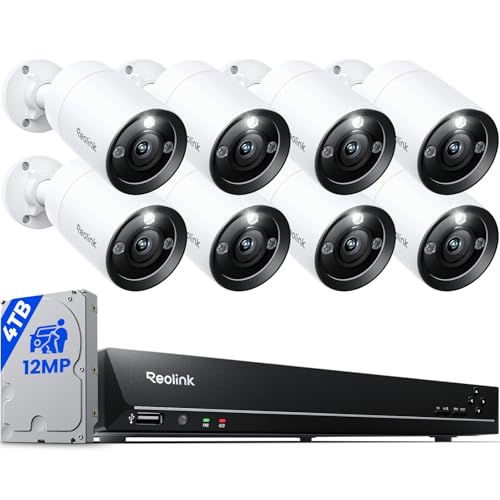
REOLINK 16CH 12MP Security Bullet Camera System with 4TB HDD RLK16-1200B8-A | 8pcs H.265 12MP PoE Cameras Outdoor, Smart Detection, Spotlight Color Night Vision, Two-Way Talk, Home Security Camera System
Check price on Amazon
TREND Networks | R171000 | SecuriTEST IP | CCTV Camera Tester for IP Digital/HD Coax/Analog Systems | Camera Configuration, Installation & Troubleshooting | 2 Year Warranty
Check price on Amazon
CCTV System Design & Installation (NTC Yellow Book)
Check price on AmazonFinal Thoughts on CCTV Installation
Installing a CCTV system is a rewarding project that significantly enhances your security. By planning carefully, using the right tools, and following best practices for wiring and mounting, you can achieve professional results without hiring a contractor. Remember to test thoroughly and maintain your system regularly.
If you are still in the research phase, explore our guides on CCTV cameras and surveillance camera systems to choose the best equipment for your needs. For specialized applications, such as nanny cams or sewer inspection cameras, the installation principles are similar but may require specific adaptations.
With your new system in place, you can enjoy peace of mind knowing your property is protected around the clock.