




What is a Drive Cam and Why Do You Need One?
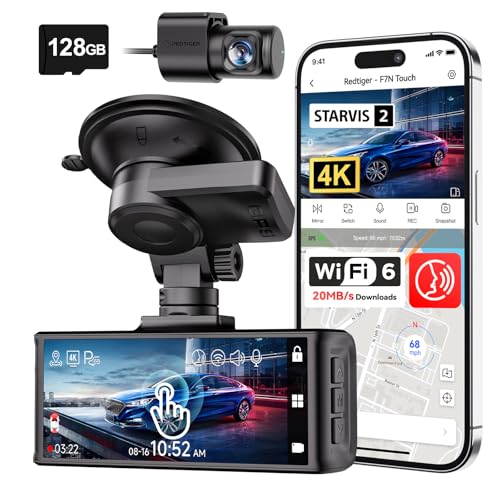
A drive cam, commonly known as a dash cam, is a small video camera mounted on your vehicle's dashboard or windshield. Its primary purpose is to continuously record the view through your windshield while you drive. But its value goes far beyond simple recording. In an era where traffic incidents and insurance fraud can be stressful and costly, a drive cam serves as an unbiased, reliable witness. Whether you're involved in a minor fender bender or a more serious collision, the footage can be crucial for determining fault and expediting insurance claims. For those interested in comprehensive vehicle monitoring, a front and rear dash cam with parking mode offers complete coverage.
Key Features to Consider in a Drive Cam
Choosing the right drive cam can feel overwhelming with the variety of options available. To simplify your decision, focus on the features that matter most for your specific needs. Here are the critical aspects to evaluate:
1. Video Resolution and Quality
Resolution is one of the most important factors. A higher resolution means clearer footage, which is vital for reading license plates and identifying details in an incident. While 1080p is a good baseline, 2K and 4K drive cams offer significantly better clarity. For instance, a dash cam with 24-hour recording front and rear capability often features high resolution to ensure all angles are captured with detail. Look for models with a wide dynamic range (WDR) to handle challenging lighting conditions like bright sunlight or dark tunnels.
2. Night Vision and Low-Light Performance
Accidents don't just happen during the day. A drive cam's performance in low-light conditions is critical. Look for features like a large aperture (e.g., f/1.8 or lower), a high-quality image sensor (like Sony STARVIS), and night vision technology. A model like a front and rear dash cam with night vision ensures you have clear evidence even when driving at night. For comprehensive car security, consider a car security camera with 24-hour recording that can also monitor your vehicle when parked.
3. Field of View (FOV)
The field of view determines how much of the road the camera can see. A wider FOV, typically between 130 and 170 degrees, is recommended as it covers more lanes and peripheral areas. This can be the difference between capturing a side-swipe incident or missing it entirely. For complete coverage, a wireless car dash camera front and rear setup is an excellent choice.
4. Parking Mode and 24/7 Surveillance
Parking mode allows the drive cam to continue recording even when your car is turned off, usually triggered by motion or impact. This feature is invaluable for protecting your car from hit-and-runs and vandalism while parked. If you want to capture incidents while your car is unattended, a 24-hour vehicle camera to capture vandalism while parked is a must-have. Some advanced models even offer features like a mirror dash cam which replaces your rearview mirror for a seamless installation.
5. Storage and Loop Recording
Drive cams use microSD cards for storage. It's essential to use a high-endurance card specifically designed for continuous writing, as standard cards can fail. A 128GB micro SD card for security camera is a great capacity to ensure you have plenty of recording time. Loop recording automatically overwrites the oldest footage when the card is full, so you never have to worry about manually deleting files.
Types of Drive Cams: Which One is Right for You?
Drive cams come in several configurations to suit different needs and budgets. Understanding the differences can help you make an informed choice.
Single-Channel vs. Dual-Channel
A single-channel drive cam records only the front view. It's a simple, affordable option for basic coverage. A dual-channel system, like a wireless car dash camera front and rear, records both the front and rear of your vehicle simultaneously. This provides comprehensive coverage, which is invaluable in rear-end collisions or when someone hits your car from behind. For a stylish and integrated look, a mirror dash cam with wireless rear camera is an excellent dual-channel option.
Basic vs. Smart Drive Cams
Basic drive cams simply record video. Smart drive cams come with additional features like built-in Wi-Fi, GPS for speed and location logging, and even cloud connectivity for remote viewing. If you want to connect your camera to your phone for easy footage review, a digital camera with Bluetooth transfer (a feature found in many modern dash cams) or a portable camera that connects to your phone is the way to go. For instance, a rear view camera wireless system can often be monitored via a smartphone app.
Installation and Maintenance Tips
Proper installation is key to getting the best performance from your drive cam. Mount it behind the rearview mirror to minimize obstruction of your view and keep it out of direct sunlight, which can cause overheating. Tuck the power cable neatly along the headliner and down the A-pillar to the power outlet. Regularly format your memory card and clean the lens to ensure clear footage. Just as you would maintain other security devices, like an HD security camera for your home, a few simple steps will keep your drive cam in top condition. For those who prefer a professional setup, a service for home security camera installation can sometimes also assist with vehicle camera systems.
Beyond the Dashboard: Other Vehicle Camera Systems
While drive cams are the most common, other vehicle camera systems serve different purposes. If you are looking for a cheaper, more basic option, a cheap vlogging camera with flip screen can sometimes be repurposed, though not ideal for continuous use. For off-road or adventure enthusiasts, a Bluetooth motorcycle helmet with camera offers a unique point of view. The principles of choosing a good camera, such as those found in our guide to a beginner camera for nature photography, can be applied to selecting any camera, but for the specific task of driving, a dedicated drive cam is unbeatable. If you're also interested in a camera detector device to find hidden cameras, the technology shares some similarities with dash cam detection.