
Security Cameras That Record Continuously: The Complete 24/7 Guide
Discover how continuous recording cameras work, what storage and power options you need, and how to choose a 24/7 surveillance system that never misses a moment.
Why Continuous Recording Matters: Most security cameras only start recording when they detect motion, which means critical moments can be missed if the trigger fails. Security cameras that record continuously capture every second of activity, giving you a complete, unbroken record of everything happening on your property. This guide explains how 24/7 recording works, the storage and power requirements involved, and how to pick the right system for your needs.
What Does "Continuous Recording" Actually Mean?
Continuous recording means a camera captures video 24 hours a day, 7 days a week, without gaps. Unlike motion-triggered cameras that only save clips when something moves, a continuous recording camera writes footage to storage nonstop. This approach eliminates the risk of missed events caused by failed motion detection, poor sensitivity settings, or brief movement that falls outside the trigger zone.
For homeowners and business owners who need a reliable record of everything, this is a major advantage. However, it also means you will generate far more footage, so storage capacity and power reliability become critical planning factors. If you want a system that balances constant recording with practical storage, explore options like continuous recording home security cameras designed for exactly this purpose.
How Continuous Recording Cameras Store Footage
Storage is the single biggest consideration when planning a 24/7 recording setup. There are three main approaches, and each has trade-offs in cost, reliability, and accessibility.
1. Local Storage (NVR, DVR, or SD Card)
Local storage keeps footage on a device inside your home or business, such as a network video recorder (NVR), a digital video recorder (DVR), or a memory card inside the camera. This is often the most cost-effective option because you avoid monthly cloud fees. A system like a wireless security camera system with local storage lets you retain weeks of continuous footage on a hard drive without paying a subscription.
If you prefer no recurring costs at all, a wireless security camera system without a monthly fee paired with a large hard drive is an excellent choice. Just remember that local storage is vulnerable to theft or damage if the recorder itself is taken, so consider placing it in a secure, hidden location.
2. Cloud Storage
Cloud storage uploads footage to a remote server, so even if your camera or recorder is stolen or destroyed, the footage remains safe. The downside is that continuous cloud recording consumes significant bandwidth and usually requires a paid subscription plan. Many users prefer a security camera without a cloud subscription to avoid ongoing costs, while others accept the fee for the added security.
3. Hybrid Storage
A hybrid setup records continuously to a local drive while also backing up key events to the cloud. This gives you the best of both worlds: no monthly fee for everyday footage, plus a safety net for critical moments. For a deeper comparison of recorder types, see our guide on the difference between NVR and DVR security systems.
Power Requirements for 24/7 Recording
Because continuous recording cameras never sleep, they need a constant, reliable power source. Battery-powered cameras generally cannot sustain true 24/7 recording for long periods, since the battery would drain within hours or days. This is why most continuous recording systems rely on wired power or, in some cases, solar power with a large battery buffer.
Wired Power
The most reliable approach is a wired connection, either through a standard power adapter or Power over Ethernet (PoE). A security camera system using Power over Ethernet delivers both power and data through a single cable, which simplifies installation and ensures uninterrupted operation. For permanent installations, hardwired security camera installation is the gold standard for reliability.
Solar Power
If running wires is not practical, a wireless security camera with a solar charger can keep a battery topped up during daylight hours. However, for true 24/7 recording, solar alone is usually not enough unless paired with a large battery and favorable sun exposure. A solar-powered outdoor surveillance camera works well for locations where occasional recording is acceptable, but continuous recording demands more power than most solar-only setups can provide.
Wired vs. Wireless Continuous Recording Cameras
Both wired and wireless cameras can record continuously, but each has distinct advantages.
Wired Systems
Wired cameras are the most dependable choice for 24/7 recording. They never need battery changes, they maintain a stable connection, and they can handle high-resolution video without bandwidth issues. A top-rated wired security camera system is ideal for businesses, large properties, and anyone who needs guaranteed uptime. If you want a fully wired setup for a large home, a 16-channel wireless security camera system (many of which support wired cameras as well) gives you room to expand.
Wireless Systems
Wireless cameras are easier to install and reposition, but continuous recording puts heavy demands on their batteries and Wi-Fi connection. If you choose wireless, look for a model designed for constant operation, such as a wireless outdoor security camera with long battery life, and consider pairing it with a solar panel. For indoor use, an indoor security camera that records 24/7 can be a convenient option when plugged into a wall outlet.
Key Features to Look For in a 24/7 Recording Camera
Not all continuous recording cameras are built the same. Here are the features that matter most.
Resolution and Frame Rate
Higher resolution (1080p, 2K, or 4K) gives you clearer detail, which is essential for identifying faces, license plates, and other critical information. However, higher resolution also means larger file sizes, so you will need more storage. A balance of 1080p or 2K at 15–30 frames per second is usually sufficient for most home and business needs.
Storage Capacity and Retention
Calculate how many days of footage you want to keep. A single 1080p camera recording continuously can generate 15–30 GB per day, depending on compression. For a multi-camera system, you may need a hard drive of 2 TB or more. A continuous recording home security camera with a large local drive or expandable storage gives you flexibility.
Night Vision and Low-Light Performance
Continuous recording is only useful if the footage is clear, day or night. Look for cameras with infrared or color night vision, and check the effective range. An infrared surveillance camera for home use can capture usable footage in complete darkness.
Remote Viewing and Alerts
Even with continuous recording, you will want to check in on your property from your phone. Choose a camera that supports a security camera you can watch on your phone, and consider one that sends alerts for important events. A security camera that will alert your phone adds an extra layer of awareness on top of constant recording.
Audio Recording
Some situations require not just video but also sound. An indoor security camera with audio recording or a home security camera with audio recording can capture conversations, alarms, or other audible events that video alone might miss.
Best Use Cases for Continuous Recording Cameras
Continuous recording is not necessary for every situation, but it is invaluable in certain scenarios.
Business and Retail Security
Businesses need a complete record of activity for loss prevention, employee safety, and liability protection. A top business security camera system with continuous recording ensures nothing is missed during operating hours or after closing.
Home Security and Peace of Mind
For homeowners, continuous recording provides peace of mind, especially when traveling or away from home. A home security camera with continuous recording captures everything, so you can review any incident without gaps. If you want a simple, subscription-free setup, consider security cameras for home with no monthly fee.
Construction and Remote Sites
Construction sites and remote locations benefit from continuous monitoring to deter theft and document progress. A time-lapse camera for construction projects can complement a continuous recording system by providing a condensed visual record of the project timeline.
Installation Tips for 24/7 Recording Systems
Proper installation ensures your continuous recording system runs reliably for years.
- Plan your storage first. Decide how many days of footage you need to keep and size your hard drive accordingly.
- Use a UPS (Uninterruptible Power Supply). A power outage should not stop your recording. A UPS keeps your NVR and cameras running during short outages.
- Secure your recorder. Place your NVR or DVR in a locked, hidden location so it cannot be stolen or tampered with.
- Optimize your network. Continuous recording generates constant data flow. Use a wired connection where possible, and ensure your router can handle the load.
- Test your system regularly. Check that recording is actually happening and that footage is being saved correctly. A security camera system that is easy to install often includes monitoring tools to help with this.
Common Mistakes to Avoid
Many people set up continuous recording only to run into problems later. Here are the most common pitfalls.
- Underestimating storage needs. Running out of storage means recording stops. Always buy more capacity than you think you need.
- Using battery-powered cameras for 24/7 recording. Most battery cameras cannot sustain constant recording. Choose a wired or solar-assisted model instead.
- Ignoring bandwidth limits. Continuous cloud recording can overwhelm your internet connection. Check your upload speed before committing.
- Forgetting about privacy. Continuous recording captures everything, including private moments. Position cameras carefully and inform anyone on your property.
- Not testing playback. Recording is useless if you cannot find the footage you need. Test your system's search and playback functions regularly.
How to Choose the Right Continuous Recording Camera
With so many options available, here is a simple framework for making the right choice.
- Define your goal. Are you protecting a home, a business, or a remote site? The answer determines your resolution, storage, and power needs.
- Decide on storage. Local, cloud, or hybrid? Consider your budget for hardware and any monthly fees.
- Choose your power source. Wired is best for 24/7. Solar works for some locations. Battery alone is usually not enough.
- Select key features. Prioritize resolution, night vision, remote viewing, and alerts based on your situation.
- Plan for expansion. If you might add cameras later, choose a system that supports more channels, such as a 16-channel wireless security camera system.
Best Security Cameras for Continuous Recording
⚠️ AFFILIATE DISCLOSURE: This website contains affiliate links. As an affiliate Associate, we earn from qualifying purchases. If you make a purchase through these links, we may receive a small commission at no additional cost to you. Read our full affiliate policy.

Tapo 1080P Indoor Security Camera, Baby Monitor, Dog Camera, C101 | Motion Detection, 2-Way Audio, Siren, Night Vision, Cloud & SD Card Storage, Works w/Alexa & Google Home, Black
Check price on Amazon
Psync MaaX V1 2.5K Outdoor/Indoor Wired Security Camera, Color Night Vision | Built-in 64GB Storage, No Subscription Required, IP65, 24/7 Recording, WiFi, Two-Way Talk, Dual-Band WiFi, Motion Detection
Check price on Amazon
Blink Mini 2K+ (newest model) – Plug-in Home & Pet Indoor Security Camera with 2K video resolution, night vision, enhanced audio, motion detection – 1 camera (Black)
Check price on Amazon
GNCC Cameras for Home Security 5Ghz WiFi Indoor Camera with 360°PTZ, 4 Pack | AI Motion Tracking,2K Night Vision, Detection for Pets /Baby/Nanny/Dogs, 2-Way Audio, 24/7 SD Card or Cloud, Works with Alexa
Check price on Amazon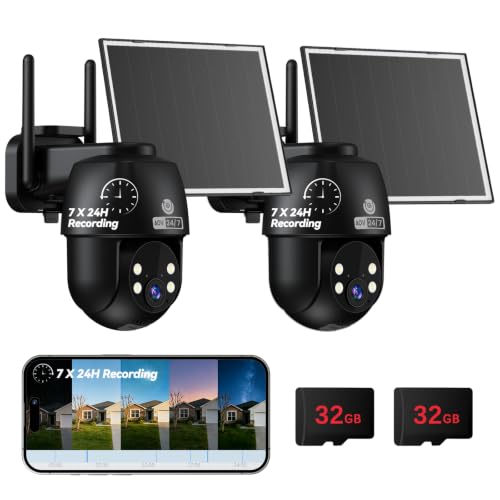
MUBVIEW 24/7 Continuous Recording Wireless Outdoor Security Camera | No Monthly Fee, 2.4G WiFi, 8X Zoom, 4MP 10W Solar Powered, 360° PTZ, Auto Tracking, SD Included, Charges Even Below 32°F
Check price on Amazon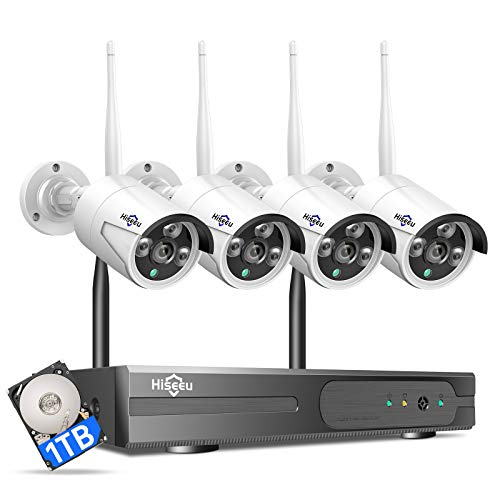
Hiseeu [24/7 Recording Home Security Camera System, No Subscription, 4K NVR with 4pcs 3MP Corded Plug-in Powered Outdoor Bullet Cameras, 2.4G/5G Wireless WiFi Connection, 1TB HDD, Night Vision, IP66
Check price on Amazon
Security Cameras Wireless Outdoor 5G& 2.4G, No Subscription, 2 Cam-Kit,4MP Solar Powered Home Security Cameras System With 360°PTZ,128GB Local Storage,Color Night Vision WiFi Cameras for Home Security
Check price on Amazon
2K Security Camera System, 5GHz&2.4GHz WiFi Solar Wireless Cameras for Home Security, Wire-free Installation, AI Detection, Two-way Audio, Mobile alerts, SD/Cloud Storage, Color Night Vision, 4 Packs
Check price on AmazonFrequently Asked Questions
Can any security camera record continuously?
Technically, most cameras can be set to record continuously, but not all are designed for it. Battery-powered cameras will drain quickly, and some cameras lack the storage or processing power for constant recording. Choose a camera specifically rated for 24/7 operation.
How much storage do I need for continuous recording?
For a single 1080p camera, plan on roughly 15–30 GB per day. A 2 TB hard drive can hold about 60–120 days of footage from one camera, or about 15–30 days from four cameras. Adjust based on your resolution and number of cameras.
Is continuous recording better than motion detection?
Continuous recording captures everything, so it never misses an event. Motion detection saves storage and makes it easier to find important clips, but it can miss events if the trigger fails. Many systems combine both: continuous recording for a complete record, and motion tagging for easy searching.
Can I record continuously without the internet?
Yes. A local recording system, such as an NVR or DVR with a hard drive, does not need the internet to record. You only need the internet if you want remote viewing or cloud backup. A security camera system that doesn't require internet is a good choice for locations with unreliable connectivity.
Do continuous recording cameras use a lot of electricity?
Most security cameras use very little power, typically 5–15 watts each. Even with a recorder and multiple cameras, the electricity cost is usually modest. The bigger concern is reliability, not cost.
Final Thoughts
Security cameras that record continuously offer the most complete and reliable way to monitor your property. They eliminate the gaps that motion-triggered cameras can leave, giving you a full record of everything that happens. The trade-off is that you need to plan carefully for storage, power, and bandwidth.
By understanding how continuous recording works and choosing the right equipment for your situation, you can build a 24/7 surveillance system that provides genuine peace of mind. Whether you are protecting a family home, a growing business, or a remote job site, the right continuous recording setup will keep watch every second of every day.