
Rear View Mirror Dash Cam: The Ultimate Buyer's Guide
Upgrade your driving safety with a smart rear view mirror dash cam. Learn how to choose the right model, understand key features, and find the best options for your vehicle.
VIEW TOP RECOMMENDATIONSWhy a Rear View Mirror Dash Cam? Unlike traditional dash cams, a rear view mirror dash cam replaces your existing mirror, providing a sleek, integrated solution. It typically offers a wider field of view, dual-channel recording (front and rear), and advanced features like parking monitoring and night vision, all while keeping your windshield clutter-free.
What is a Rear View Mirror Dash Cam?
A rear view mirror dash cam is a dual-purpose device that combines a traditional rearview mirror with a high-definition dash camera. It clips over or replaces your existing mirror and typically includes a front-facing camera, a rear-facing camera (mounted on the back of the car), and a built-in display that shows the live feed from the rear camera. This gives you a clear, unobstructed view of what's behind you, even if your rear window is blocked by passengers or cargo.
These devices are becoming increasingly popular because they offer a clean installation without the suction cup or adhesive mounts that can fall off in extreme temperatures. For those who want a comprehensive view of their vehicle's surroundings, a car dash camera front and rear setup like this is ideal. It provides peace of mind by recording both the road ahead and the traffic behind you.
Key Features to Consider
Before you buy, it's important to understand the specifications that matter most. Here are the critical features to look for:
- Video Resolution: Look for at least Full HD (1080p) for the front camera. Many modern models offer 2K or even 4K for the front and 1080p for the rear. Higher resolution means clearer details, like license plates. If you want the best clarity, consider a 4K video camera.
- Field of View (FOV): A wider FOV covers more lanes. Look for a front camera with at least 140° and a rear camera with 120° or more. This is especially important for dash cams for trucks or larger vehicles.
- Night Vision: Good low-light performance is crucial. Sensors like Sony STARVIS are excellent for capturing clear footage at night. For superior night recording, check out models with advanced digital night vision.
- Parking Mode: This feature allows the dash cam to record when it detects motion or impact while your car is parked. A dash cam with parking mode is a must-have for added security.
- Storage & Connectivity: Most models use a microSD card (class 10 or U3 recommended). Built-in Wi-Fi and GPS are also valuable for easy file transfer and speed/route logging. You can also use a camera connect app to manage settings.
- Display Size: The mirror itself acts as a display. A 9.35-inch or 10-inch screen is common and provides a good balance between visibility and mirror functionality.
Benefits of Installing a Mirror Dash Cam
Investing in a rear view mirror dash cam offers several advantages over traditional dash cams:
- Unobstructed Rear View: The live feed from the rear camera eliminates blind spots caused by headrests, passengers, or bulky items in the trunk.
- Clean Installation: There are no dangling wires or suction cups on the windshield. The device looks like a factory-installed option.
- Dual Recording: You get simultaneous recording of the front and rear, which is invaluable in the event of an accident or insurance claim.
- Enhanced Safety: Features like parking monitoring and collision warnings add an extra layer of security. A dashcam for cars is a smart investment for any driver.
For truck drivers, a mirror dash cam can be a game-changer. The wide view helps with lane changes and reversing. Many models are specifically designed for larger vehicles, so be sure to look for dash cams for trucks if you drive a commercial vehicle. Similarly, if you need a system for a larger vehicle, consider rear view cameras for trucks.
Installation Tips & Best Practices
While installation is generally straightforward, a few tips can ensure optimal performance:
- Mounting the Rear Camera: Mount the rear camera on the rear window or license plate area. Ensure it is centered and angled correctly. For trucks or SUVs, you may need a rear wireless camera to avoid running long cables.
- Routing Cables: Tuck the cables along the headliner and trim panels. Avoid routing cables near airbags.
- Power Source: You can power the dash cam via the cigarette lighter or hardwire it to the fuse box for parking mode. For a truly integrated look, consider a car video camera system with a hardwire kit.
- Adjusting the Mirror: After installation, adjust the mirror to your preference. You can toggle between the mirror view and the camera view.
If you're not comfortable with DIY installation, professional CCTV installation services can often handle dash cam installation as well, though it's a different application.
Recommended Rear View Mirror Dash Cams
⚠️ AFFILIATE DISCLOSURE: This website contains affiliate links. As an affiliate Associate, we earn from qualifying purchases. If you make a purchase through these links, we may receive a small commission at no additional cost to you. Read our full affiliate policy.

WOLFBOX G840S 12" 4K Mirror Dash Cam Backup Camera with 32GB Card and GPS | 5.8GHz WiFi Smart Rearview Mirror for Cars & Trucks, Front and Rear View Dual Cameras, Night Vision, Parking Assistance
Check price on Amazon
10’’ Mirror Dash Cam Front and Rear View Mirror Camera Night Vision for Car | 1080P FHD Touchscreen with Backup Camera, Loop Recording, 170°Wide Angle, Parking Assistance for Trucks, RVs, Campers, SUVs
Check price on Amazon
Pelsee S12 Native 4K + 2.5K Mirror Dash Cam, 64GB Card Included, GPS | 8MP Starlit Color Night Vision, Rear View Mirror Camera w/ WiFi 6, 12" Touch Screen, Backup Assist for Cars Trucks Vans RVs
Check price on Amazon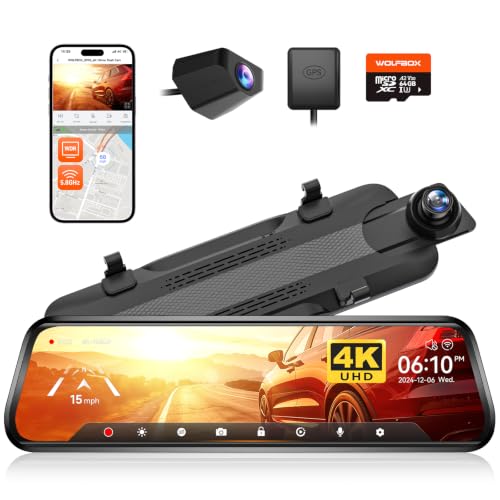
WOLFBOX G930 10'' 4K Rear View Mirror Camera with 64GB Card,5.8GHz WiFi | Dash Cam Front and Rear with WDR,Touch Screen Rearview Mirror Backup Camera,Night Vision,Parking Monitor,Reverse Assist,GPS
Check price on Amazon
LINGDU 12" Mirror Dash Cam, 4K UHD Front and 2.5K Rear View Dash Camera for Car, with ADAS BSD LCA Smart Mode, GPS, G-Sensor, Loop Recording, Parking Monitor, Voice Control, 5.8GHz WiFi
Check price on Amazon
WOLFBOX G850 PRO 4K Mirror Dash Cam with ADAS and BSD,64GB Card,5.8GHz WiFi | Smart Rear View Mirror with Voice Control and Night Vision, 12 inches Camera Includes GPS, G-Sensor, Loop Recording
Check price on Amazon
4K 13’’ Rear View Mirror Camera with Wireless Carplay&Android Auto | Mirror Dash Cam with 1080P Backup Camera/5.8GHz WiFi/Voice Control/64GB Card/Parking Monitor/Reverse Assist/Loop Record
Check price on Amazon
Upgraded 10'' Rear View Mirror Camera Mirror Dash Cam Front and Rear 1080P Backup Camera Full Touch Screen w Loop Recording, G-Sensor Night Vision 170° Wide Angle
Check price on AmazonHow to Choose the Best Mirror Dash Cam
When selecting a rear view mirror dash cam, consider your specific needs. If you drive a lot at night, prioritize night vision. If you park on the street, parking mode is essential. For those who want the best possible video quality, a model with a high-quality sensor and a high quality camera lens is worth the investment.
Budget is also a factor. You can find decent entry-level models for around $100, while premium models with 4K resolution and advanced features can cost $300 or more. If you're looking for a deal, check out our camera deals page for the latest offers. For those who want a no-subscription option, there are cameras that don't need WiFi for basic recording.
Finally, consider the brand's reputation and customer support. A reliable rear dash cam should come with a good warranty and easy-to-use software. If you're on a tight budget, a budget friendly digital camera might be a good starting point, but for a dedicated dash cam, it's worth spending a bit more for reliability.
Frequently Asked Questions
Q: Does a rear view mirror dash cam replace my existing mirror?
A: Most models are designed to clip over your existing mirror, while some higher-end models replace it entirely. Always check the product specifications.
Q: Will I need a separate rear camera?
A: Yes, these kits typically include a rear camera that you mount on the back of your car. The main unit displays the feed.
Q: Can I use it without hardwiring?
A: Yes, you can power it via the cigarette lighter socket. However, for parking mode, hardwiring is usually required.
Q: How do I transfer footage?
A: You can usually remove the microSD card and use a card reader, or connect via Wi-Fi to a smartphone app. Some models offer cloud storage (subscription may apply).