
Security Cameras for Home with Internet Access
Protect what matters most with a security camera that connects to the internet. Learn how to choose the right Wi-Fi or wired camera, understand remote viewing, cloud storage, and find the perfect system for your home.
VIEW RECOMMENDED CAMERASWhy Internet Access Matters: A security camera with internet access lets you monitor your home from anywhere in the world. Whether you're at work, on vacation, or just in another room, you can check live feeds, receive motion alerts, and review recorded footage right from your smartphone. This guide will help you understand the technology, features, and options available so you can make an informed purchase.
Why Choose a Security Camera with Internet Access?
Traditional security cameras simply record to a local DVR or SD card. While that works, it limits your ability to monitor your home in real-time. Internet-connected cameras offer a level of convenience and peace of mind that local-only systems can't match. With a Wi-Fi or Ethernet-connected camera, you can:
📱 Remote Viewing
Access live video from your smartphone, tablet, or computer no matter where you are. Check in on your home, pets, or family members at any time.
🔔 Instant Alerts
Receive push notifications when motion is detected. Some cameras even use AI to distinguish between people, pets, and cars, reducing false alarms.
☁️ Cloud Storage
Store recordings securely in the cloud. If a camera is stolen or damaged, your footage remains safe and accessible.
🗣️ Two-Way Audio
Many internet-connected cameras include microphones and speakers, allowing you to listen and talk to whoever is on camera.
Types of Internet-Connected Security Cameras
Not all internet-connected cameras are the same. Understanding the different types will help you choose the best option for your home. If you want a camera that hooks up to your phone easily, there are many options available. You can also explore security cameras that hook up to your phone for seamless integration.
Wi-Fi Security Cameras
These cameras connect wirelessly to your home's Wi-Fi network. They're easy to install and don't require running cables. Ideal for indoor and outdoor use.
- Easy DIY installation
- Flexible placement
- May have signal issues in large homes
Wired (Ethernet/PoE) Cameras
These cameras connect via Ethernet cable to your router or a PoE switch. They offer a more reliable connection and often higher video quality.
- Reliable, stable connection
- No wireless interference
- Requires cable installation
Wireless Battery-Powered Cameras
These cameras run on rechargeable batteries and connect via Wi-Fi. They're perfect for areas without power outlets. Check out security cameras for home battery operated for more options.
- No power cables needed
- Flexible placement
- Requires periodic charging
Cellular Security Cameras
These cameras use a cellular network instead of Wi-Fi. They're ideal for remote locations or as a backup if your internet goes down. Learn more about security cameras with cellular service.
- Works without Wi-Fi
- Requires cellular plan
- Great for remote properties
Key Features to Consider When Buying
When shopping for a security camera with internet access, pay attention to these critical features. They determine how well the camera will perform and how easy it will be to use.
| Feature | Why It Matters | What to Look For |
|---|---|---|
| Resolution | Higher resolution means clearer images and better identification of people or objects. | 1080p (Full HD) minimum; 2K or 4K for premium clarity. |
| Night Vision | Most home intrusions happen at night. Good night vision is essential. | Infrared (IR) LEDs or color night vision; range of 30 feet or more. |
| Field of View | Determines how much area the camera can cover. | 130° to 180° for wide coverage; 360° for panoramic. |
| Storage Options | You need a place to store recordings. Cloud and local storage both have pros and cons. | Cloud subscription, microSD card, or NVR support. |
| Power Source | Determines where you can place the camera. | Battery, wired, or solar. Consider small solar panels for security cameras for outdoor use. |
| Smart Home Integration | Allows the camera to work with your existing smart home ecosystem. | Amazon Alexa, Google Assistant, Apple HomeKit. |
| Two-Way Audio | Lets you communicate with people on camera. | Built-in microphone and speaker. |
| Weather Resistance | Outdoor cameras need to withstand rain, snow, and heat. | IP65 or higher rating for outdoor use. |
Wi-Fi vs. Wired vs. Cellular: Which Is Right for You?
Choosing the right connectivity type depends on your home's layout, your internet reliability, and your budget. Here's a quick comparison to help you decide.
Wi-Fi Cameras
- Easy to install
- No cables needed
- Affordable
- Flexible placement
Wi-Fi Cameras
- Can be affected by signal strength
- May experience interference
- Potential security risks if not secured
Wired Cameras
- Reliable, stable connection
- No wireless interference
- Often higher video quality
- No battery changes
Wired Cameras
- Requires professional installation
- Less flexible placement
- Higher upfront cost
Cellular Cameras
- Works without Wi-Fi
- Ideal for remote locations
- Backup if internet fails
Cellular Cameras
- Requires monthly data plan
- Higher ongoing cost
- Limited data usage
Cloud Storage vs. Local Storage
Where your footage is stored is a critical decision. Each option has trade-offs in terms of cost, security, and convenience.
☁️ Cloud Storage
Recordings are stored on a remote server managed by the camera manufacturer. You typically pay a monthly or annual subscription fee.
- Access footage from anywhere
- Safe if camera is stolen
- No local hardware needed
- Monthly fees apply
Explore wireless security camera cloud storage options.
💾 Local Storage
Recordings are stored on a microSD card inside the camera or on a local NVR (Network Video Recorder).
- No monthly fees
- Full control over footage
- Limited by storage capacity
- Risk of theft or damage
Learn about wireless security cameras with storage.
Installation Tips for Internet-Connected Cameras
Proper installation ensures your camera works effectively and stays secure. Here are some tips to get the most out of your system:
📡 Optimize Wi-Fi Signal
Place your router centrally or use a Wi-Fi extender to ensure a strong signal reaches all cameras. Weak signals cause lag and dropped connections.
🔒 Secure Your Network
Use WPA3 encryption, change default passwords, and keep camera firmware updated. This prevents unauthorized access to your feeds.
📍 Strategic Placement
Mount cameras at least 8-10 feet high, angled downward. Cover entry points like doors, windows, and driveways. Learn where to install security cameras outdoors.
⚡ Power Considerations
For battery cameras, consider small solar panels for security cameras to extend battery life. For wired cameras, plan cable routes carefully.
Privacy and Security Concerns
Internet-connected cameras offer incredible convenience, but they also come with privacy and security risks. Here's what you need to know:
🔐 Data Encryption
Choose cameras that use end-to-end encryption for video transmission and storage. This prevents hackers from intercepting your feeds.
🔄 Regular Updates
Manufacturers release firmware updates to patch security vulnerabilities. Enable automatic updates or check regularly.
📋 Privacy Policy
Read the manufacturer's privacy policy. Understand how your data is stored, who has access, and whether it's shared with third parties.
🏠 Indoor vs. Outdoor
Be cautious about placing internet-connected cameras in private areas like bedrooms or bathrooms. Even with security, there's always a risk.
Top Use Cases for Internet-Connected Security Cameras
These cameras are versatile and can be used in many scenarios. Here are some of the most common:
🏡 Home Security
Monitor entry points, driveways, and backyards. Receive alerts when motion is detected and scare off intruders with two-way audio.
👶 Baby Monitoring
Keep an eye on your baby or toddler. Many cameras offer lullabies, temperature sensors, and two-way audio.
🐾 Pet Monitoring
Check in on your pets during the day. Some cameras even dispense treats or allow you to talk to your furry friends.
Check out indoor home security cameras with audio.
📦 Package Delivery
Monitor your front porch for package deliveries and theft. Get alerts when packages arrive or when someone approaches.
Consider a video doorbell and security camera bundle.
Budget Considerations: How Much Should You Spend?
Security cameras range from budget-friendly options to premium systems. Here's a general idea of what to expect at different price points:
Budget: $30–$80
Entry-level Wi-Fi cameras with 1080p resolution, basic night vision, and limited cloud storage. Great for indoor use or single-camera setups.
Mid-Range: $80–$200
Better resolution (2K), improved night vision, AI detection, and more storage options. Suitable for most homes.
Premium: $200–$500+
4K resolution, advanced AI features, color night vision, and robust build quality. Ideal for comprehensive home security systems.
Ongoing Costs
Cloud storage subscriptions typically range from $3–$15 per month per camera. Some brands offer free basic plans. Consider Wi-Fi cameras that don't need subscription if you want to avoid monthly fees.
Ready to Protect Your Home?
Now that you understand the key features and options, it's time to choose the right security camera for your home. Browse our recommended products below, hand-picked for their performance, reliability, and value.
VIEW RECOMMENDED CAMERASBest Security Cameras for Home with Internet Access
⚠️ AFFILIATE DISCLOSURE: This website contains affiliate links. As an affiliate Associate, we earn from qualifying purchases. If you make a purchase through these links, we may receive a small commission at no additional cost to you. Read our full affiliate policy.
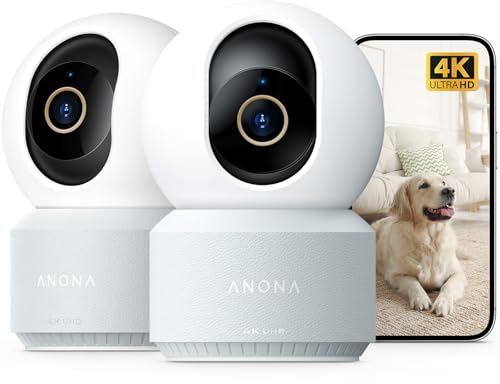
Anona 4K UHD Indoor Camera, Pet/Dog/Baby Security Camera with Phone App, 360°Pan-Tilt, 5G/2.4G Dual-Band Wi-Fi 6, Auto-Tracking, Person/Pet/Baby Crying Detection, Privacy Mode, Two-Way Audio, 2 Pack
Check price on Amazon
4CH Wired Security Camera System, AIWIXEN 4X 1080P Cam, DVR with 512GB HDD | Surveillance Cameras with Human Vehicle Detection, IP68 Waterproof, 24-7 Recording, Remote Access, Home Security CCTV Outdoor
Check price on Amazon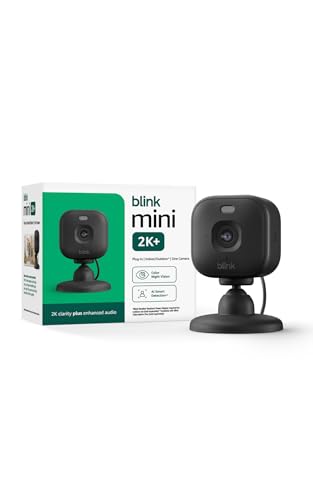
Blink Mini 2K+ (newest model) – Plug-in Home & Pet Indoor Security Camera with 2K video resolution, night vision, enhanced audio, motion detection – 1 camera (Black)
Check price on Amazon
AOQEE 5G Cameras for Home Security Indoor, Pet Monitor w/Phone APP G5 2Pcs | Dual-Band Wi-Fi Indoor Camera with 24/7 TF Card Storage, 360 PTZ Auto-Tracking Pet/Dog/Cat/Puppy/Nanny, Motion Alert, Plug-in
Check price on Amazon
4G LTE Cellular Security Camera No Internet Needed, 2K Solar No wifi Security Camera Outdoor Wireless With SIM Card Jobsite,360 Live View, Motion Detection,Free Cloud Storage(Need Apply), 2 Packs
Check price on Amazon
GMK 4 Pack Cameras System, Security Cameras Wireless Outdoor, 2K Video | VicoHome Cam, Motion Detect, Color Night Vision, 2-Way Talk, IP65 Waterproof, Indoor&Outdoor, 2.4GHz WiFi, SD/Cloud Storage
Check price on Amazon
2K Security Camera System, 5GHz&2.4GHz WiFi Solar Wireless Cameras for Home Security, Wire-free Installation, AI Detection, Two-way Audio, Mobile alerts, SD/Cloud Storage, Color Night Vision, 4 Packs
Check price on Amazon
4CH Wired Security Camera System, AIWIXEN DVR with 512GB HDD, 4X 1080P Cam | Home Surveillance CCTV, Security Cameras with Human Vehicle Detection, IP68 Waterproof, Remote Access, 24-7 Recording
Check price on AmazonFrequently Asked Questions
Do I need Wi-Fi for a security camera to work?
Not necessarily. While Wi-Fi is the most common way to connect a security camera to the internet, you can also use an Ethernet cable for a wired connection or a cellular network for areas without Wi-Fi. Some cameras also support wireless security cameras that don't need internet and record locally to an SD card.
Can I use a security camera without a monthly subscription?
Yes. Many cameras support local storage via microSD card, which means you can record and review footage without paying a monthly fee. However, you'll miss out on cloud backup and advanced AI features. Check out Wi-Fi cameras that don't need subscription for options.
How many security cameras do I need for my home?
It depends on your home's size and layout. Most homes need 2-4 cameras to cover main entry points: front door, back door, driveway, and backyard. For larger properties, you may need 6-8 cameras. Consider a 16 camera wireless surveillance system for comprehensive coverage.
Are wireless security cameras secure?
Yes, if properly configured. Use strong passwords, enable two-factor authentication, keep firmware updated, and choose cameras with end-to-end encryption. Avoid using default passwords and secure your Wi-Fi network with WPA3.
What is the best resolution for a home security camera?
1080p (Full HD) is the minimum recommended for clear identification. However, 2K and 4K cameras offer even better detail, which can be crucial for reading license plates or identifying faces. For most homes, 2K strikes a good balance between quality and cost.
Can I install a security camera myself?
Yes, most Wi-Fi and battery-powered cameras are designed for DIY installation. They typically come with mounting hardware and a mobile app to guide you through setup. Wired cameras may require professional installation, especially if you need to run cables through walls.
Final Thoughts
Choosing the right security camera for your home with internet access is a decision that balances features, budget, and your specific needs. Whether you want a simple indoor camera to keep an eye on your pets or a comprehensive outdoor system to protect your entire property, there's a solution for you.
Remember to prioritize reliability, security, and ease of use. A camera that's difficult to use or frequently disconnects won't provide the peace of mind you're looking for. Take the time to research, read reviews, and choose a system that fits your lifestyle.
For more help on your security camera journey, explore our related guides on security cameras that hook up to your phone, outdoor use wireless home security cameras, and home security camera with cloud storage.